65BDL3050Q
27
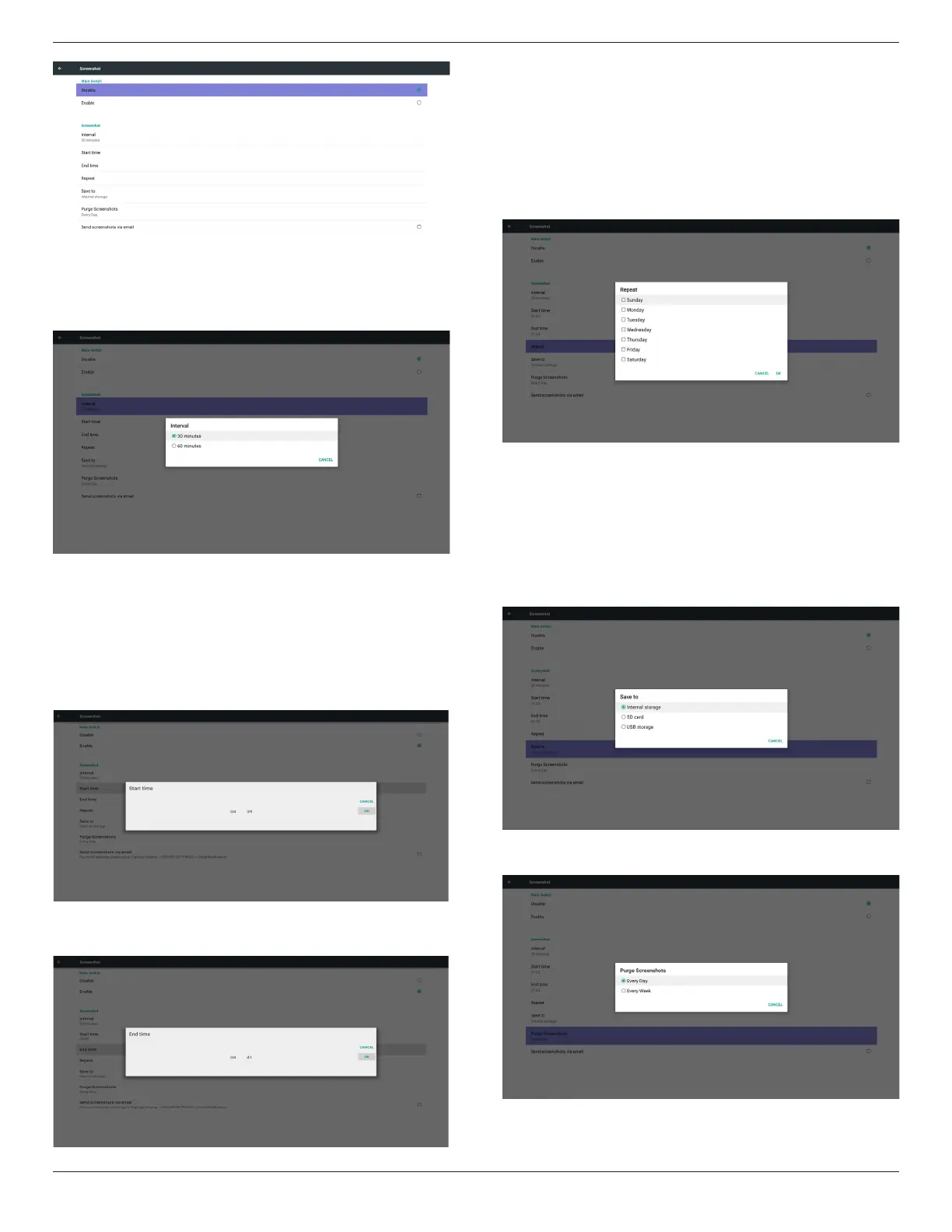
1) Interval
Set up interval timeframe. 30 mins or 60 mins.
2) Start Time
Set up screenshot start time.
Note:
(1) If no start time, the screen will show current time automatically
(2) Just press Back key to exit dialog for Set up
(3) Start time cannot be newer than End time. It will show Error
toast.
3) End Time
Set up screenshot End time
Note:
(1) If no End time, the screen will show current time automatically
(2) Start time cannot be newer than End time. It will show error
toast.
4)Repeat
Set screenshot repeat cycle. User can choose screenshot time frame.
(Multiple selection)
5)Save to
Set up screenshot save path. Internal storage, SD card or USB
storage.)
Note:
picture storage path
(1) In root of internal storage/usb storage/sd card, PD will create
folder automatically.
(2) The picture will save to philips/Screenshot/.
6) Purge Screenshots
Set up purge timeframe. One day or One week.


 To Next Page