65BDL6005X
13
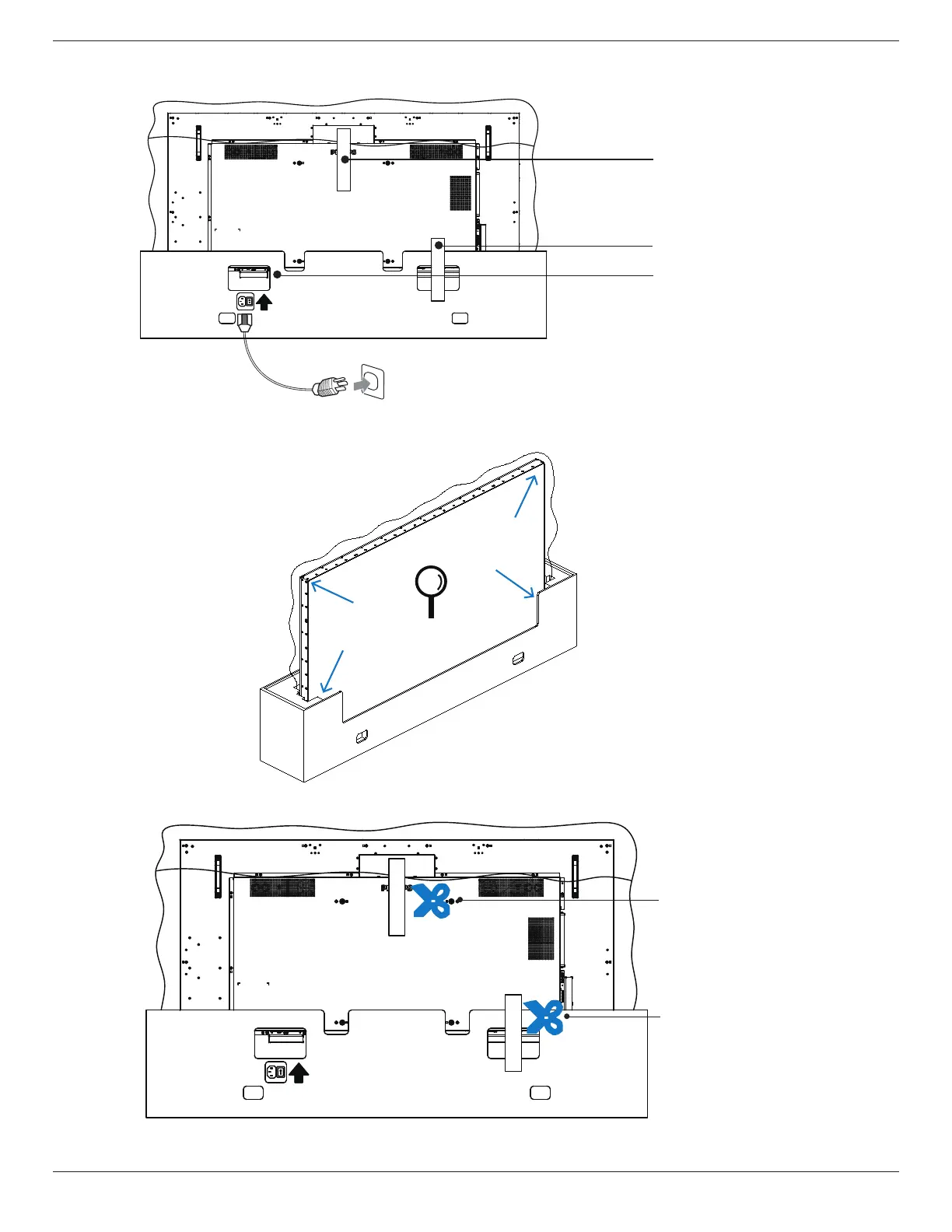
5. Connect the power cord to the back of the display. Plug the other end of the power cord into an electric outlet to power on the
display.
Sealing Labels
Sealing Labels
AC Inlet
<<Back Side>>
Cau�on
1. Follow the inspec�on instruc�ons printed on the box.
2. Ensure the product is in good condi�on prior to the removal of sealing labels, or the
warranty may be void
.
6. The display will initiate a white screen test. Carefully inspect the screen for abnormalities, especially the four corners of the
display.
7. If no damage is found, cut the sealing labels.
<<Back Side>>
Cau�on
1. Follow the inspec�on instruc�ons printed on the box.
2. Ensure the product is in good condi�on prior to the removal of sealing labels, or the
warranty may be void.
Sealing Labels
Sealing Labels













 To Next Page