65BDL6005X
28
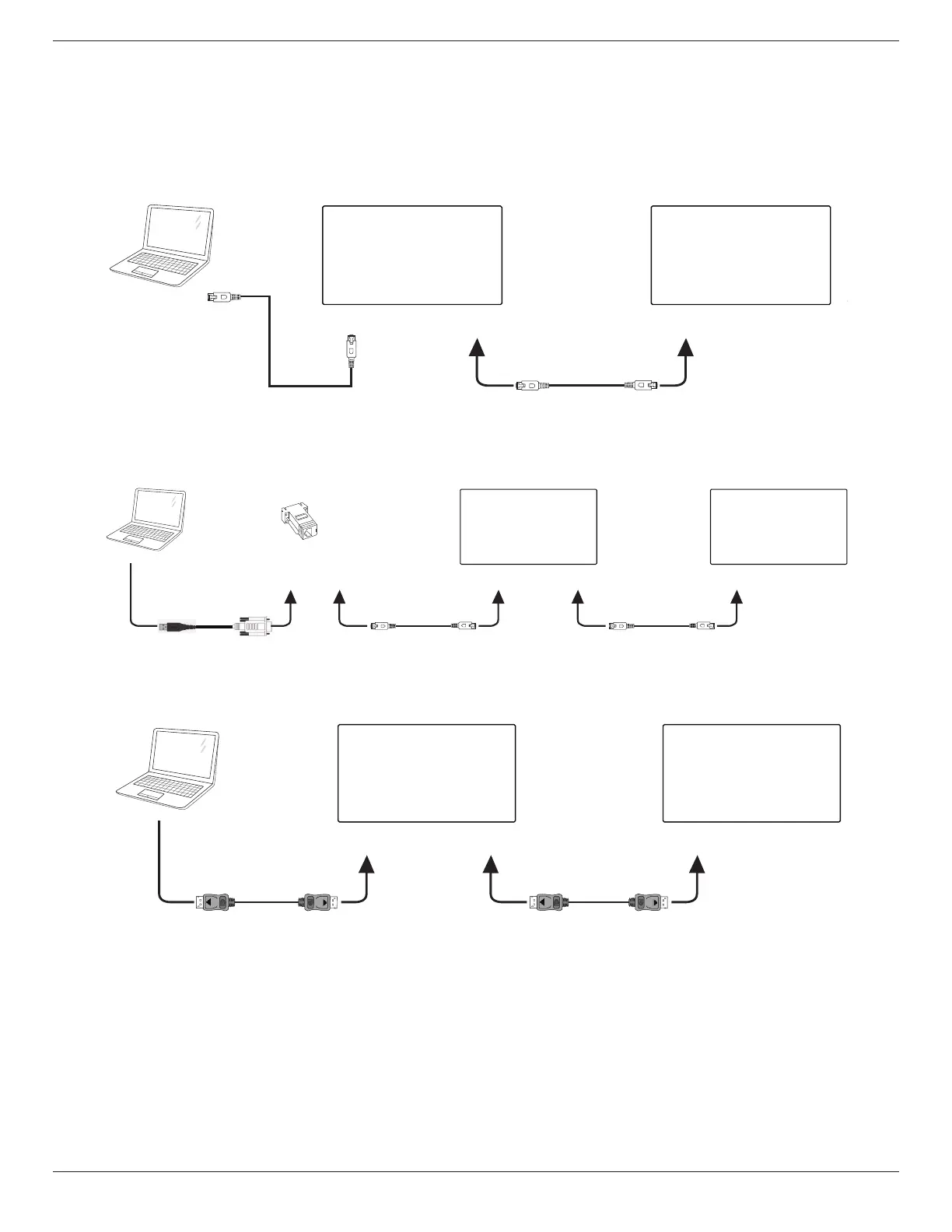
4.4. Connecting Multiple Displays in a Daisy-chain Configuration
You can interconnect multiple displays to create a daisy-chain conguration for applications such as a menu board.
4.4.1. Display control connection
Connect laptop [RJ45] to [RJ45 IN] of DISPLAY 1, connect the [RJ45 OUT] connector of DISPLAY 1 to the [RJ45 IN] connector of
DISPLAY 2.
PC
[RJ45 IN] [RJ45 OUT] [RJ45 IN]
DISPLAY 1 DISPLAY 2
[RJ45]
Connect laptop [USB] to adaptor and connect to [Control IN] of DISPLAY 1, connect the [Control OUT] connector of DISPLAY 1 to
the [Control IN] connector of DISPLAY 2.
DISPLAY 1
PC
DISPLAY 2
[Control IN][DB9 IN]
[USB]
[Control OUT] [Control IN]
[RJ45 OUT]
DB9(female) to
RJ12/45 adaptor
4.4.2. Digital video connection
Connect laptop [DP] to [DP IN] of DISPLAY 1, connect the [DP OUT] connector of DISPLAY 1 to the [DP IN] connector of DISPLAY 2.
PC
DISPLAY 1 DISPLAY 2
[DP IN]
[DP]
[DP OUT] [DP IN]













 To Next Page