65BDL6005X
32
Sharpness
This function is digitally capable to keep crisp image at any
timings.
It is adjustable to get a distinct image or a soft one as you
prefer and set independently for each picture mode.
Black level
Adjust the image brightness for the background.
NOTE: sRGB picture mode is standard and cannot be
changed.
Tint(Hue)
Adjust the tint of the screen.
Press + button the esh tone color becomes greenish.
Press - button the esh tone color becomes purplish.
NOTE: VIDEO mode only.
Color(Saturation)
Adjust the color of the screen.
Press + button to increase color depth.
Press - button to decrease color depth.
NOTE: VIDEO mode only
Noise Reduction
Adjust the noise reduction level.
Gamma
Select a display gamma. It refers to the brightness
performance curve of signal input. Choose from {Native} /
{2.2} / {2.4} / {s gamma} / {D-image}.
NOTE: sRGB picture mode is standard and cannot be
changed.
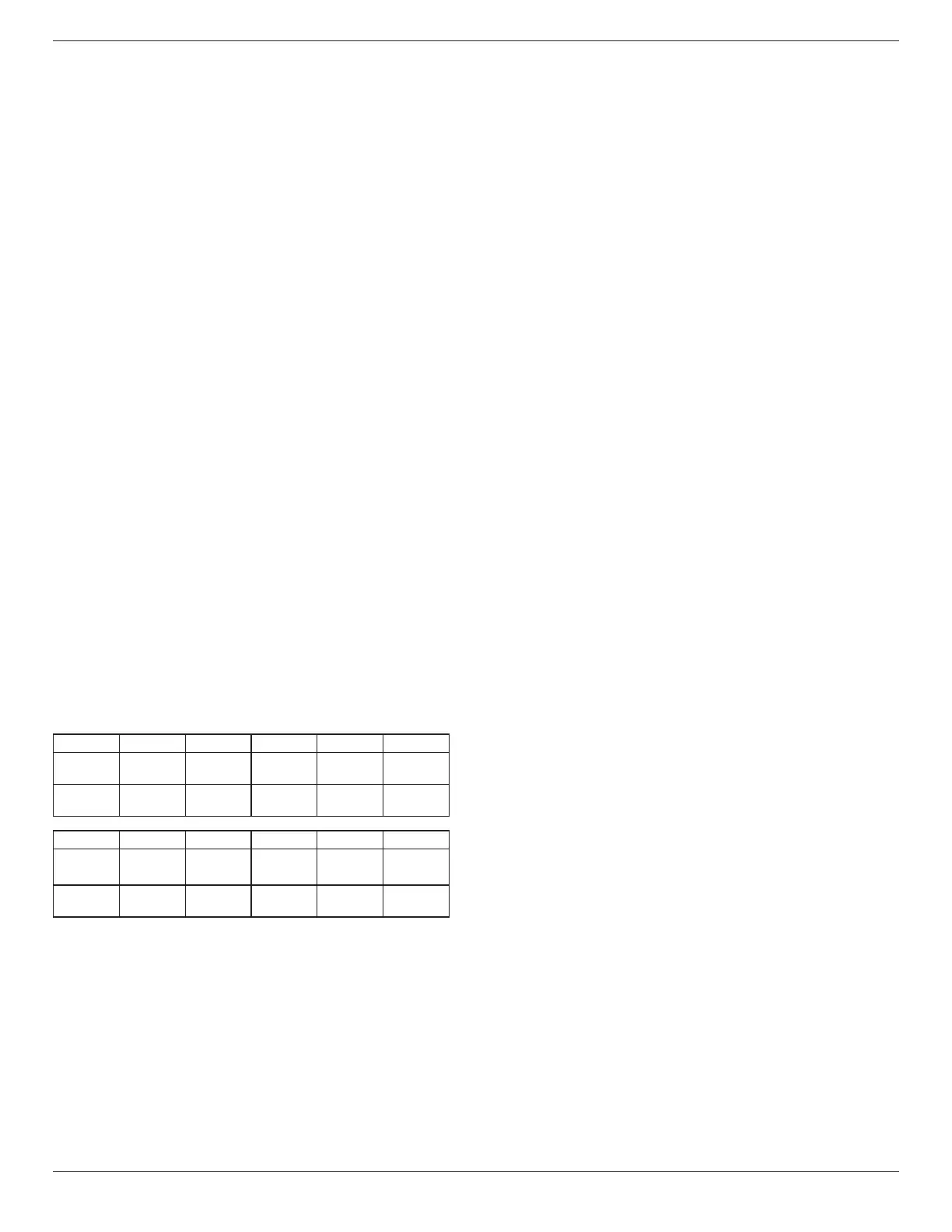
Color temperature
It is used to adjust the color temperature.
The image becomes reddish as the color temperature
decreases, and becomes bluish as the color temperature
increases.
CCT
10000º K 9300 º K 7500 º K 6500 º K 5000 º K
X
0.279 ±
0.030
0.283 ±
0.030
0.299 ±
0.030
0.313 ±
0.030
0.346±
0.030
Y
0.292 ±
0.030
0.298 ±
0.030
0.315 ±
0.030
0.329 ±
0.030
0.359±
0.030
CCT
4000 º K 3000 º K Native User1 User2
X
0.382±
0.030
0.440±
0.030
0.28±
0.030
0.28 ±
0.030
0.28 ±
0.030
Y
0.384±
0.030
0.403±
0.030
0.29±
0.030
0.29±
0.030
0.29±
0.030
NOTE:
• The color levels of red, green, and blue are adjusted by
the color bars.
• In User1 mode, R/B/G adjust range is 0-255.
• In User2 mode, color temperature adjust range is
3000k-10000k.
Color control
You can adjust the color tones of the image precisely by
changing the Red Gain, Green Gain, Blue Gain, Red Oset,
Green Oset, Blue Oset settings independently.
{Picture} - {Color temperature} - {User} setting to [User 1]
Or, you can adjust the color tones per 100K in the range of
3000K to 10000K.
{Picture} - {Color temperature} - {User} setting to [User 2]
Smart picture
PQ setting
PC mode: {Standard} / {Highbright} / {sRGB}.
Video mode: {Standard} / {Highbright} / {Cinema}.
Smart power
Smart Power control is not relative to brightness control:
1. Initial setting Brigthness
70 (in the range from 0-100)
Power consumption 70% of maximum power
consumption
2. Smart Power
OFF: no adaptation
MEDIUM: 80% of power consumption relative to current
settings
HIGH: 65% of power consumption relative to current
settings
3. Panel saving/Brightness ON: 40% of maximum power
consumption
The controls settings should only be visible on its own
controls. It should not have secondary eects on other
controls (brightness setting changes when smart power
setting has changed).
Color Space
Color space setting
RGB PC / RGB Video / REC601 / REC702 / Auto.
Local Dimming
Turn the local dimming function On/O.
Overscan
Change the display area of the image.
ON: Set to display area about 95%.
OFF: Set to display area about 100%.
Uniformity
Turn the uniformity function On/O.
Picture reset
Reset all settings in the Picture menu.













 To Next Page