EasyManua.ls Logo

Philips AVENT SCD841 - ECO mode

Philips AVENT SCD841
372 pages
Print Icon
To Next Page IconTo Next Page
To Previous Page IconTo Previous Page
Loading...
- English 16 -
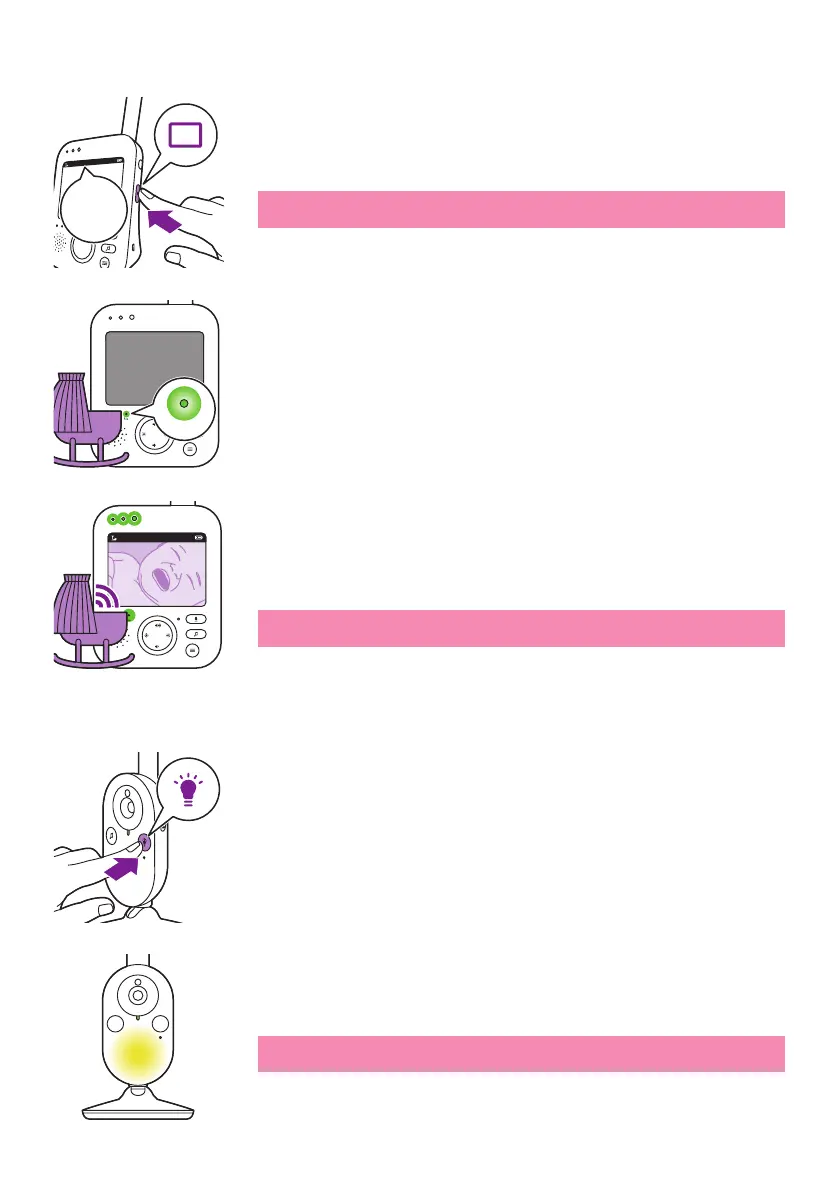
ECO mode
1 Press the mode button on the side of the parent unit to switch to ECO
mode�


When the ECO mode is activated the display and sound of the parent

light lights up green to indicate that the ECO mode is activated� During



the parent unit and the sound level lights light up green� As long as no

Note: The minimum sound level to activate sound and display is

Nightlight
1 
nightlight feature�
The nightlight of the baby unit goes on�
Note: It is not possible to control the nightlight from the parent unit�

ECO
ECO
Eco
20°C
1
ECO

Table of Contents

Related product manuals