- 31 -
Video 20.3
o
C
Select language
Čeština
Deutsch
English
Español
Français
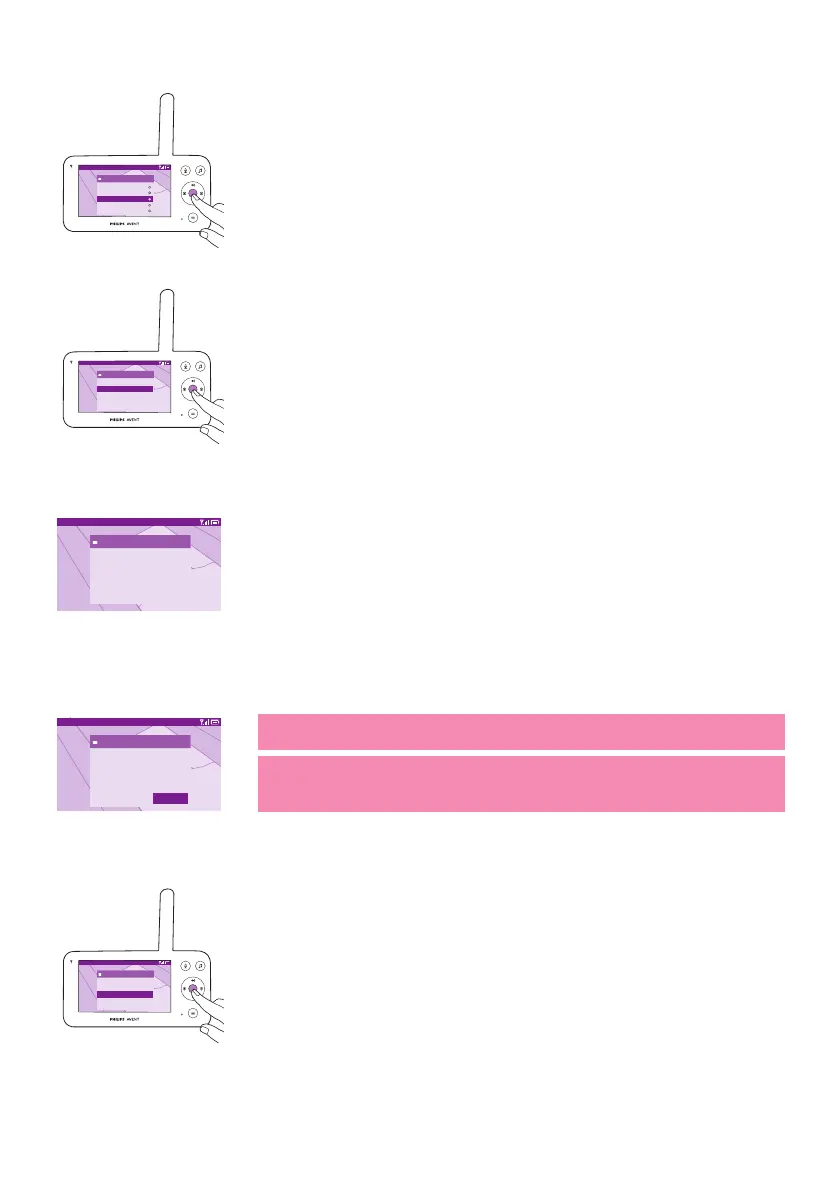
3 Press the conrm button to save the new setting and return to the
main menu�
Video 20.3
o
C
App download
Settings
Language
>
Firmware
Licenses
You can check and update the rmware of the parent unit.
1 Press the conrm button to enter the rmware menu.
Video 20.3
o
C
Firmware
Baby unit �rmware version: X.X.X
Parent unit �rmware version: X.X.X
Your �rmware is up to date.
2 The display shows the latest rmware version of the parent unit and
the baby unit�
Video 20.3
o
C
Firmware update
New �rmware is available for the parent unit.
Installation will start soon. It should take a
few minutes.
OK
Note: When you see there is an update option, update the rmware
for optimal product performance�
Tip: Make sure the parent unit is plugged to a mains socket with the
provided adapter and it is placed close to the baby unit to complete
the update�
Video 20.3
o
C
App download
Settings
Language
>
Firmware
Licenses
You can check the software license of the parent unit/baby monitor�
1 Press the conrm button to enter the license feature.













 To Next Page