BDL5590VL
9
2.3. Remote Control
2.3.1. General functions
1
2
3
4
5
6
7
8
10
9
12
14
15
11
13
16
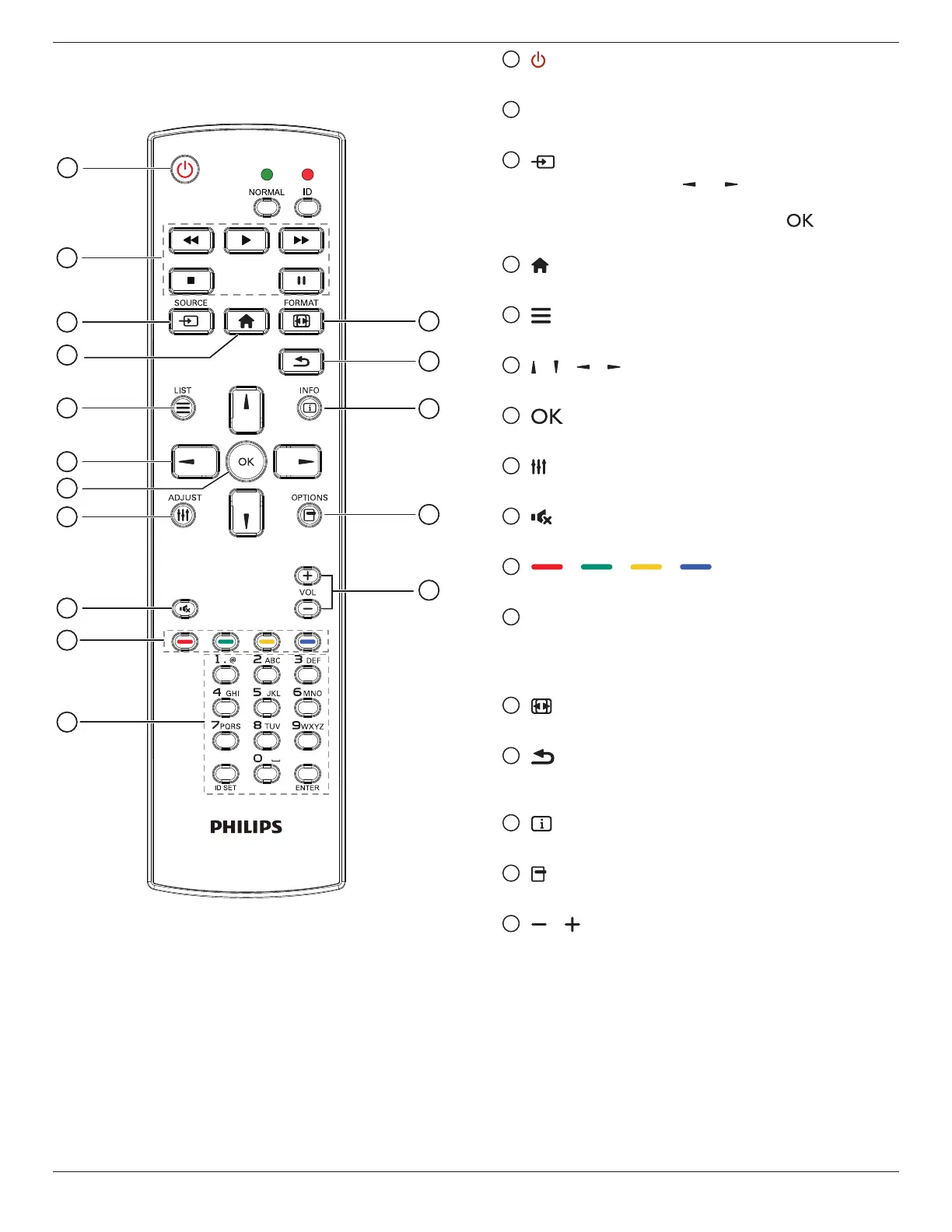
1
[ ] POWER button
Turnthedisplayonorputthedisplaytostandby.
2
[PLAY] buttons
Controlplaybackofmediales.
3
[ ] SOURCE button
Chooseinputsource.Press[ ]or[ ]buttontochoosefrom
USB
,
Network
,
HDMI 1
,
HDMI 2
,
DisplayPort
,
Card
OPS
,
DVI-D
,
YPbPr
,
AV
,or
VGA
.Press[ ]buttonto
conrmandexit.
4
[ ] HOME button
AccesstheOSDmenu.
5
[ ] LIST button
Nofunction.
6
[ ] [ ] [ ] [ ] NAVIGATION buttons
Navigatethroughmenusandchooseitems.
7
[ ] button
Conrmanentryorselection.
8
[ ] ADJUST button
Accesscurrentlyavailableoptions,pictureandsoundmenus.
9
[ ] MUTE button
Presstoturnthemutefunctionon/off.
10
[ ] [ ] [ ] [ ] COLOR buttons
Choosetasksoroptions.
11
[Number/ ID SET/ ENTER] button
Entertextfornetworksetting.
PresstosetthedisplayID.Referto2.3.2. ID Remote Control
formoredetail.
12
[ ] FORMAT button
Changepictureformat.
13
[ ] BACK button
Returntothepreviousmenupageorexitfromtheprevious
function.
14
[ ] INFO button
Displayinformationaboutcurrentactivity.
15
[ ] OPTIONS button
Accesscurrentlyavailableoptions,pictureandsoundmenus.
16
[ ] [ ] VOLUME button
Adjustvolume.










 To Next Page