BDL5590VL
28
• Ifthetemperatureexceeds70°C(158°F)over3minutesandthen
atemperaturewarningmessagewillbeshownonthescreenfor10
seconds,thedisplaywillbeshutdownautomaticallywithblinkingred
&greenLEDlights.
Network control port
ChoosetheRS232controlformCardOPSorembeddedRS232inPD
set.
Factory settings
Resetallyourcustomizedsettingstothefactorydefaults
5.1.7. Adv.
AdvancedsettingspageenablesyoutocongureHDMIandDVIsignal
settingsforimagequality.
Picture
Sound
Tiling
Network
Storage
General settings
Adv.
Jitter clean
VCO gain
Jitter clean
Turnon/offjittercleaningfunctionforHDMIandDVIsignalquality
enhancement.Thedefaultsettingison.
VCO gain
AdjustVCOgainautomaticallyormanually.ThedefaultsettingisAuto.
Note:WhenthesignalisunstableandlosethepicturefromHDMIinput,
youcanadjustVCOgaintogetgoodpicture.
5.1.8. Web control
A. Ensureyouhaveconnectedtothenetwork.YoucanpressINFO
buttontodisplaytheconnectionofthenetwork.
Picture format
Picture style
Sound style
Smart power
Volume
Monitor group
Monitor ID
Model name
SW Version
Serial no
Temperature
Network configuration
IP address
Netmask
Gateway
Network name
Ethernet MAC address
Auto zoom
Standard
Original
Off
20
1
1
BDL5590VL
0.07
39°C
DHCP
192.168.0.101
255.255.255.0
192.168.0.1
BDL5590VL
00:00:00:00:00:00
HDMI 1 1080p60 29/12/2014 Monday 16:10:14
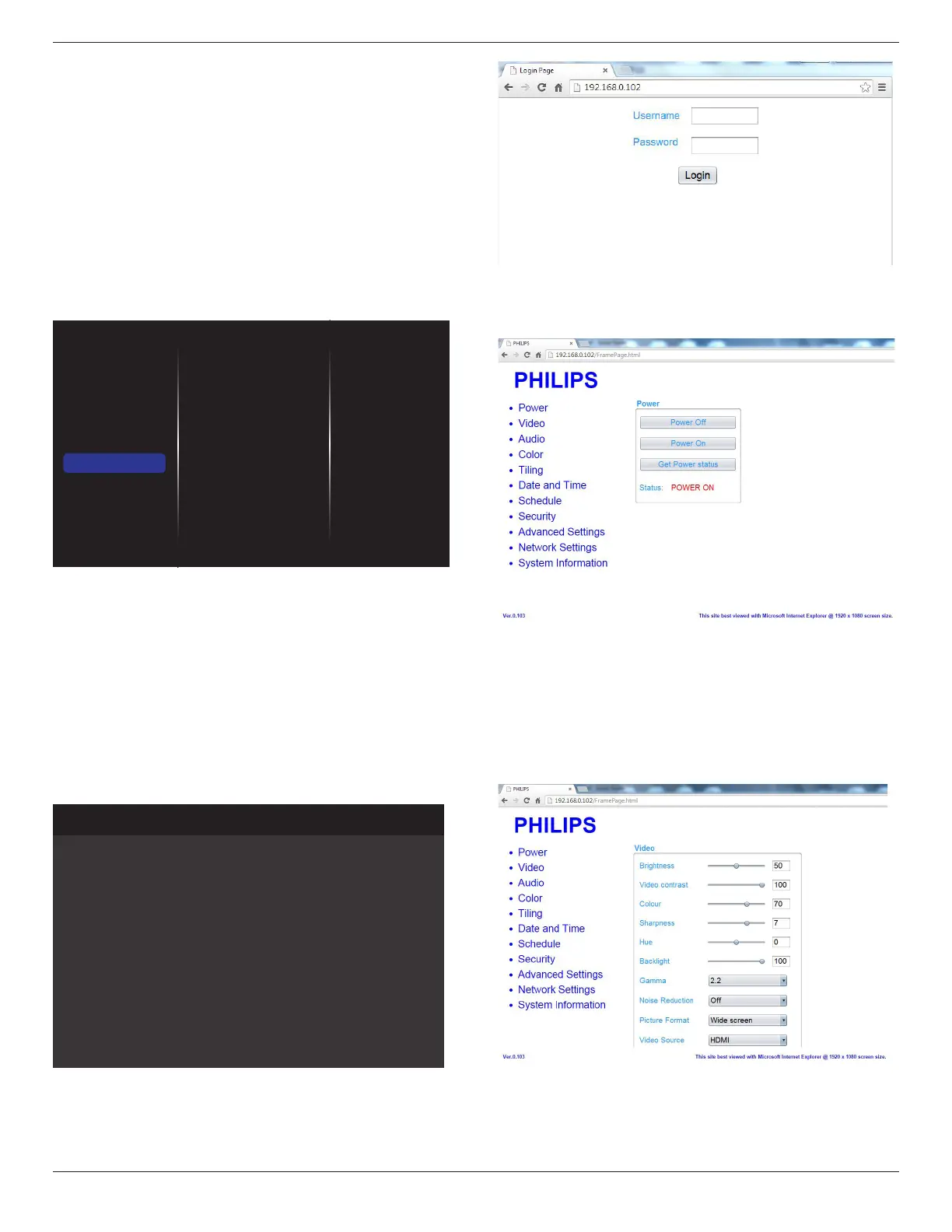
FromthecomputerconnectedtothePD,rstopenyourWebbrowser.
ThenenterthePD’saddress(192.168.0.101)fornetworkadministration
inthewebaddresseldandhitentertoreachthehomepageofWeb
Control.
Note:DefaultUsernameisadminwithPassword1234.
B. ThedefaultMainPageofWebControlisPowerPage.Itprovides
youaneasywaytoturnthedisplayonorputthedisplaytostandby.
PowerOff:Putthedisplaytostandby.
PowerOn:Turnthedisplayon.
GetPowerstatus:Clickthisbuttontogetthedisplaystatus.
Note:PowerOnfunctiononlysupportedaftersettingEcomodeto
Normal.
C. ClickonvideotoswitchtoVideoPage.Itprovidesyouaneasyway
toadjustvideosettings.
Brightness:Adjusttheoverallimagebrightnessbychangingtheintensity
oftheLCDpanel’sbacklight.0(minimum)to100(maximum).
Videocontrast:Adjusttosharpenthepicturequality.Theblackportions
ofthepicturebecomericherindarknessandthewhitebecomebrighter.
0(minimum)to100(maximum).









 To Next Page