BDL8470QT
21
• DNS2
• MACaddress
• Loginusername(Thedefaultusernameis{admin})
• Loginpassword(Thedefaultpasswordis{0000})
DMR
Receivemultimedialesfromtheconnecteddevicebyyournetwork.
Clear internet memory
Clearallthecookies,bookmarks,historylistandtextusedforlling
automatically.
Conguration1 reset
ResetallsettingsinConguration1menutothefactorypresetvalues.
Factory reset
ResetallsettingsintheOSDmenusof{Picture},{Screen},{Audio},{PIP},
{Conguration1},{Conguration2},and{Advanced option}tothe
factorypresetvalues.
Press[ ]
or[ ]buttontoselect{Reset},andpress[OK]buttonto
dothereset.
Factory reset
Cancel
Reset
5.2.6. Configuration2 menu
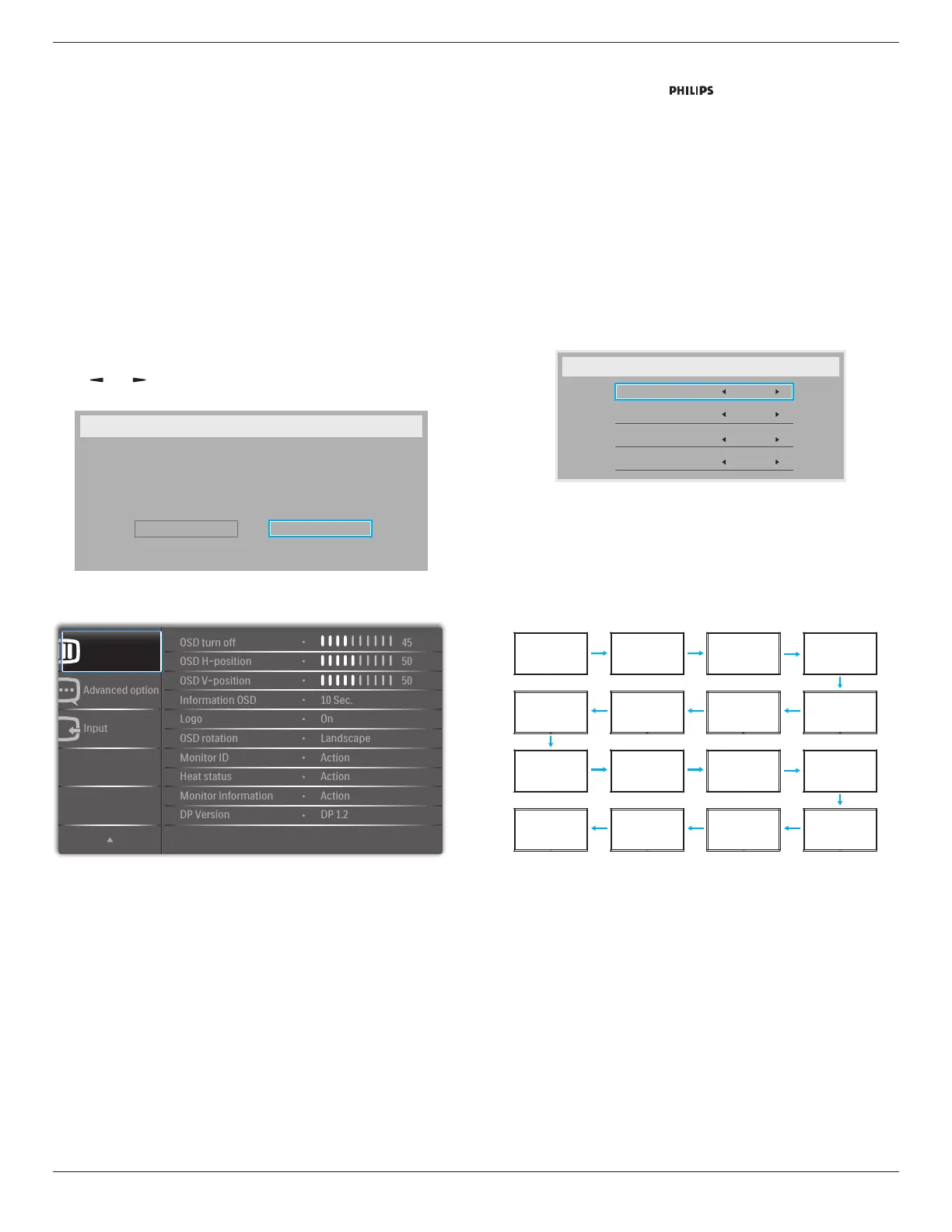
Configuration 2
OSD turn off
SettheperiodoftimetheOSD(on-screendisplay)menustaysonthe
screen.
Theoptionsare:{0 ~ 120}seconds.
OSD H-position
AdjustthehorizontalpositionoftheOSDmenu.
OSD V-position
AdjusttheverticalpositionoftheOSDmenu.
Information OSD
SettheperiodoftimetheinformationOSDisdisplayedontheupper
rightcornerofthescreen.TheinformationOSDwilldisplaywheninput
signalischanged.
TheinformationOSDwillremainonthescreenwith{Off}selection.
Theoptionsare:{Off,1 ~ 60}seconds.
Logo
Enableordisabletoshowthe logowhenyouturnonthe
display.
OSD rotation
RotatetheOSDMenu.
Theoptionsare:
• {Landscape}(Default)
• {Portrait}
Monitor ID
SettheIDnumberforcontrollingthedisplayviatheRS232C
connection.EachdisplaymusthaveauniqueIDnumberwhenmultiple
setsofthisdisplayareconnected.MonitorIDnumberrangeisbetween
1to255.
Theoptionare:{Monitor group}/{Tiling matrix}/{Auto ID}
Monitor Id
Monitor Id
Monitor group
Tiling matrix
Auto ID
1
1
1
End
• {Monitor group}
Theoptionsare:{1-255}.Thedefaultsettingis1.
• {Tiling matrix}
Tilingmatrixnumberrangeisbetween1to15.1isdefaultsetting.
The{Auto ID}setupfunctionenablessettingup{Monitor ID}of
connectedmachineaccordingto{Tiling matrix}settings.
Example:Tilingmatrixsetsas4
1 2
5 6
3 4
7 8
9 10 11 12
13 14 15 16
• {Auto ID}
Theoptionare:{Start}/{End}.Thedefaultis{End}.
• SwitchtoStartoptiontosetupIDsofmachinesbackward
fromcurrentone.
• Oncethesetupiscompleted,theoptionexitstoEnd
automatically.
• Tousethisfunction,serialconnectallmachineswithRS-232
cableandsettheirControlportstoRS-232,too.
Heat status
Thisfunctionallowsyoutocheckthethermalstatusofthedisplayat
anytime.







 To Next Page