17
[HDMI Audio]
Select an HDMI audio output when you connect
this product and the TV/audio device with an HDMI
cable.
• [Bitstream] – Select the best original HD
audio experience (only via an HD audio
compatible receiver).
• [Auto] – Detect and select the best supported
audio format automatically.
[Digital Audio]
Select an audio format for the sound output from
the DIGITAL OUT jack (coaxial/optical).
• [Auto] - Detect and select the best supported
audio format automatically.
• [PCM] - The audio device does not support
multi-channel format. Audio is downmixed to
two-channel sound.
• [Bitstream] - Select the original audio to
experience Dolby or DTS audio (BD-video
special sound effect is disabled).
Note
Ensure that the audio format is supported by the disc •
and the connected audio device (amplifier/receiver).
When
• [Bitstream] is selected, interactive audio like
button sound is muted.
[PCM Downsampling]
Set the sampling rate for PCM audio output from
the DIGITAL OUT jack (coaxial/optical).
• [On] - PCM audio is down-sampled at 48kHz.
• [Off] - For BD or DVD recorded in LPCM
without copyright protection, two-channel
audio signals up to 96 kHz are output as LPCM
signals with no conversion.
Network setup
1 Press .
2 Select [Setup], and press OK.
3 Select [Network Setup], and press .
View Network Settings
Network Installation
Video Setup
Advanced Setup
Audio Setup
Network Setup
Preference Setup
EasyLink Setup
• [Vivid] – Vibrant color setting.
• [Cool] - Soft color setting.
• [Action] – Sharp color setting. It enhances
the details in the dark area. Ideal for action
movies.
• [Animation] – Contrast color setting. Ideal for
animated pictures.
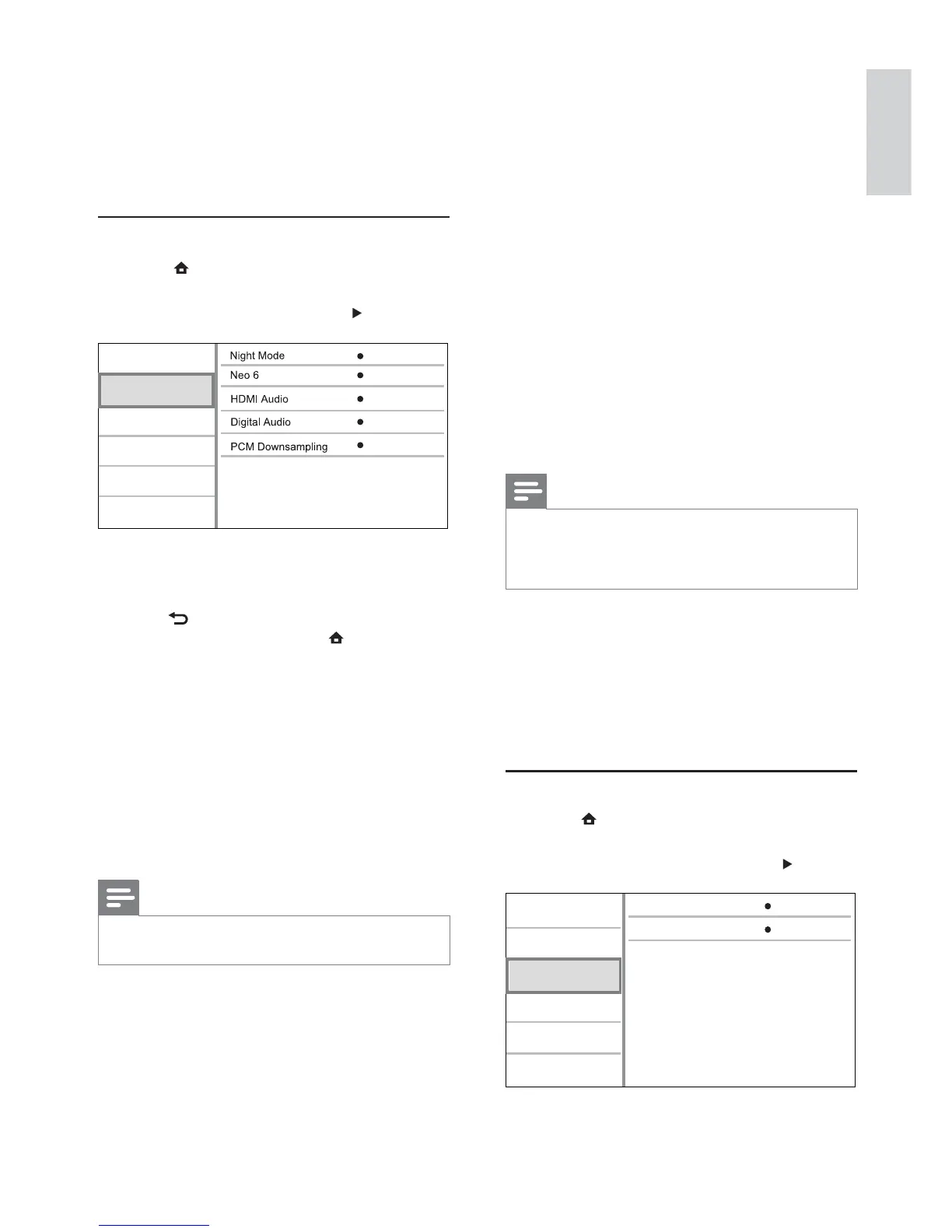
Audio setup
1 Press .
2 Select [Setup], and press OK.
3 Select [Audio Setup], and press .
Off
Auto
Auto
On
Video Setup
Advanced Setup
Audio Setup
Network Setup
Preference Setup
EasyLink Setup
Off
4 Select an option, then press OK.
5 Select a setting, then press OK.
To return to the previous menu, press •
BACK.
To exit the menu, press•
.
[Night Mode]
Increase a soft sound level such as dialogue to
make it easier to hear at a low volume, while
simultaneously decreasing a loud sound level.
• [Auto] - Detect and select a best sound level
at a low volume. Applicable to tracks with
Dolby TrueHD audio only.
• [On] – For quiet viewing at night.
• [Off] – For surround sound with a full dynamic
range.
Note
Applicable only to Dolby encoded DVD-video or BD- •
video.
[Neo 6]
A post processing by DTS to generate a surround
sound effect from 2 channel audio.
• [Cinema] – Enable Neo 6 post processing to
the cinema mode.
• [Music] - Enable Neo 6 post processing to the
music mode.
• [Off] – Disable Neo 6 post processing.
English
EN



 To Next Page