EasyManua.ls Logo

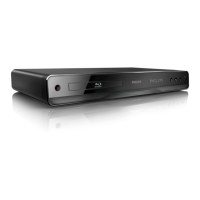
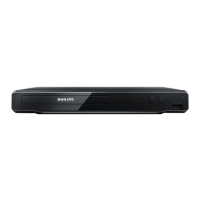
Philips BDP3502 - User Manual

Philips BDP3502
48 pages
Print Icon
To Next Page IconTo Next Page
Loading...
Register your product and get support at
www.philips.com/welcome
EN User Manual
BDP3502
Blu-ray Disc
/ DVD Player
EN For further assistance, call the customer
support service in your country.
To obtain assistance, contact Philips Customer
Care Center;
In the U.S.A., Canada, Puerto Rico, or the U.S.
Virgin Islands; 1- 866-515-1124

Questions and Answers

  • J
    Jessica KennedyAug 17, 2025
    How to fix Philips Blu-ray Player when it has no power?
    • A
      Alisha KentAug 18, 2025
      If your Philips Blu-ray Player isn't powering on, first ensure the AC power cord is properly connected. If it is, try plugging the player into another power outlet. As a last resort, unplug the AC power cord, wait 5-10 seconds, and then plug it back in to try powering on the unit again.
  • L
    loganmorrowAug 20, 2025
    Why Philips Blu-ray Player not reacting to the remote control?
    • E
      Erika WilliamsAug 20, 2025
      If your Philips Blu-ray Player isn't responding to the remote control, try these steps: reduce the distance to the infrared sensor window on the player. Ensure the player’s AC power cord is properly plugged into a power outlet. Check the batteries in the remote, ensuring they are correctly inserted according to the + and - symbols.
  • P
    Paula MillerAug 23, 2025
    How to troubleshoot no sound or distorted sound on Philips BDP3502?
    • F
      fostersandraAug 23, 2025
      If you're experiencing no sound or distorted sound with your Philips Blu-ray Player, start by adjusting the volume. Check that the speakers are correctly connected and that the HDMI connection is secure. Ensure the HDMI cable isn't plugged into an HDMI-DVI adapter or projector that doesn't support digital sound. Finally, review the settings in the Audio Setup menu.
  • O
    Olivia WilliamsAug 25, 2025
    Why Philips Blu-ray Player cannot play back a disc?
    • J
      Jason SawyerAug 26, 2025
      If your Philips Blu-ray Player can't play a disc, first ensure the disc is playable on the unit. Check the region code of the disc. For DVD-RW/-R discs, ensure that the disc is finalized. Also, clean the disc.
  • P
    patrickrileyAug 27, 2025
    Why is there no sound or picture on my Philips BDP3502?
    • M
      Michele FloresAug 28, 2025
      If you're not getting any sound or picture from your Philips Blu-ray Player, first ensure that both the TV and the Blu-ray Player are turned on. Also, verify that the connections to the TV are correctly made. Finally, check if the connected TV or another device supports HDCP, as the unit will not output a video signal without HDCP support.
  • J
    jasonallenAug 30, 2025
    What to do if there is no audio/video signal from Philips BDP3502 via HDMI cable?
    • J
      jordangreenAug 30, 2025
      If you're not getting any audio/video signal via HDMI from your Philips Blu-ray Player, first ensure the display device is on the correct input/video source. If that doesn't work, try an HDMI hotplug: disconnect the HDMI cable from the display device, turn on both devices, and then reconnect the HDMI cable. Check with the TV manufacturer for any available software updates. Also, verify that the HDMI cable is a certified version. If the power-on indicator is blinking during startup, wait until it lights up and the home menu appears on the display device.
  • K
    karen98Sep 1, 2025
    How do I get audio from my Philips BDP3502 Blu-ray Player to play through my surround sound system?
    • D
      Denise TaylorSep 2, 2025
      To get audio from your Philips Blu-ray Player to play through your surround sound system, first ensure the audio system is turned on and set to the correct input channel. Verify that the surround system is compatible with either bitstream or LPCM (check the surround manufacturer's user manual if unsure), and then check the settings in the Setup menu of the Blu-ray player. Finally, increase the volume level of the surround system.
  • F
    Felicia RogersSep 4, 2025
    Why there is no high-definition video signal on Philips BDP3502 Blu-ray Player?
    • M
      Matthew BrownSep 4, 2025
      If you're not getting a high-definition video signal from your Philips Blu-ray Player on your TV screen, make sure the disc contains high-definition video. High-definition video is only available when the disc contains it. Also, confirm that the TV supports high-definition video, as it is only available when the TV supports it.
  • J
    John SmithSep 6, 2025
    What to do if the picture freezes during disc playback on Philips Blu-ray Player?
    • M
      Megan WhiteSep 6, 2025
      If the picture freezes momentarily during disc playback on your Philips Blu-ray Player, inspect the disc for fingerprints or scratches. Clean the disc with a soft cloth, wiping from the center to the outer edge.
  • P
    Philip MontoyaSep 9, 2025
    Why Philips Blu-ray Player cannot find a JPEG file?
    • T
      Trevor MillerSep 9, 2025
      If your Philips Blu-ray Player can't find a JPEG file, make sure that the selected folder does not contain more than 9,999 files for Blu-ray Disc / DVD / USB memory stick and 999 files for CD. Also, verify that the file extension is .jpg, .JPG, .jpeg, or .JPEG.

Philips BDP3502 Specifications

General IconGeneral
Video upscalingYes
Ethernet portYes
Wi-FiNo
3D PlaybackNo
Audio FormatsAAC, MP3, WMA
ConnectivityHDMI, USB, Component Video, Composite Video, Optical Audio
Disc types supportedBD, DVD, CD
Video OutputHDMI, Component Video, Composite Video

Related product manuals