EN 34
10.2. HDMI video resolution
HOME A ˝Setup˝ A ˝Video Setup˝ A ˝HDMI Video˝
Set the resolution of the video signal being output from the HDMI OUT jack.
You can select the desired video resolution among the settings listed below: ˝Auto˝, ˝4 8 0 p˝, ˝720p˝, ˝1080i˝,
˝1080p˝, ˝1080p24˝.
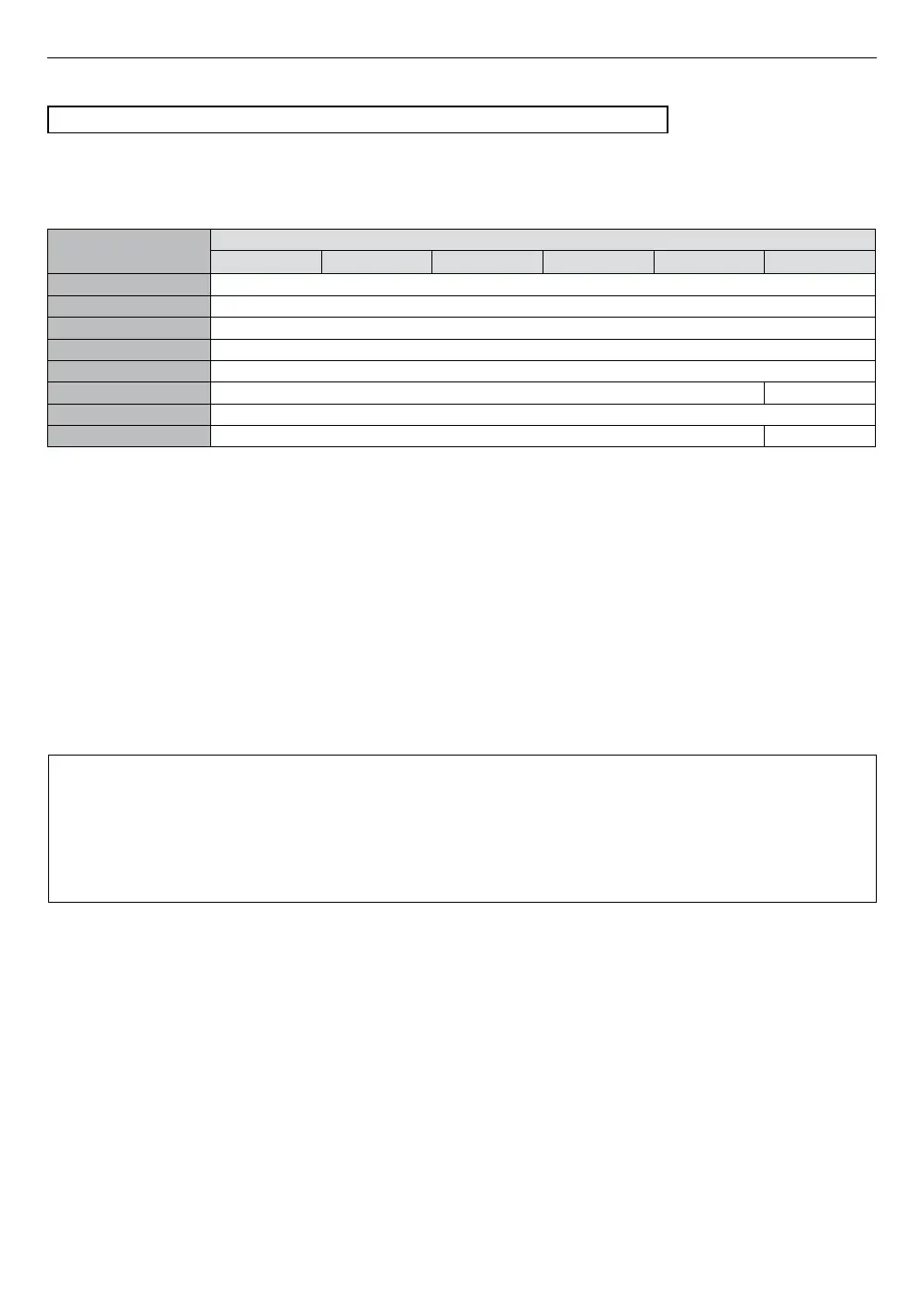
Actual output resolution:
Setting in
˝HDMI Video˝
Source
480i/60 480p/60 720p/60 1080i/60 1080p/60 1080p/24
Auto The highest resolution supported by your display device will automatically be in effect.
480p 480p/60
720p 720p/60
1080i 1080i/60
1080p 1080p/60
1080p/24 1080p/60 1080p/24
4K 2160p/60
4K/24 2160p/60 2160p/24
• For AVCHD, outputting the video in 24 frames per second (1080p/24) is not available.
NoteD
• The selected resolution must also be supported by your display device.
• If your TV and the unit are connected by a DVI cable and if ˝Auto˝ is selected, ˝4 8 0 p ˝ will be automatically in
effect.
• Refer also to your TV’s manual.
• When connected to an HDCP incompatible display device, the picture will not be displayed properly.
• The audio signals from the HDMI OUT jack (including the sampling frequency, the number of channels and bit
length) may be limited by the connected device.
• Among the display devices that support HDMI, some do not support audio output (for example, projectors).
While connected to a device such as a projector, audio will not be output from the HDMI OUT jack.
• When this unit’s HDMI OUT jack is connected to a DVI-D compatible display device(s) (HDCP compatible) with an
HDMI-DVI converter cable, the signals are output in digital RGB.
• HDMI video resolution does not work during playback of a BD-video.
Copyright protection system
To play back digital video images of a BD-video or DVD-video via an HDMI connection, it is necessary that
both the player and display device (or an AV receiver / amplifier) support a copyright protection system called
HDCP (high-bandwidth digital content protection system). HDCP is copy protection technology which prevents
copying or playback of encrypted content when connected to a non-HDCP compliant AV device. This unit
supports HDCP. Please read the operating instructions of your display device (or an AV receiver / amplifier) for
more information.


 To Next Page