EN 19
C Description for icons
[ ] : group (folder) icon
[
] : music file icon
[
] : photo file icon
- ˝Folders˝ refers to the group of files.
- ˝Track˝ refers to the contents recorded on the audio CD.
- ˝Files˝ refers to the contents on a disc which are recorded in AVCHD or JPEG file format.
NoteD
• Unrecognizable characters will be replaced with asterisks.
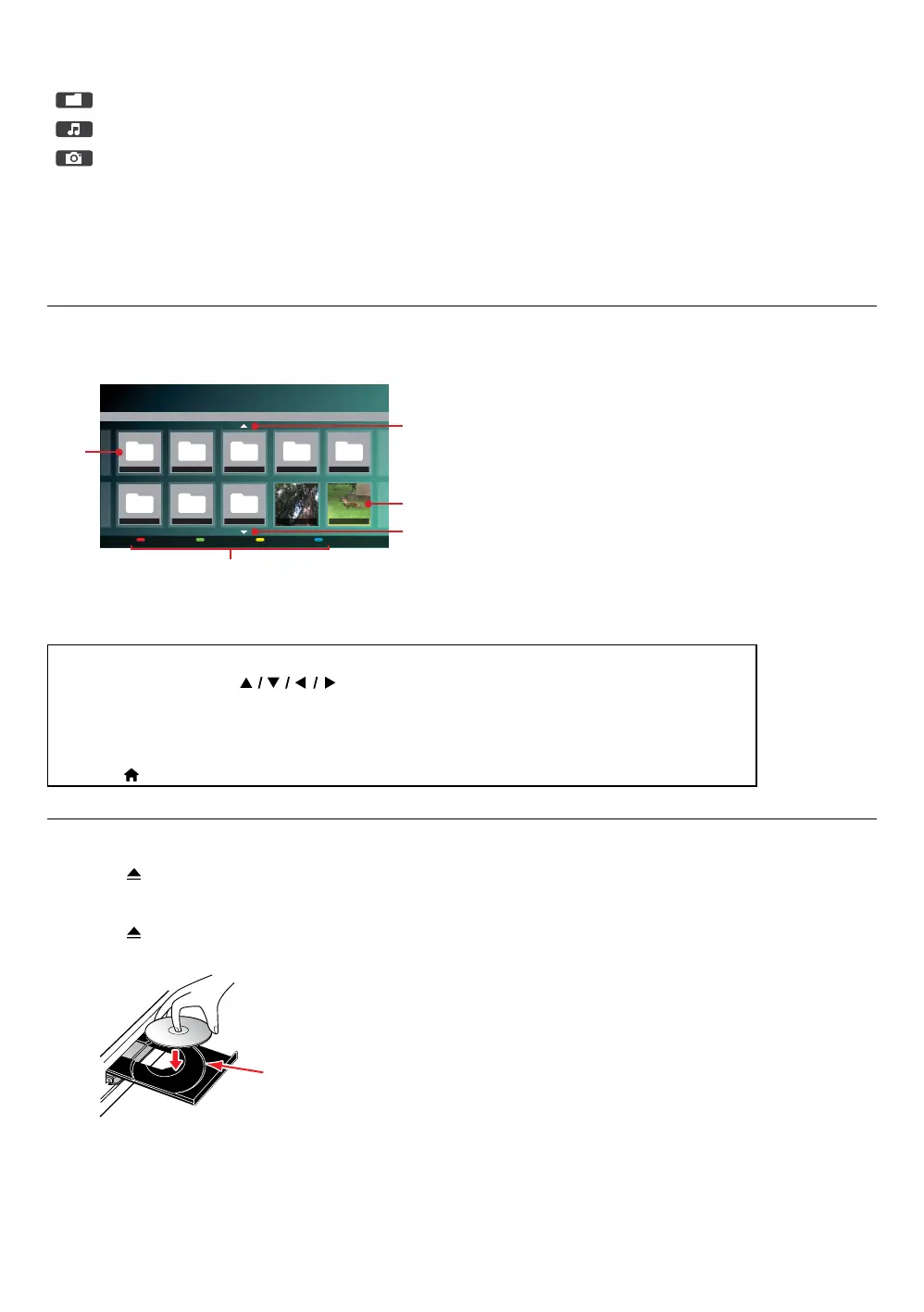
6.2. Guide to file list
C Photo file list
Playable file(s) File information
USB
Photo AVCHDMusic
Photo
Page Down Media Mode
RED GREEN YELLOW BLUE
Folder_1 Folder_2 Folder_3 Folder_4 Folder_5
Folder_6 Folder_7 Folder_8 Photo_1 Photo_2
Page 1/2
1
2
4
3
3
1. Folder
2. Photo thumbnail
3. Pages Up / Down
4. Operation guide
C How to navigate through the file list
• For photo file list, use [ ] to move the highlight up, down, left and right. Press
[BACK] to go back to the previous hierarchy.
• To access the files in a Group (folder), select the desired Group (folder), then press [OK].
• Press [RED] or [GREEN] to change the page list up or down.
• Press [BLUE] to go back to the file type (˝Photo˝ / ˝AVCHD˝) selection screen.
• Press [ (HOME)] to Exit.
6.3. How to insert a disc
1. Press [ (OPEN/CLOSE)] to open the disc tray.
2. Place the disc on the disc tray with its label side facing up.
3. Press [
(OPEN/CLOSE)] to close the disc tray.
• It may take a while to load the disc.
Align the Disc to the disc tray guide.


 To Next Page