EN 35
8.15. JPEG Status
[JPEG]
JPEGJPEG
You can confirm the status of the JPEG file being
displayed.
1. During playback, press [ OPTIONS U ] .
2. Use [ K / L ] to select “Operation Menu”, then press
[OK].
3. Use [ K / L ] to select “Status”, then press [OK].
4. Use [ K / L ] to select your desired setting.
“Off” : Date and detailed information will not be
displayed.
“Date” : The date and time at which this picture file
was created
“Details” : Detailed information on the picture file
– Date:
The date and time at which this picture
was taken
– Size:
The size of this picture (width x height)
– Manufacturer:
The manufacturer's name of the device
used to shoot this picture
– Equipment:
The model name of the device used to
shoot this picture
– Track Number:
The Track number of the picture file
being displayed
5. Press [ OPTIONS U ] to exit.
8.16. JPEG Rotation
[JPEG]
JPEGJPEG
You can rotate the JPEG picture 90 degrees to the Left/
Right.
1. While viewing, press [ OPTIONS U ] .
2. Use [ K / L ] to select “Operation Menu”, then press
[OK].
3. Use [ K / L ] to select “Rotate Left” or "Rotate Right",
then press [OK].
“Rotate Left” : Turns the picture 90 degrees to the Left.
“Rotate Right” : Turns the picture 90 degrees to the
Right.
NoteD
• Rotation setting will be cleared when viewing is
stopped.
8.17. Playback Information Window
[UHDBD]
UHD
BD
UHD
BD
[BD Video]
BD
VIDEO
BD
VIDEO
[DVD Video]
DVD
VIDEO
DVD
VIDEO
[DVD Video]
DVD
VR
DVD
VR
[AVCHD]
AVC H DAVC H D
You can confirm the information on the video
being played.
1. During playback, press [ OPTIONS U ] .
2. Use [ K / L ] to select “Operation Menu”, then press
[OK].
3. Use [ K / L ] to select “Playback Information
Window”, then press [OK].
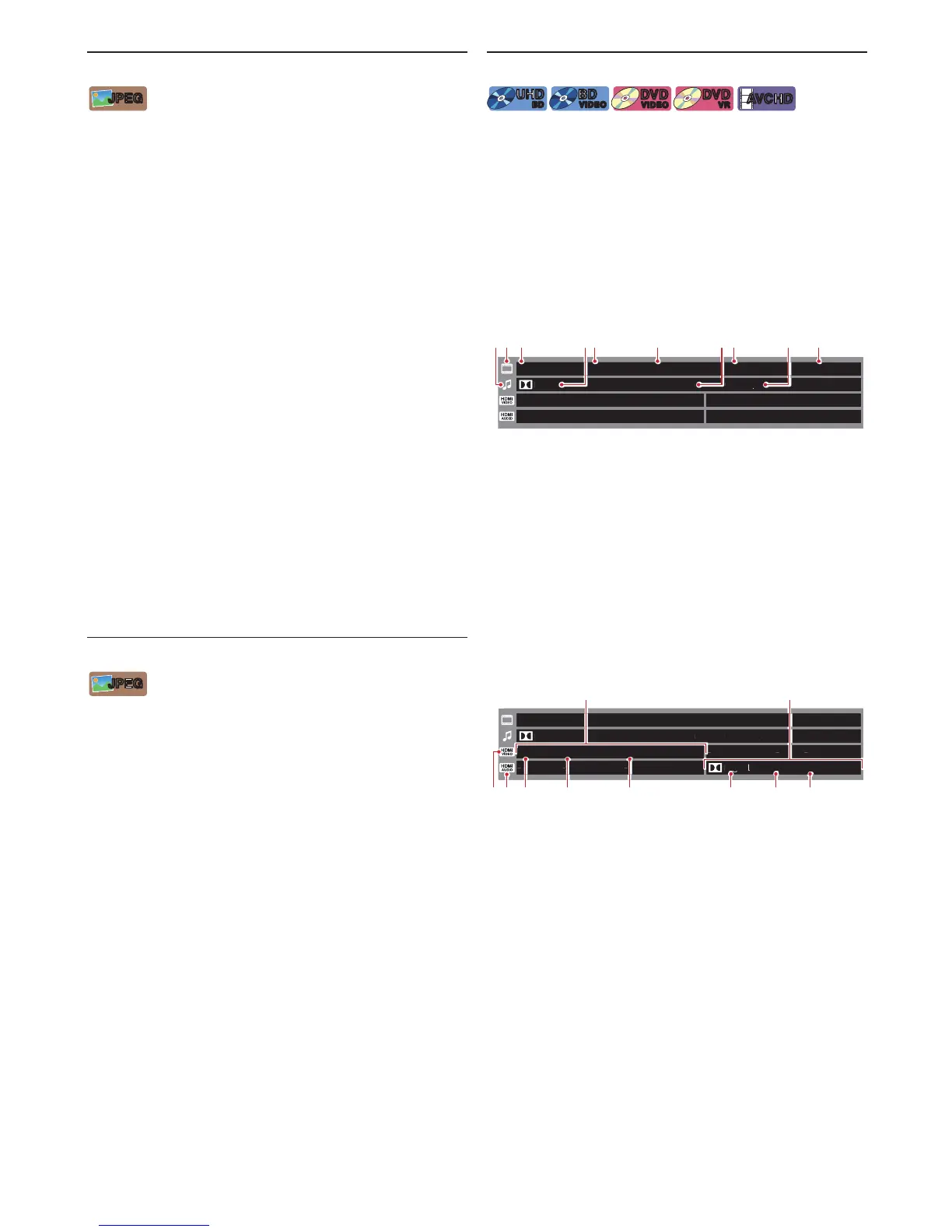
C Playback Information Window
1920x1080/24p HDR/BT.2020 YCbCr4:2:0/8bit
YCbCr4:4:4/8bit
MPEG-4 AVC
0.6Mbps
16.3Mbps
5.1ch
1080/60i SDR/BT.709
-- - - --
---
HTDH
1920x1080/24
1 Video information from the HDMI OUT port
2 Audio information from the HDMI OUT (AUDIO) port
3 HDMI Video icon
4 HDMI Audio icon
5 HDMI Video Resolution / HDMI Video Frame Rate
6 Dynamic Range Information/Color Gamut
7 Chroma Sampling / Bits per Primary Color
8 Audio Codec
9 Number of Audio Channels
10 Audio Sampling Frequency



 To Next Page