9
EN
Your CD535
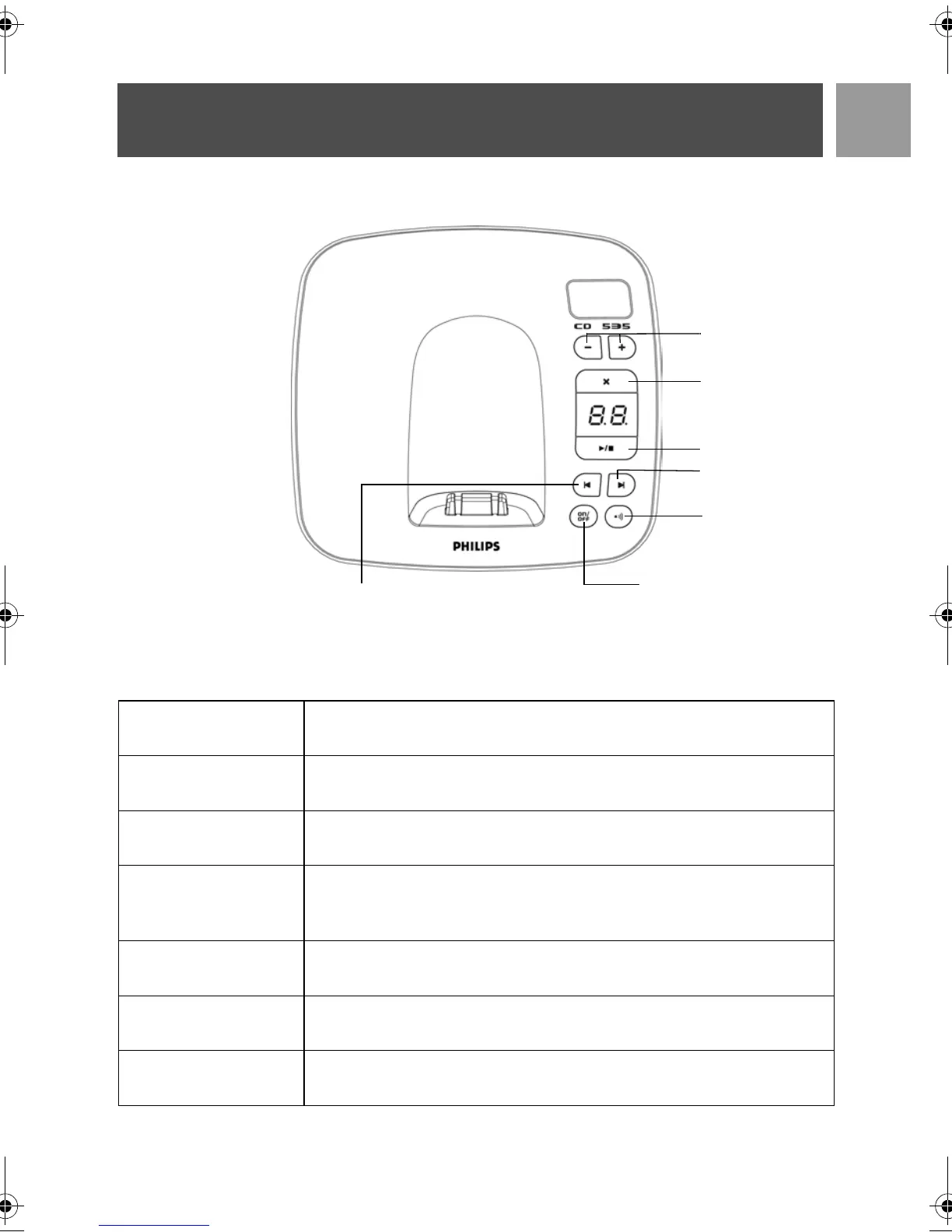
Overview of the base station
Base station keys
c
Page handset.
Long press to start registration procedure.
o
Long press to turn the answering machine On/Off.
v
Increase speaker volume during message playback.
Reduce speaker volume during message playback.
x
Delete current message during message playback.
Long press to delete all messages when TAM is in standby mode (unread
messages will not be deleted).
p
Play phone messages (the first recorded will be played first).
Stop message playback.
l
Go to previous message if pressed within 1 second of current message playback.
Replay current message if pressed after 1 second of current message playback.
r
Skip to the next message during message playback.
Volume keys
Delete key
Play / Stop key
Next message key
Paging key
Answer Machine
On/Off key
Previous message /
Replay message key
CD535_IFU_EN.book Page 9 Monday, September 25, 2006 1:15 PM


 To Next Page