18 EN
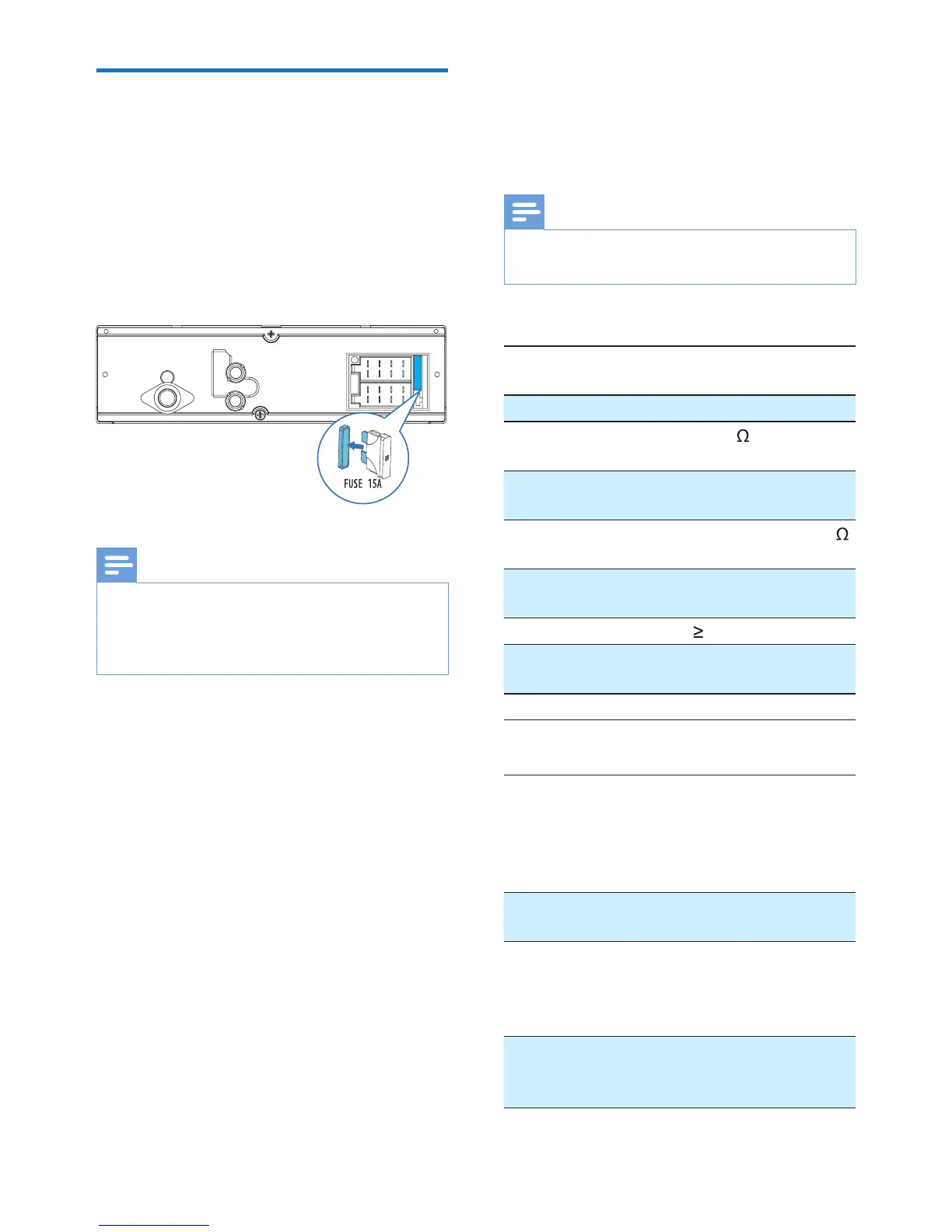
Replace the fuse
If there is no power, check the fuse and
replace it if it is damaged.
1 Check the electric connection.
2 Remove the damaged fuse from the
rear panel.
3 Insert a new fuse with the same
specications (15 A).
Note
•
If the fuse gets damaged immediately
after it is replaced, an internal malfunction
may occur. In such case, consult your local
retailer.
REAR
L
R
10 Product
information
Note
•
Specications are subject to change
without prior notice.
General
Power supply
12 V DC (11 V - 16 V),
negative ground
Fuse 15 A
Suitable speaker
impedance
4 - 8
Maximum power
output
50 W x 4
Continuous power
output
22 W x 4 RMS (4
10% T.H.D.)
Pre-Amp output
voltage
2.5 V
Aux-in level
500 mV
Dimensions
(W x H x D)
188 x 58 x 110 mm
Weight 0.63 kg
Radio
Frequency range
- FM
87.5 - 108.0 MHz
(100 kHz per step
in auto search and
50 kHz per step in
manual search)
Usable sensitivity
- FM (S/N = 20 dB)
8 µV
Frequency range
- AM(MW)
522 - 1,620 KHz
(9 KHz)
530 - 1710 KHz
(10 KHz)
Usable sensitivity
- AM(MW)
(S/N = 20 dB)
30 µV



 To Next Page