6 EN
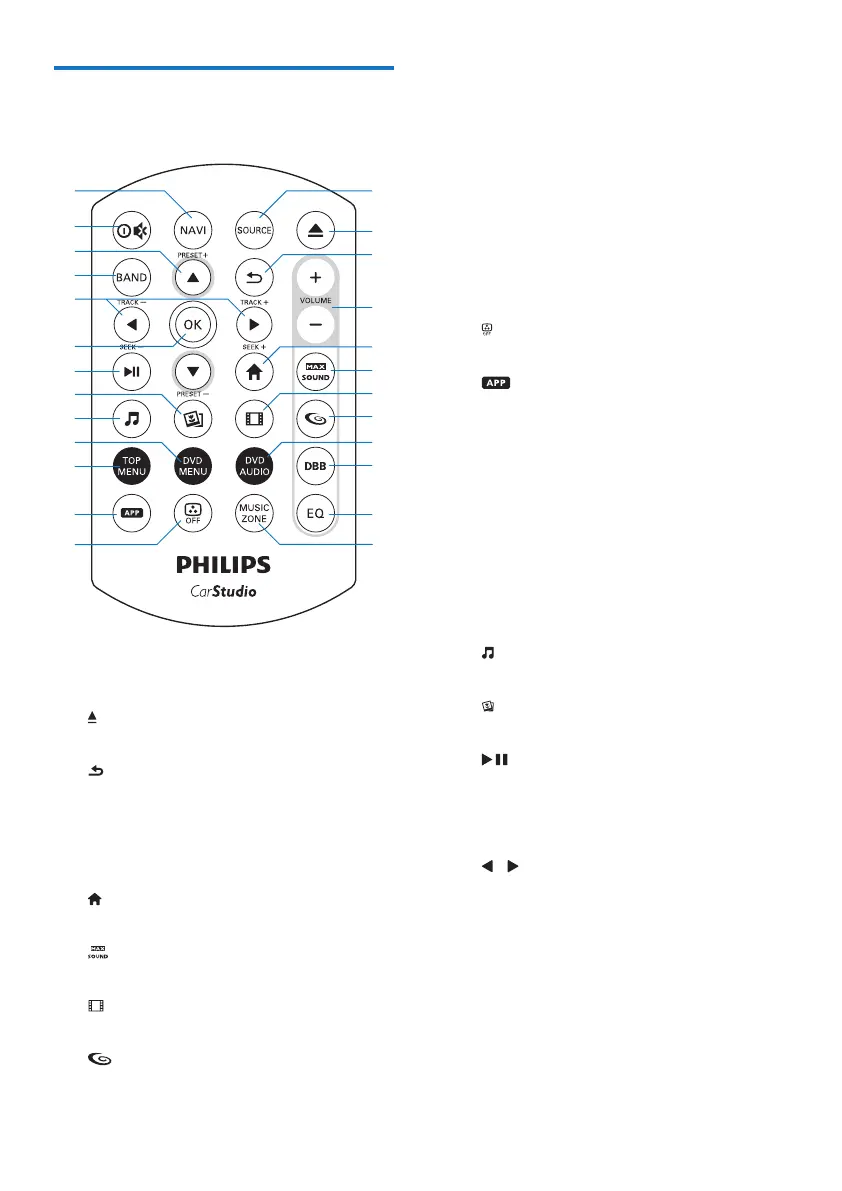
Overview of the remote
control
a SOURCE
• Press repeatedly to select a source.
b
• Press to eject the disc.
c
• Return to the previous menu or mode.
d VOLUME + / -
• Press to increase or decrease the
volume.
e
• Access the home menu.
f
• Enable or disable the maximum sound.
g
• Switch to video playback mode.
h
• Enable or disable the FullSound effect.
b
c
a
d
f
h
g
e
j
i
k
l
x
w
y
v
t
u
s
q
o
p
r
n
m
i DVD AUDIO
• Select an audio language or audio
channel.
j DBB
• Enable or disable the DBB (Dynamic
Bass Boost) sound effect.
k EQ
• Select a preset sound equalizer.
l MUSIC ZONE
• Select a music listening zone.
m
• Turn on or off the screen.
n
• Press and hold to pop up virtual
control buttons, only available when an
external smart link box(not supplied) is
connected with the system. tch to the
control interface for front source or
rear source.
o TOP MENU
• Return to top menu.
p DVD MENU
• Access the DVD menu.
q
• Switch to music playback mode.
r
• Switch to picture slideshow mode.
s
• Start, pause, or resume the play.
t OK
• Conrm an option.
u / /TRACK -/TRACK +
• Skip to the previous or next track,
chapter, or le.
• For DVD, press and hold to select a
speed for fast backward or forward
search.
v BAND
• Select a tuner band.



 To Next Page