7EN
3 Before use
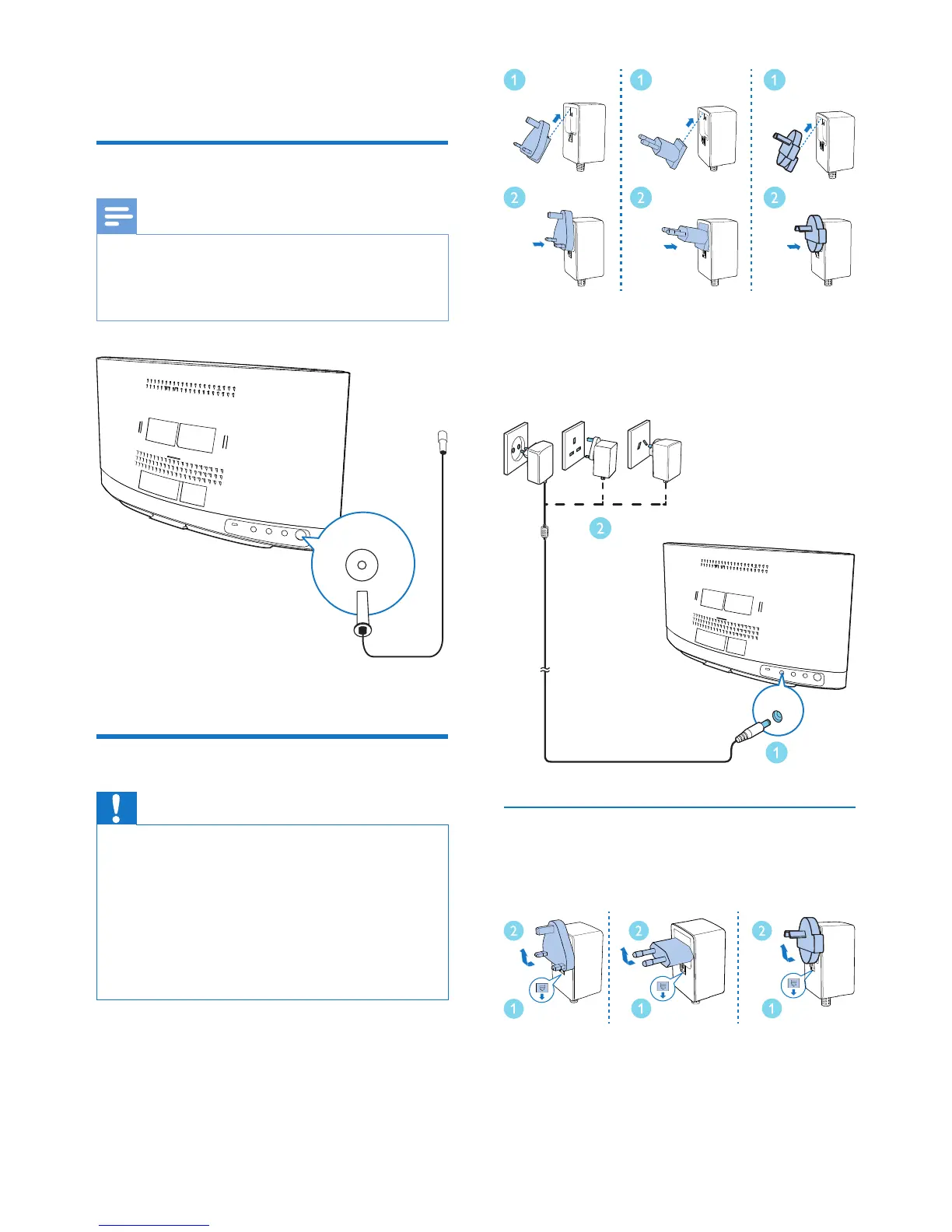
Connect the radio antenna
Note
• For optimal reception, fully extend the antenna and
adjust its position, or connect an outdoor antenna.
• This product does not support AM (amplitude
modulation) radio reception.
Connect the radio antenna to the product.
Connect power
Caution
• Risk of product damage! Make sure that the power
supply voltage matches the voltage printed on the back
of the main unit.
• Risk of electric shock! Before you plug the AC power
adaptor, make sure that the adaptor plug converter is
xed securely. When you unplug the AC power adaptor,
always pull the plug, never the cord.
• Before you connect the AC power adaptor, make sure
that you have completed all the other connections.
1 Select an adaptor plug converter and x it
to the adaptor.
2 Connect the AC power adaptor to
• the DC IN socket on the back panel,
and
• the wall outlet.
Remove the plug converter
To replace a plug converter, remove it rst as
illustrated below.
DC IN



 To Next Page