3EN
2 Your micro
music system
Congratulations on your purchase, and
welcome to Philips! To fully benet from the
support that Philips offers, register your product
at www.philips.com/welcome.
If you contact the Consumer Care, you will
be asked for the model and serial number of
this apparatus. The model number and serial
number are on the rear of the apparatus. Write
the numbers here:
Model No. __________________________
Serial No. ___________________________
Introduction
With this product, you can:
• enjoy audio from discs, USB storage
devices, iPod/iPhone/iPad, and other
external devices, and
• listen to FM and DAB radio stations.
What's in the box
Check and identify the contents of the package:
• Micro music system
• Remote control (with one AAA battery)
• AC power adaptor
• Wall mounting kit (2 dowels and 2 screws)
• FM antenna
• Short user manual
• Wall mounting instructions
DCM2260
Short User Manual
www.philips.com/welcome
Always there to help you
Register your product and get support at
Question?
Contact
Philips
Wall Mounting
Instructions
www.philips.com/welcome
Always there to help you
Register your product and get support at
Question?
Contact
Philips
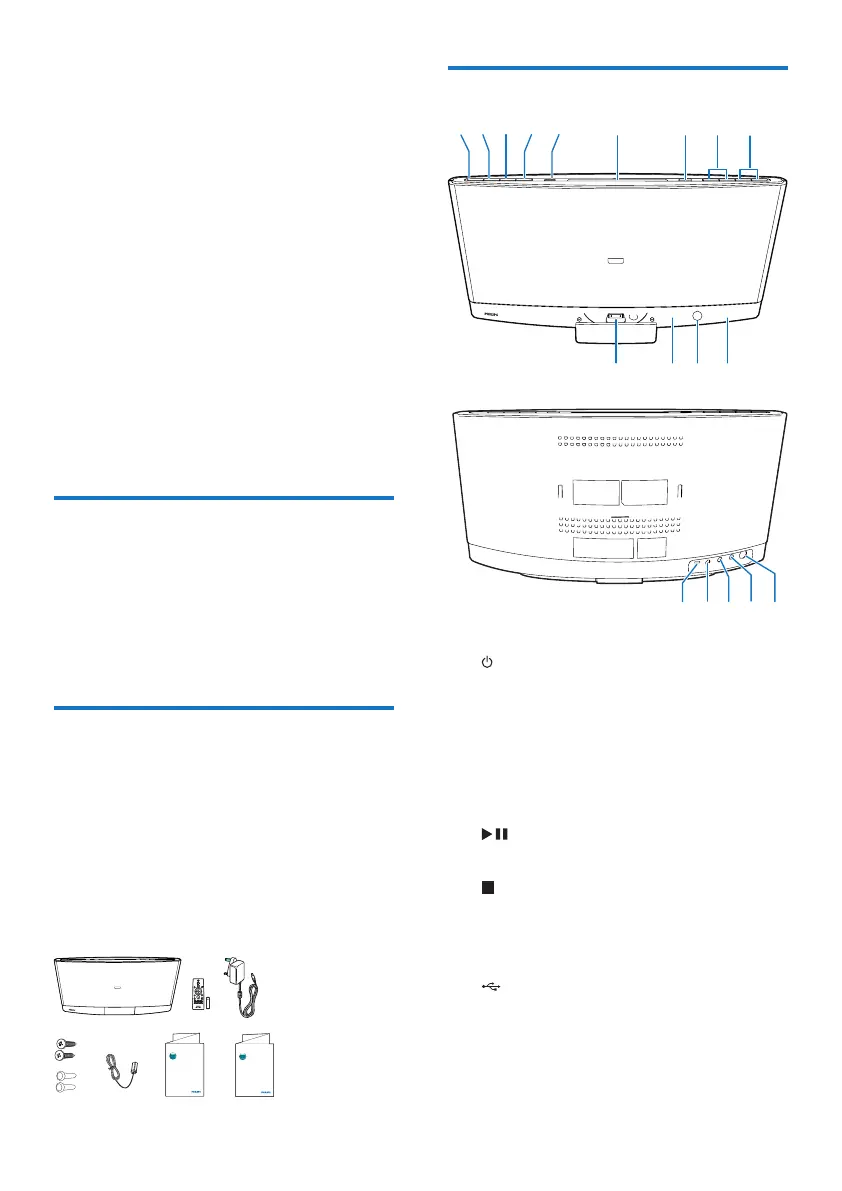
Overview of the main unit
a
• Turn on the product.
• Switch the product to eco power
standby mode or normal standby
mode.
b SOURCE
• Press repeatedly to select a source.
c
• Start, pause, or resume play.
d
• Stop the play of music.
• Access the playlist of a docked iPod/
iPhone.
e
• Connect a compatible USB storage
device for music play.
• Connect a compatible USB device for
charging.
o
n
pqr
abcdef ghi
l
k



 To Next Page