4 EN
f Disc compartment
g
• Press to eject the disc from the disc
compartment.
h /
• Skip to the previous or next track.
• Press and hold to search within a track.
• Tune to a radio station.
i VOL+/VOL-
• Increase or decrease the volume level.
j Dock for iPod/iPhone/iPad
• Connect to a compatible iPod/iPhone/
iPad.
k IR sensor
• Receive infrared signals from the
remote control.
l Indicator
• It lights red when the product is in the
eco power standby mode.
m LCD screen
n Micro USB socket
• This socket is for rmware upgrade
only.
o DC IN
• Connect to the AC power adaptor.
p
• Connect to a headphone with 3.5-mm
connector.
q AUDIO IN
• Connect to the audio output socket
(usually the headphone socket) of an
external device.
r FM ANT
• Connect to the FM antenna.
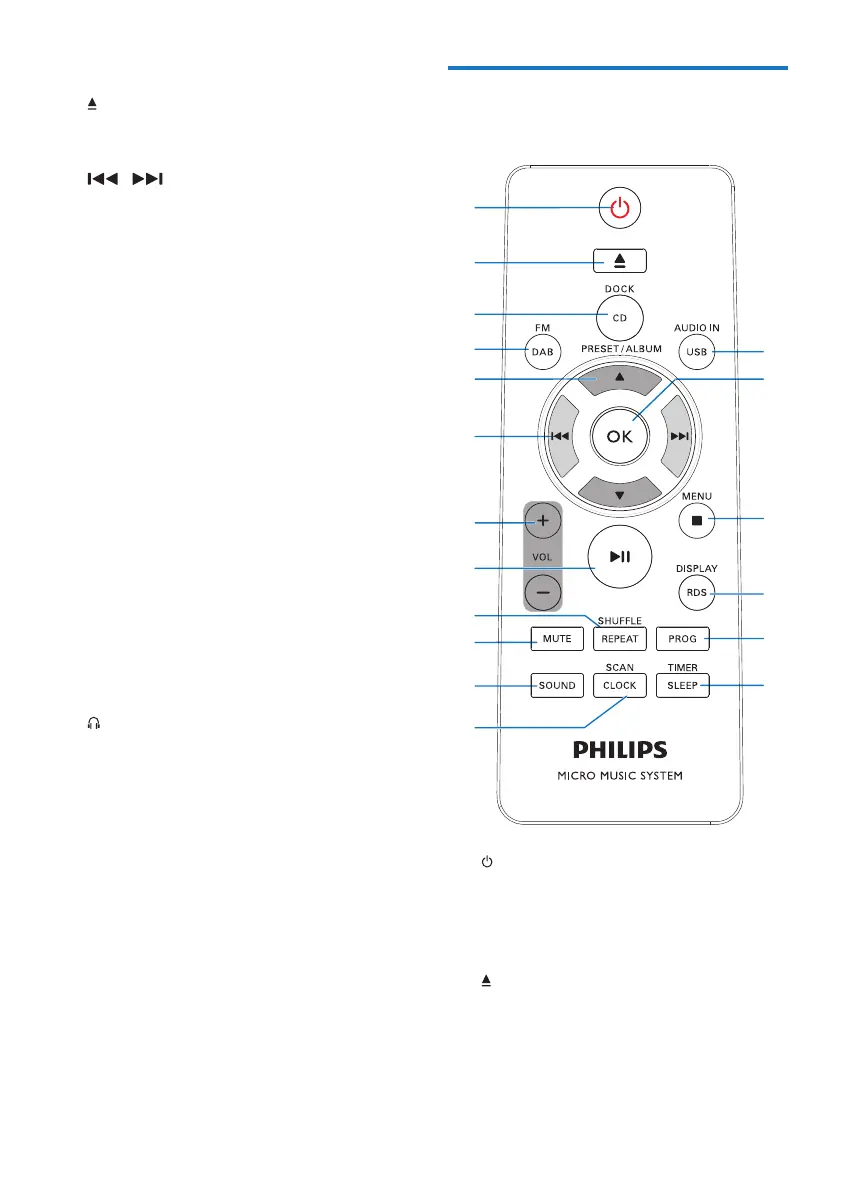
Overview of the remote
control
a
• Turn on the product.
• Switch the product to eco power
standby mode or normal standby
mode.
b
• Eject the disc.
c DOCK/ CD
a
b
c
d
e
f
h
g
i
j
k
l
r
q
p
o
n
m



 To Next Page