Direction of Use
Note
To avoid magnetic interference or unwanted
noise, never place this apparatus and speakers
tooclosetoanyradiationdevices.
Place this unit on top of a table or mount it on
the wall.
Never place this unit in an enclosed cabinet.
InstallthisunitneartheACoutletwherethe
AC power plug can be easily reached.
Connect speakers
Note
For optimal sound, use the supplied speakers
only.
Connect only speakers with impedance that is
the same or higher than the supplied speakers.
RefertotheSpeci¿cations section of this
manual.
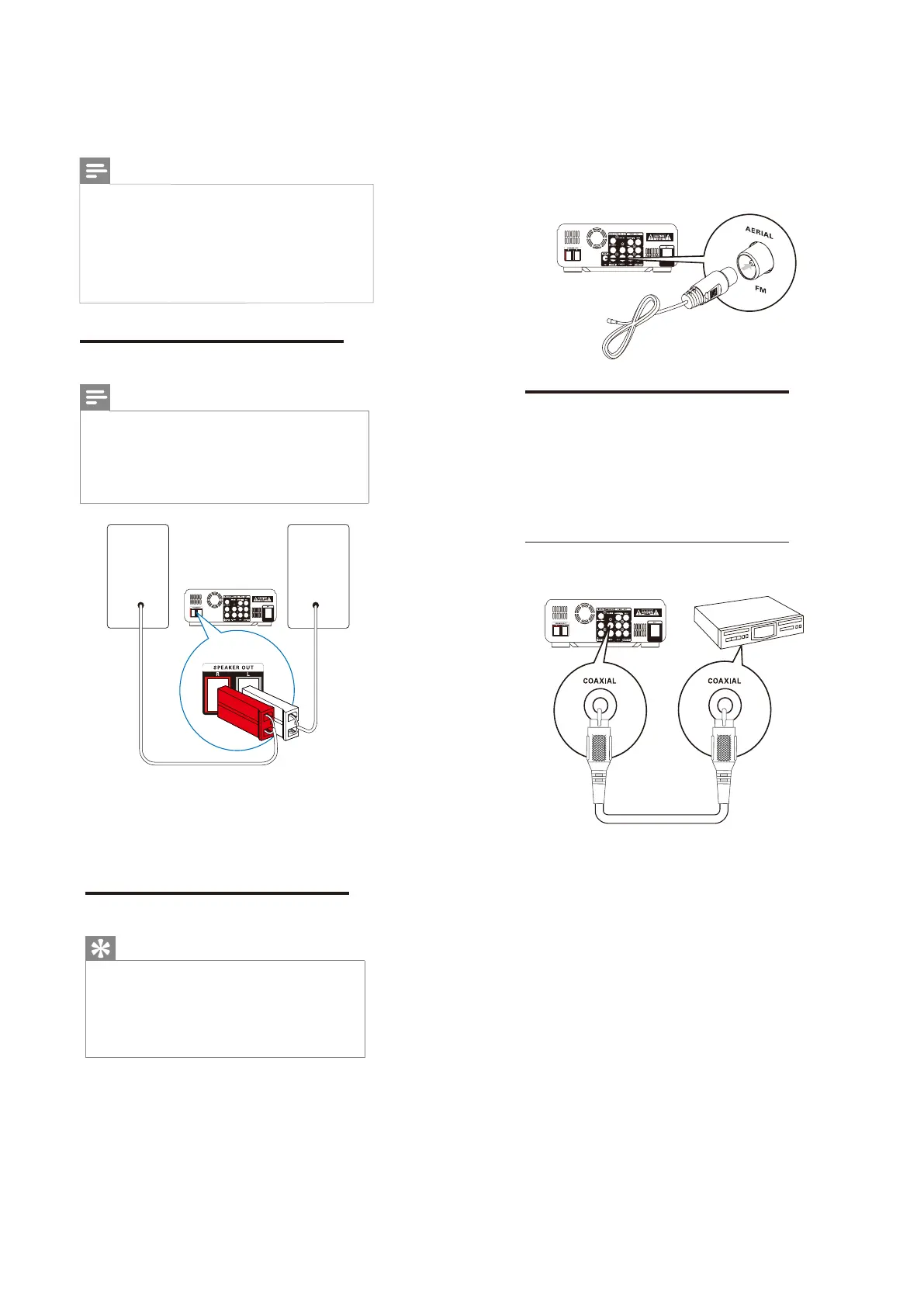
1 Insertthespeakerplugsto
SPEAKER
OUT (L andR) sockets.
The plug of right speaker to R.
The plug of left speaker to L.
Connect FM antenna
Tip
Foroptimalreception,fullyextendandadjust
thepositionoftheantenna.
ForbetterFMstereoreception,connectan
outdoorFMantennatotheFMAERIAL
jack.
TheunitdoesnotsupportMWradio
reception.
1 Connect the supplied FM wire antenna to
the FM AERIALsocket on the unit.
Speaker
(Right)
Speaker
(Left)
Connect audio cables
To hear audio from other audio devices as well
as the accompanied speakers, select a preferred
audio connection:
Option 1: Connect through a coaxial cable
Option 2: Connect through analog audio
cables
Option 1: Connect through a coaxial
cable
You can enjoy multi-channel surround sound
from this apparatus when it is connected to a
digital audio device.
1 Connect a coaxial cable (not supplied) to
the COAXIAL socket on this product.
the COAXIAL/DIGITAL input socket
on the device.
7-3



 To Next Page