6 EN
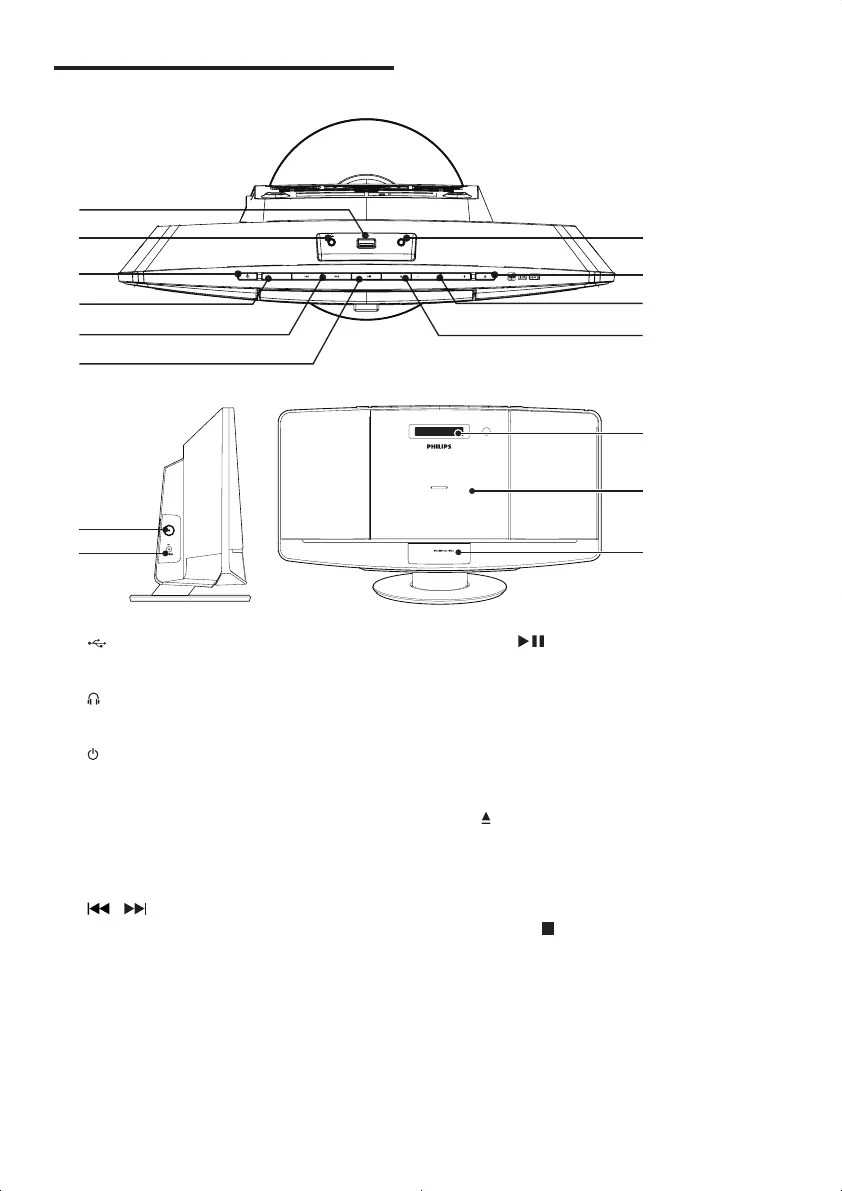
Overview of the main unit
a
• Connect USB device.
b
• Headphone socket.
c
• Turn the unit on.
• Switch to standby mode.
d SOURCE
• Select a source: CD, FM, USB, Dock, or
MP3 LINK.
e
/
• Skip to the previous or next track.
• Search within a track or disc.
• Tune to radio stations.
• Adjust time.
k
a
g
h
i
j
b
c
d
e
f
MICRO MUSIC SYSTEM DCM2060
l
m
n
FM NT
DC N
A
V
2
o
D CK f
SOURCE
VOLUME VOLUME
MP3
L
MENU
OK /
f OK/
• Conrmselection.
• Switch between mono and stereo
broadcast.
• Start or pause play.
g MP3-LINK
• Connect an external audio device.
h
• Open or close the disk tray.
i VOLUME + / -
• Adjust volume.
j MENU/
• Access iPod/iPhone menu.
• Stop play or erase a program.
k FM ANT
• Improve FM reception.
l DC IN
• Connect power.
DCM2060_79_UM_V1.0.indd 6 6/1/2012 10:53:49 AM



 To Next Page