12
Play from iPod/iPhone/iPad
You can enjoy audio from iPod/iPhone/iPad
through this unit.
Compatible iPod/iPhone/iPad
The unit supports the following iPod, iPhone
and iPad models:
Made for.
• iPod touch (1st, 2nd, 3rd, and 4th
generation)
• iPod nano (2nd, 3rd, 4th, 5th, and 6th
generation)
• iPhone 4
• iPhone 3GS
• iPhone 3G
• iPhone
• iPad 2
• iPad
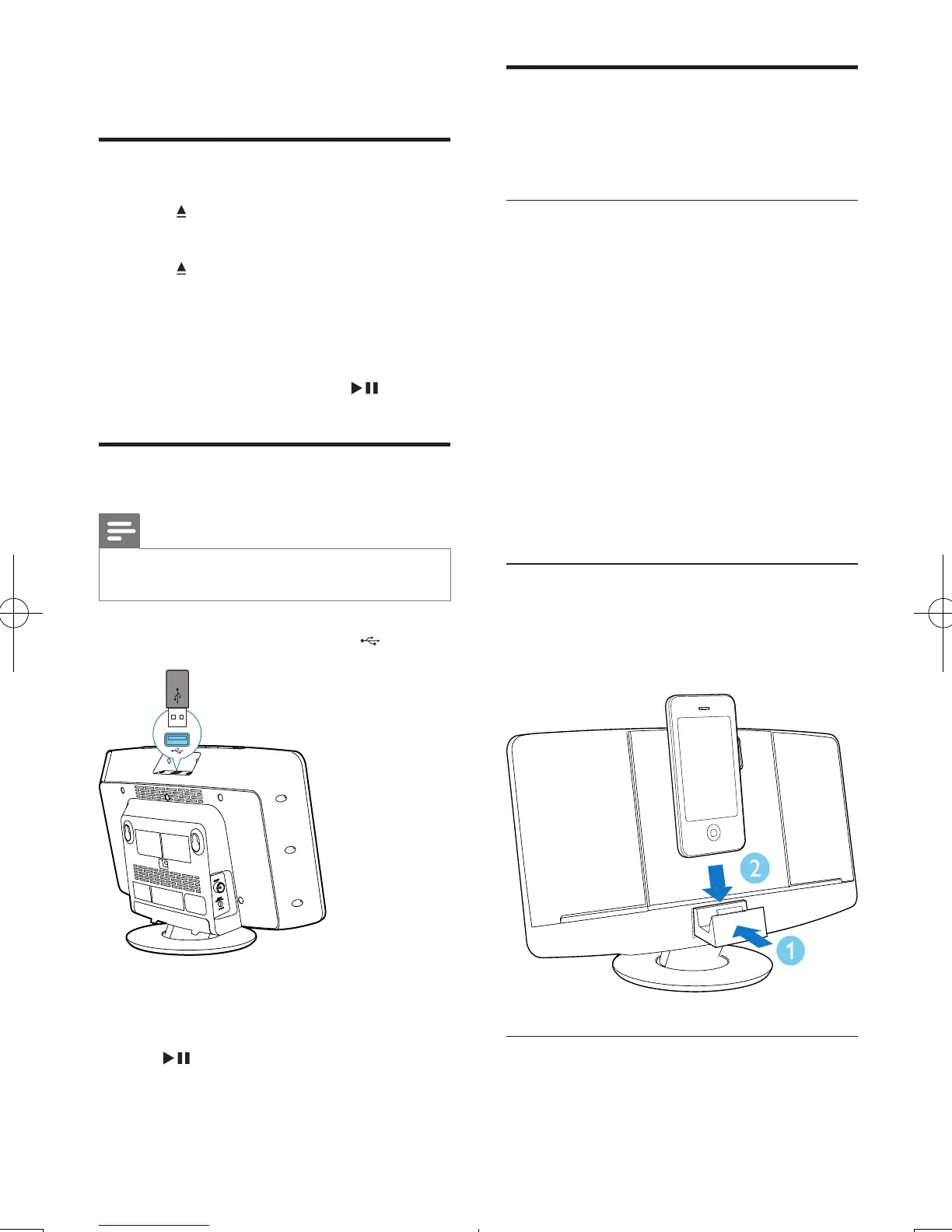
Load the iPod/iPhone
1 Push DOCK for iPod/iPhone/iPad to open
the dock compartment.
2 Place the iPod/iPhone into the dock.
Load the iPad
For iPad or iPad 2, you can use the supplied
rubber pad to keep it stable.
4 Play
Play disc
1 Press to open the disc compartment.
2 Insert a disc with the printed side facing up.
3 Press to close the disc compartment.
4 Press CD on the remote control to select
the disc source.
» [Reading](reading)blinksfora
moment, then CD starts playing
automatically. If not, press .
Play from USB
Note
• Make sure that the USB device contains playable audio
content.
1 Insert the USB device into the socket.
2 Press USB on the remote control to select
the USB source.
» Play starts automatically. If not, press
.
EN
DCM2060_12_UM_Book1_V3.0.indb 12 11/15/2013 2:59:33 PM



 To Next Page