10
Connect power
Caution
• Risk of product damage! Ensure that the power supply
voltage corresponds to the voltage printed on the back
or the underside of the unit.
• Risk of electric shock! When you unplug the AC power
cord, always pull the plug from the socket. Never pull
the cord.
• Before connecting the AC adapter, ensure that you have
completed all other connections.
Note
• The type plate is located at the back of the main unit.
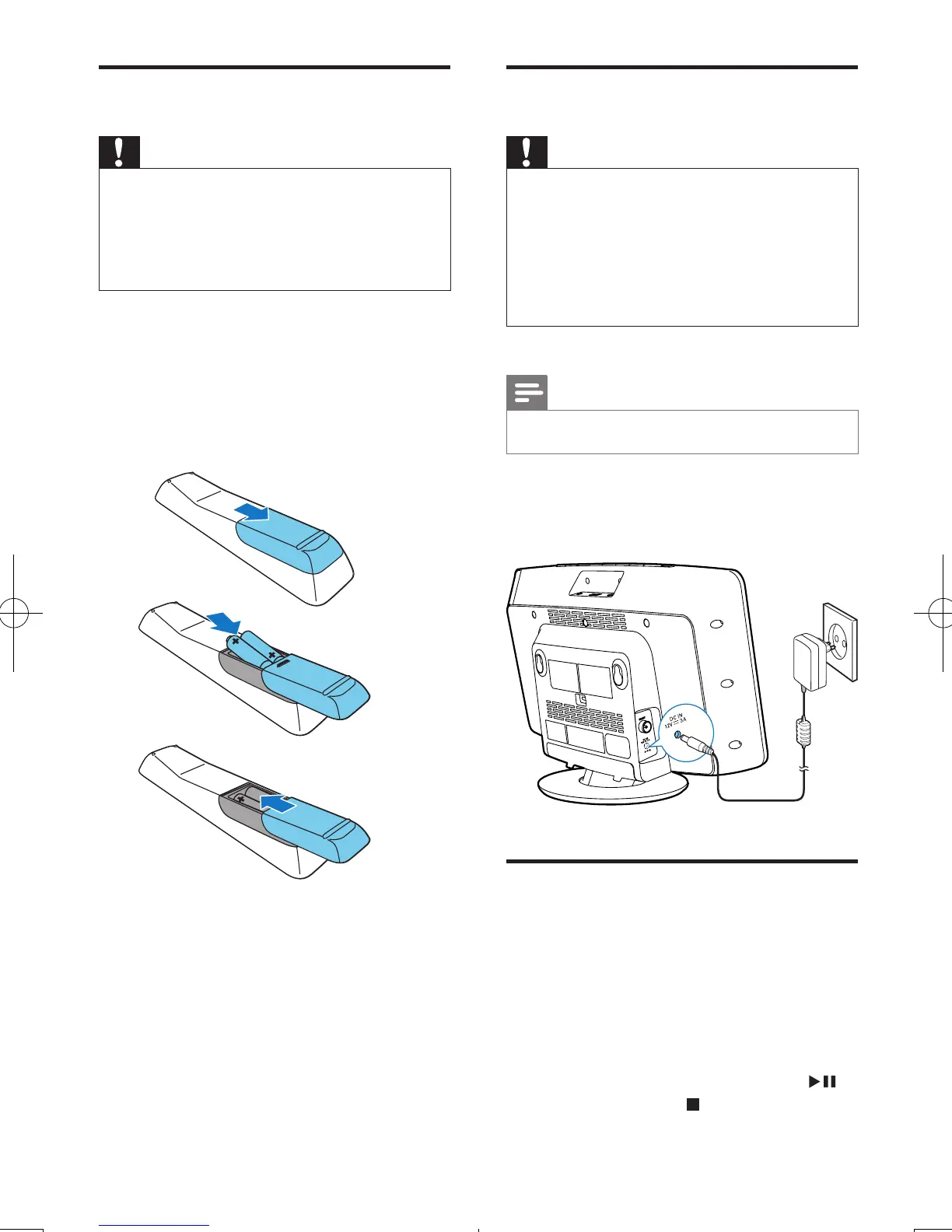
Connect the power adapter to:
• the DC IN socket on the main unit.
• the wall socket.
Store FM radio stations
automatically
When the unit turns to FM tuner mode, and
no radio stations are stored, the unit begins to
store FM radio stations automatically.
1 Connect the unit to the power supply.
» [AUTO INSTALL - PRESS PLAY, STOP
CANCEL] (to auto install, press ;
to cancel, press )isdisplayed.
Prepare the remote control
Caution
• Risk of explosion! Keep batteries away from heat,
sunshineorre.Neverdiscardbatteriesinre.
• Risk of decreased battery life! Never mix different
brands or types of batteries.
• Risk of product damage! When the remote control is
not used for long periods, remove the batteries.
To install the remote control battery:
1 Open the battery compartment.
2 Insert 2 AAA batteries with correct
polarity(+/-)asindicated.
3 Close the battery compartment.
EN
DCM2060_12_UM_Book1_V3.0.indb 10 11/15/2013 2:59:31 PM



 To Next Page