15
English
EN
Program radio stations
manually
Note
You can program a maximum of 20 preset radio
stations.
Tune to a radio station.
Press to activate
program mode.
» [PROG] (program) begins to blink.
3 Press to allocate a number (1 to 20)
to this radio station, and then press
Repeat the previous steps to program
other stations.
Note
To overwrite a programmed station, store another
station in its place.
Select a preset radio station
In FM mode, press to select a preset
number.
FM stations with RDS
Radio Data System (RDS) is a service that
sends additional broadcast information along
with FM stations.
If you listen to a FM station with RDS signal,
"RDS" is displayed.
Display RDS information
For a FM station with RDS, press RDS
repeatedly to display various broadcast
information.
You can enjoy audio from iPod/iPhone/iPad
through this unit.
The unit supports the following iPod, iPhone
and iPad models.
Made for:
iPod touch (1st, 2nd, 3rd, and 4th generation)
iPod nano (1st, 2nd, 3rd, 4th, 5th, and 6th
generation)
iPhone 4
iPhone 3GS
iPhone 3G
iPhone
iPad 2
iPad
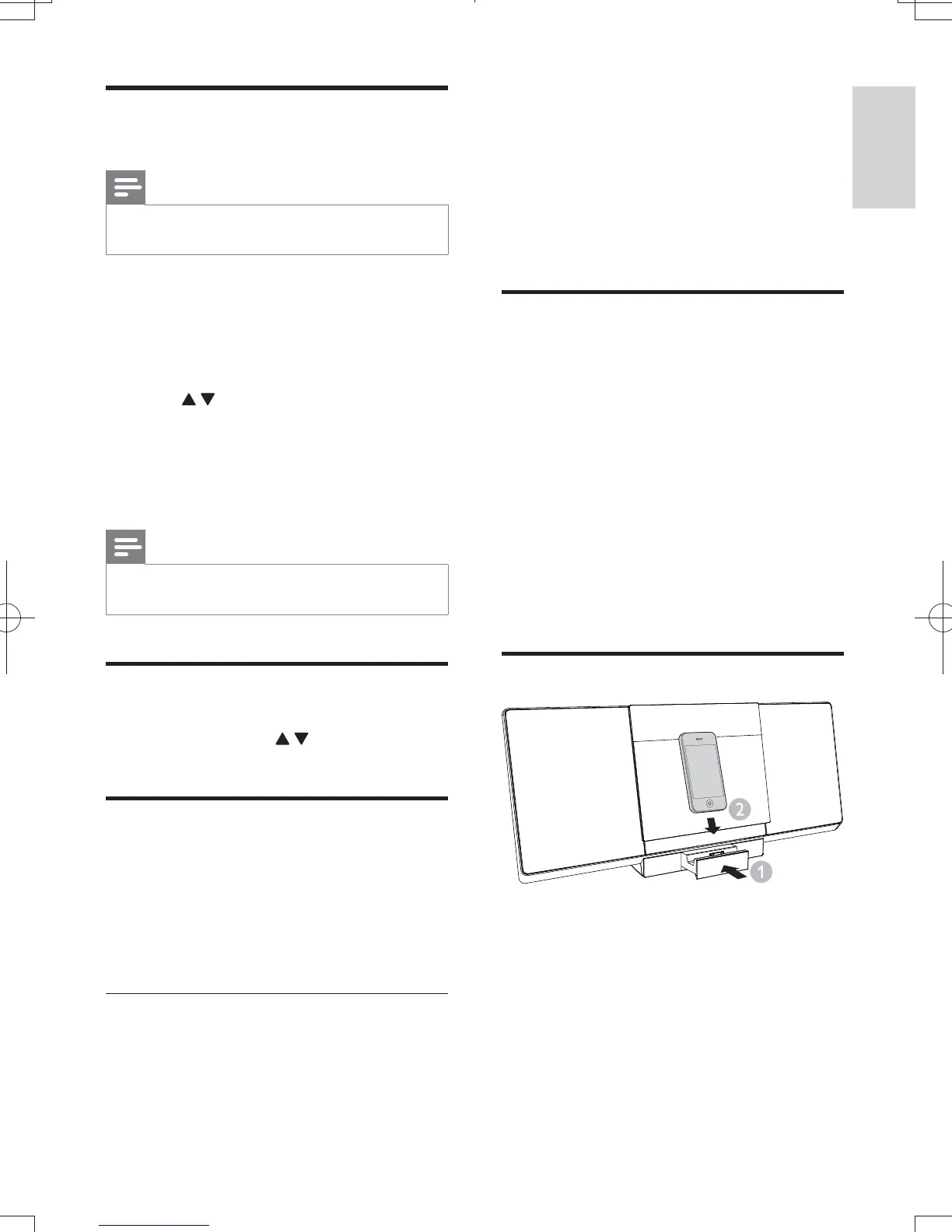
Push the dock compartment to open it.
Place the iPod/iPhone/iPad in the dock.
DCM3065_51_UM_V1.0.indb 15 3/2/2012 2:08:13 PM



 To Next Page