Redial list
12
Redial list
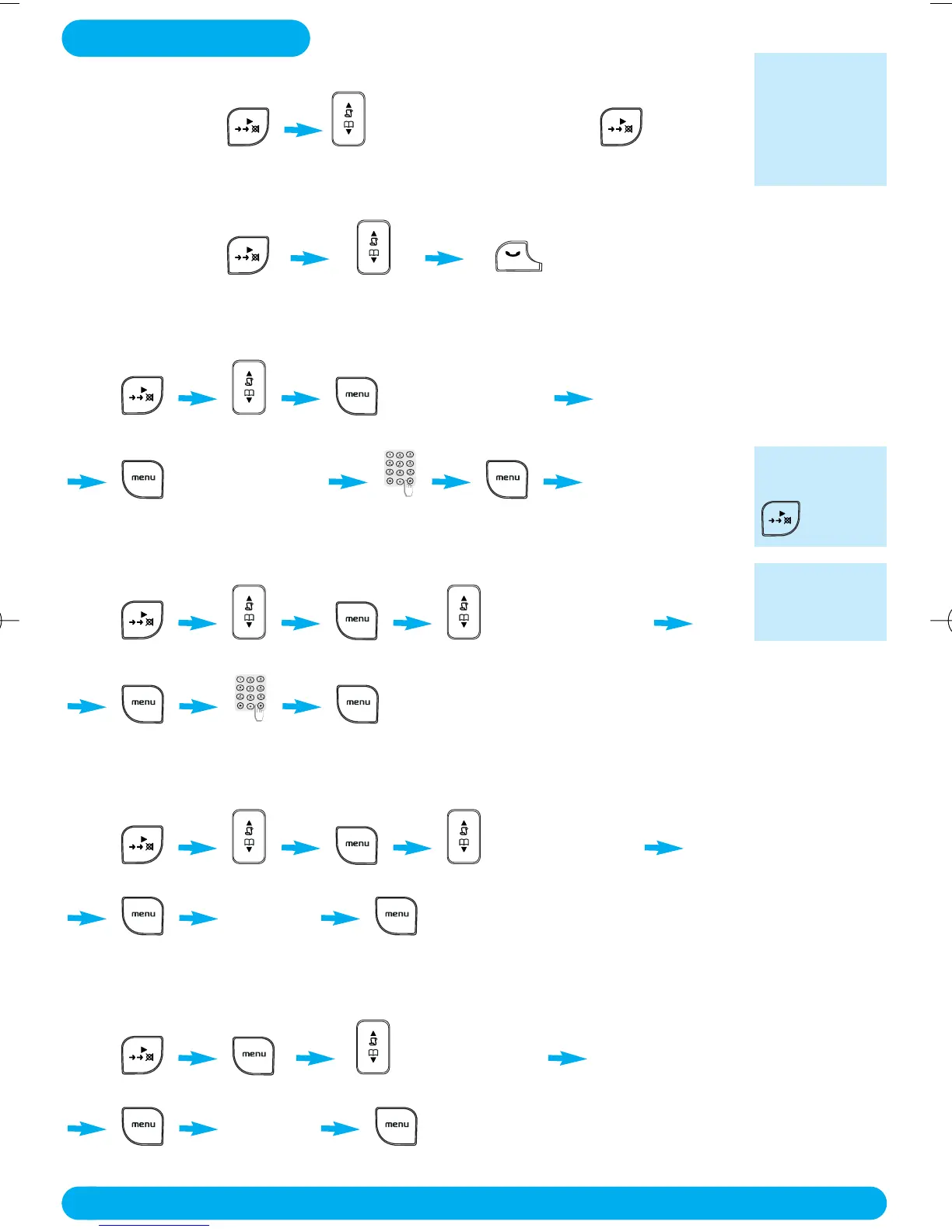
✦ Accessing / exiting the redial list
Press / BACK
scroll through the redial list to exit
The redial list
contains the 5
most recently
dialled
numbers.
✦ Calling a number from the redial list
Press
scroll through the redial list
✦ Saving redial list numbers into the phonebook
Press SAVE NUMBER
scroll to select
ENTER NAME SAVED
enter name
✦ Editing a number from the redial list
Press EDIT NUMBER
scroll to select press Down 1 time
enter number
✦ Deleting a number from the redial list
Press DELETE NUM
scroll to select press Down 2 times
DELETE?
confirmation is needed
✦ Deleting all numbers from the redial list
Press DELETE LIST
press Down 3 times
DELETE?
confirmation is needed
To delete a
character use
BACK.
Text and num-
ber entry see
page 10.
DECT122_GBIE_09.qxd 27.09.2005 17:06 Seite 12



 To Next Page