EasyManua.ls Logo

Philips DiamondClean 9000 - User Manual

Philips DiamondClean 9000
11 pages
Print Icon
To Next Page IconTo Next Page
Loading...
Troubleshooting
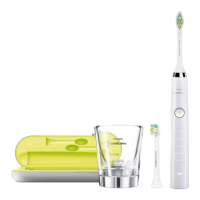
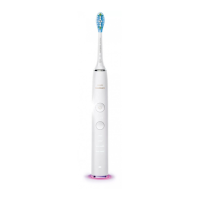
DiamondClean 9000 - HX9911/53
My Philips Sonicare toothbrush vibration is too powerful
If you find that your Philips Sonicare Toothbrush vibration is too powerful, you can adjust the
intensity settings. Below you will find tips and more information on how you can adjust it.
First time use
If you are using your Sonicare toothbrush for the first time, it is normal to feel more vibration
than when using a non-electric toothbrush.
We advise you to activate the EasyStart setting, which is a feature that gently increases the
power over the first 14 brushing sessions to help you get used to electric brushing.
To activate the EasyStart feature, see the user manual for step-by-step instructions.
Adjust the intensity setting
Your Philips Sonicare toothbrush gives you the option to choose between 3 different vibration
intensity levels: low, medium and high. To adjust the settings, simply press the mode/intensity
button while brushing.
1 bar = low intensity
2 bars = med intensity
3 bars = high intensity
My Philips Sonicare Toothbrush vibration is less powerful than
before
Is your Philips Sonicare toothbrush vibrating weakly or less powerfully than before? You can
view these possible causes and solutions to try and solve this issue yourself.
Question and Answer IconNeed help?

Do you have a question about the Philips DiamondClean 9000 and is the answer not in the manual?

Summary

Philips Sonicare Toothbrush Vibration Too Powerful

Adjusting Vibration Intensity

Explains how to adjust the toothbrush vibration to low, medium, or high settings using the mode/intensity button.

Philips Sonicare Toothbrush Vibration Less Powerful

Low Battery Impact on Vibration

Explains that a low battery can cause the toothbrush vibrations to weaken and advises on recharging.

Philips Sonicare Toothbrush Turns Off By Itself

Device Malfunction

Recommends contacting support for repair or exchange if the toothbrush turns off before a cycle is complete.

Philips Sonicare Toothbrush Not Turning On

Toothbrush Charging Status

Provides steps to check if the toothbrush is charging, including battery indicator behavior and charging times.

Charger Component Compatibility

Emphasizes using original chargers and provides a matrix for checking compatibility across different Sonicare models.

Philips Sonicare Toothbrush Power Button Issues

Connecting Philips Sonicare Toothbrush to App

Bluetooth Pairing Troubleshooting

Provides steps for troubleshooting Bluetooth connectivity issues, including clearing cache and forgetting the device.

Philips Sonicare Toothbrush Loud Noise

Philips Sonicare Toothbrush Not Charging

Original Charger Requirement

Stresses the importance of using the original charger and highlights incompatibility between different models.

Ensuring Full Charge

Advises fully charging the toothbrush for 24 hours, noting indicator light behavior and specific model charging notes.

Summary

Philips Sonicare Toothbrush Vibration Too Powerful

Adjusting Vibration Intensity

Explains how to adjust the toothbrush vibration to low, medium, or high settings using the mode/intensity button.

Philips Sonicare Toothbrush Vibration Less Powerful

Low Battery Impact on Vibration

Explains that a low battery can cause the toothbrush vibrations to weaken and advises on recharging.

Philips Sonicare Toothbrush Turns Off By Itself

Device Malfunction

Recommends contacting support for repair or exchange if the toothbrush turns off before a cycle is complete.

Philips Sonicare Toothbrush Not Turning On

Toothbrush Charging Status

Provides steps to check if the toothbrush is charging, including battery indicator behavior and charging times.

Charger Component Compatibility

Emphasizes using original chargers and provides a matrix for checking compatibility across different Sonicare models.

Philips Sonicare Toothbrush Power Button Issues

Connecting Philips Sonicare Toothbrush to App

Bluetooth Pairing Troubleshooting

Provides steps for troubleshooting Bluetooth connectivity issues, including clearing cache and forgetting the device.

Philips Sonicare Toothbrush Loud Noise

Philips Sonicare Toothbrush Not Charging

Original Charger Requirement

Stresses the importance of using the original charger and highlights incompatibility between different models.

Ensuring Full Charge

Advises fully charging the toothbrush for 24 hours, noting indicator light behavior and specific model charging notes.

Philips DiamondClean 9000 Specifications

General IconGeneral
ModesClean, White+, Gum Health, Deep Clean+
Intensity Levels3
Battery LifeUp to 14 days
Charging Time24 hours
Pressure SensorYes
BrushSync TechnologyYes
Smart Brush Head RecognitionYes
Bluetooth ConnectivityYes
App CompatibilityPhilips Sonicare App
Battery TypeLithium-ion
Brush Movements per Minute31, 000
Wireless ChargingYes
Travel CaseYes
Warranty2 years
Brush Head CompatibilityPhilips Sonicare brush heads
Timer2-minute timer with 30-second intervals

Related product manuals