12 EN
4 Play
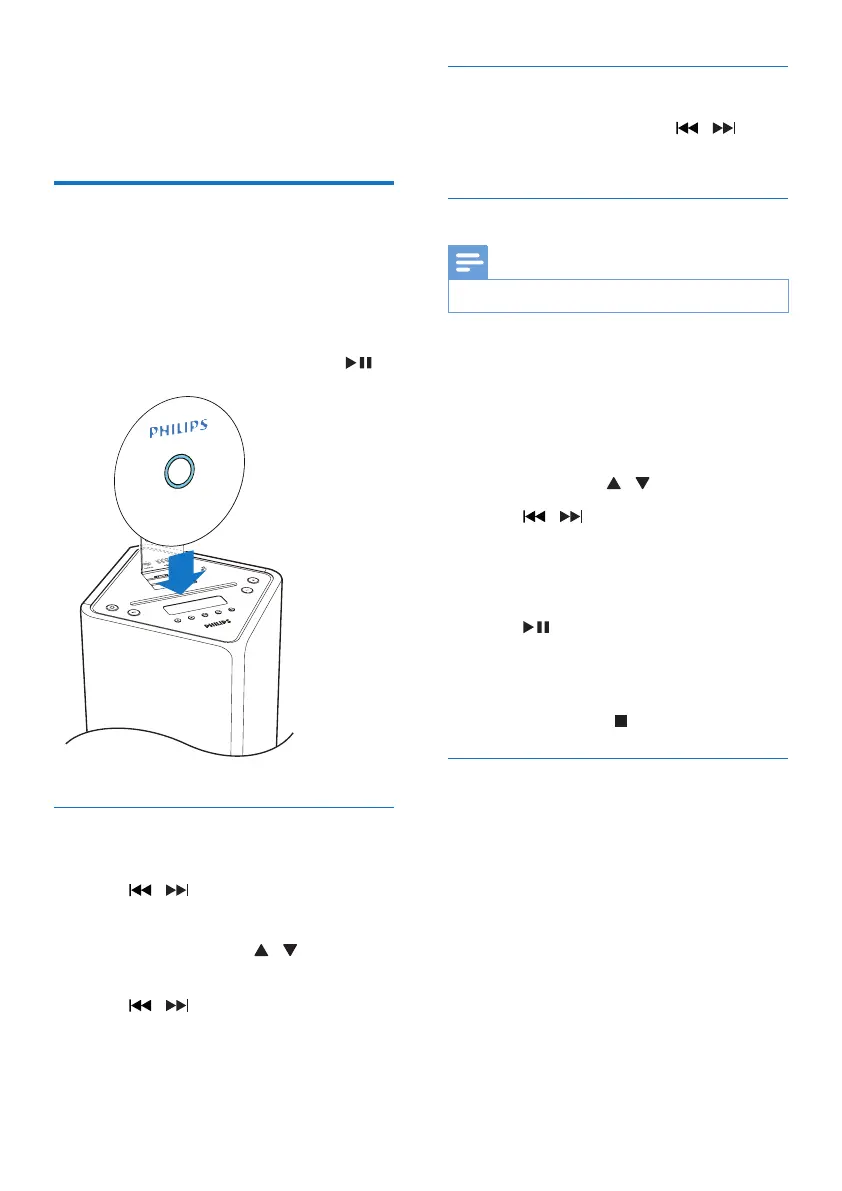
Play a disc
1 Press CD/FM/DAB+ repeatedly to select
the disc source.
2 Insert a disc with the printed side facing
frontward.
3 Play starts automatically. If not, press .
Skip to a track
For CD:
• Press / to select another track.
For MP3 disc and USB:
1 Press PRESET/ALBUM / to select an
album or a folder.
2 Press / toselectatrackorale.
Search within a track
1 During play, press and hold / .
2 Release to resume normal play.
Program tracks
Note
• You can program tracks only when the play stops.
You can program a maximum of 20 tracks.
1 Press PROG to activate the program
mode.
» [PROG] (program) is displayed.
2 For MP3/WMA tracks, press
PRESET/ALBUM / to select an album.
3 Press / to select a track, then press
PROGtoconrm.
4 Repeat steps 2 to 3 to program more
tracks.
5 Press to play the programmed tracks.
» During play, [PROG] (program) is
displayed.
• To erase the program, in the stop
position, press /MENU.
Display play information
• During play, press RDS/DISPLAY
repeatedly to select different play
information.
• For CD: Lap time of the current track,
lap time remained of the current track,
lap time remained of all tracks.
• For MP3/WMA disc and USB: ID3
information, such as [TITLE] (title),
[ARTIST] (artist), [ALBUM] (album).



 To Next Page