21
English
EN
Note
• In AUDIO IN mode, the alarm timer cannot be set.
• If DISC/USB/Dock source is selected and the track
cannot be played, tuner is activated automatically.
• If iPod/iPhone playlist is selected as the alarm source,
you need create a playlist called "PHILIPS" on your iPod/
iPhone.
• If no playlist named “PHILIPS” exists on the iPod/iPhone
or the playlist includes no playable track, this product
switches the alarm source to the iPod/iPhone library.
Play from an external audio
device
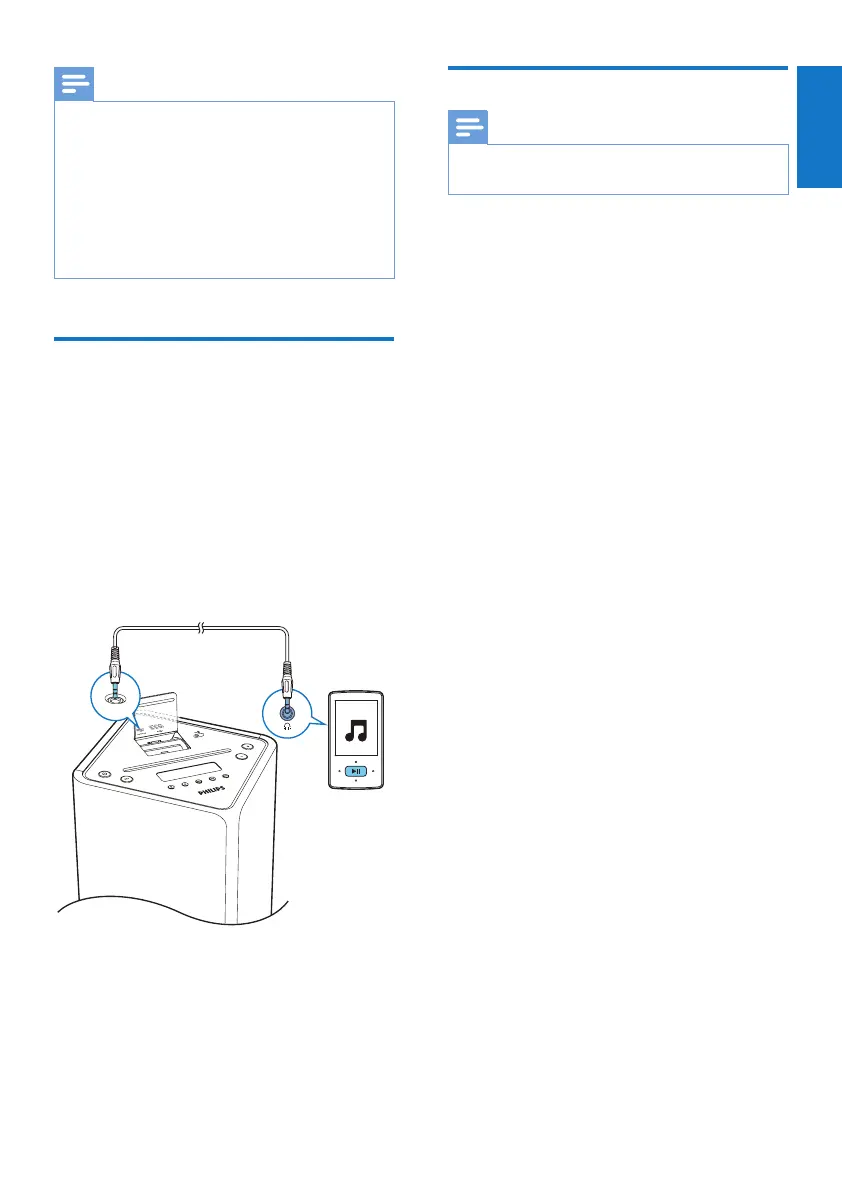
You can play from an external audio device
such as MP3 player through this unit.
1 Connect a 3.5mm audio cable (not
supplied) to:
• the AUDIO IN socket on the unit.
• the headphone socket on the audio
device.
2 Press USB/AUDIO IN repeatedly to select
the 3.5mm audio input source.
3 Play the external audio device.
Adjust display brightness
Note
• You can adjust the display brightness in standby mode
only.
• In standby mode, press RDS/DISPLAY
repeatedly to adjust the display brightness.
• Full brightness (100%)
• Half brightness (70%)
• Brightness low (40%)



 To Next Page