13
English
EN
Select repeat/shufe play options
1 During play, press REPEAT/SHUFFLE
repeatedly to select a repeat option or the
shufeplaymode.
• REP: the current track is played
repeatedly.
• REP ALL: all tracks are played
repeatedly.
• REP ALB: all the tracks in the album
are played repeatedly.
• SHUF: all tracks are played randomly.
2 To resume normal play, press REPEAT/
SHUFFLE repeatedly until no option is
displayed.
Play from USB
Note
• Make sure that the USB device contains playable audio
content.
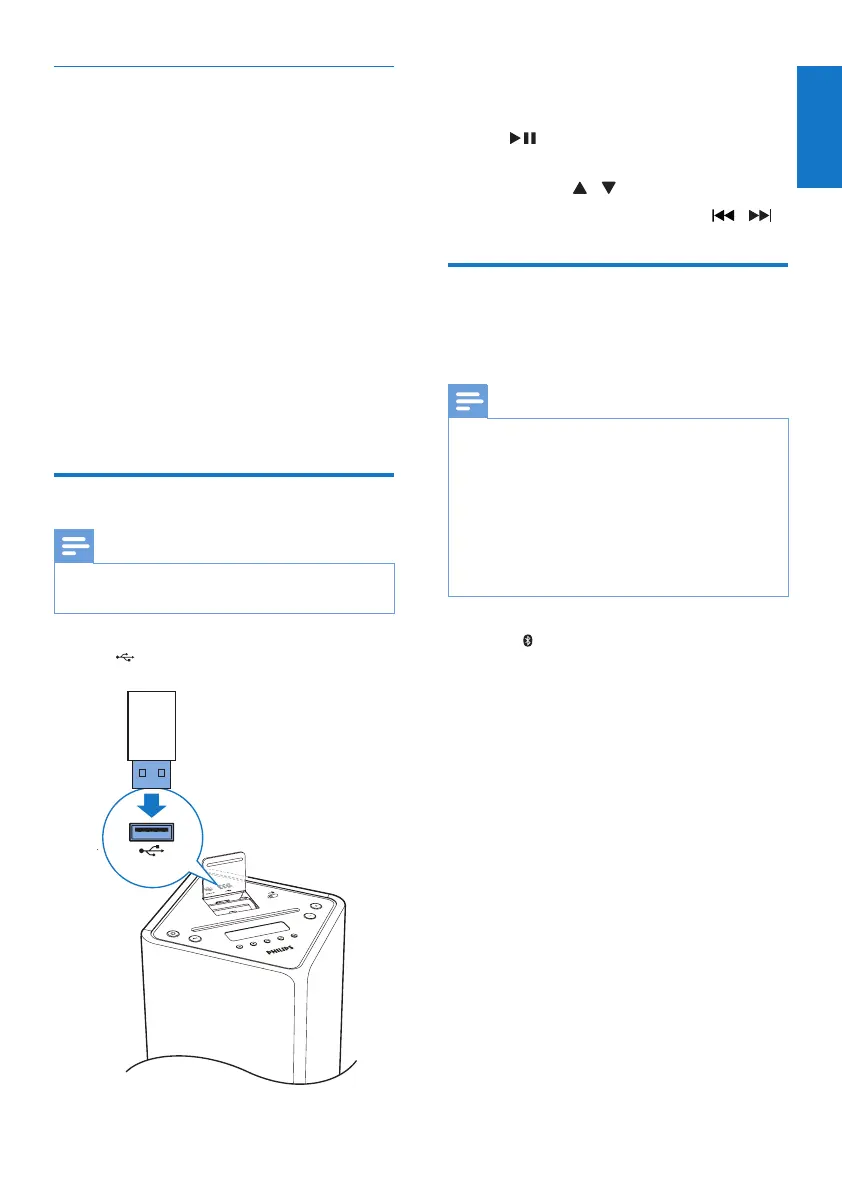
1 Insert the USB mass storage device into
the socket.
2 Press USB/AUDIO IN repeatedly to select
the USB source.
» Play starts automatically. If not, press
.
• To select a folder, press PRESET/
ALBUM / .
• Toselectanaudiole,press / .
Play from a Bluetooth device
You can listen to a Bluetooth device through
the unit.
Note
• Before you connect a Bluetooth device to the unit,
familiarize yourself with the Bluetooth capabilities of
the device.
• Keep the unit away from other electronic devices that
may cause interference.
• The effective operation range between the unit and the
paired device is approximately 10 meters (30 feet).
• Any obstacle between the unit and the Bluetooth
device can reduce the operational range.
1 Press /DOCK repeatedly to select the
Bluetooth source.
2 Activate the Bluetooth function on your
Bluetooth device (see the device user
manual).
3 Select “PHILIPS DTB3185” on your device
for pairing.
» TheLEDindicatorashes.
» [BT] displays on the screen.
• For some devices, you may need to
input ‘0000’ as the pairing password.
4 After successful connection, the unit beeps
twice and the LED indicator lights up blue.



 To Next Page