7
English
EN
e
• Turn on the unit, switch to Standby
mode, or switch to Eco Power mode.
f SRC
• Select a source: DISC, USB, TUNER,
DAB, IPOD_IPHONE, BT, or AUDIO
IN.
g
• Eject the disc.
h
• Stop play.
• Erase a program.
• Access the iPod/iPhone menu.
• In standby mode, turn on/off the
demonstration feature.
i
• Start or pause play.
j LED indicator
k /
• Skip to the previous/next track.
• Tune to a radio station.
• Press and hold the key to search within
a track/disc/USB/iPod/iPhone.
l Display panel
• Show the current status.
m +/-
• Adjust volume.
• Adjust time.
n Disc compartment
o Toggle switch for lightning/30-pin control
p Dock cover
q AC ~ MAINS
• Power supply socket.
r FM/DAB ANTENNA
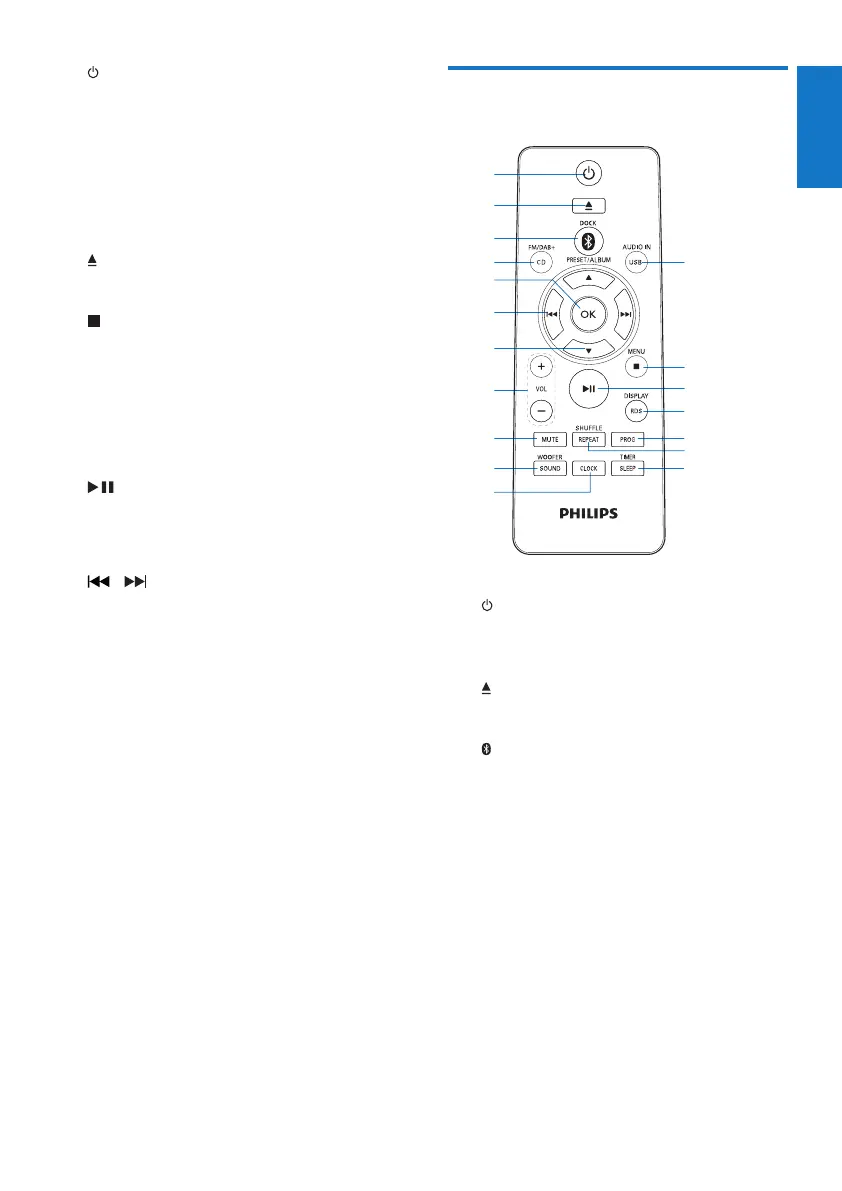
Overview of the remote
control
a
• Turn on the unit, or switch to Standby
mode, or switch to Eco Power mode.
b
• Eject the disc
c /DOCK
• Select the dock(IPOD_IPHONE) or
Bluetooth source.
d CD/FM/DAB+
• Select the disc source.
• Select the FM/DAB+ radio source.
e OK
• Conrmaselection.
• Switch between STEREO and MONO
in tuner mode.
d
e
c
b
f
g
h
i
j
k
a
l
m
n
o
p
q
r



 To Next Page