HDD Information
Volume
Total Size:
Free Size:
Rec Size:
TMS Size:
File System:
[uda1]judy
3.75G bytes
2.99G bytes
0 bytes
2.99G bytes
NTFS
USB Disk A:3.75G bytes
Volume
Total Size:
Free Size:
Rec Size:
TMS Size:
File System:
[uda1]judy
3.75G bytes
2.99G bytes
0 bytes
2.99G bytes
NTFS
DVR Set
DVR Type REC&TMS
OK Cancel
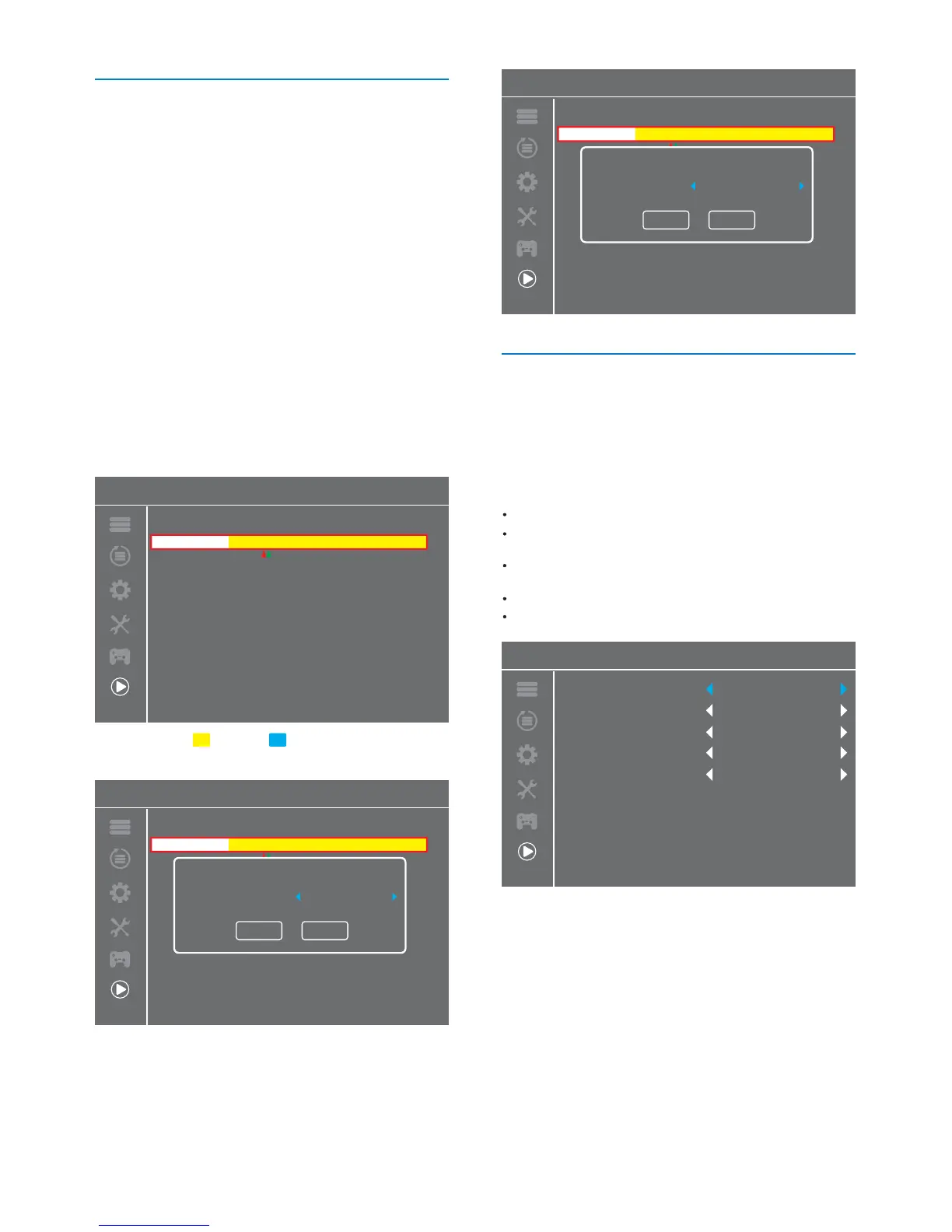
This menu can display storage state of HDD.
HDD Information
1
2
In "Media Player" menu, select "HDD Information", press
"OK" button to open PVR Storage information window.
Press "EXIT" button to exit.
FAT/NTFS
Format
Press YELLOW button to open Disk Mode
menu.
Press "LEFT" or "RIGHT" cursor button to
change Disk Mode.
Select "OK" to conrm. Select "Cancel" to
cancel.
"YELLOW" button:
"LEFT" or "RIGHT"
button:
.
REC&TMS/Record/Timeshift
Press "BLUE" button to open DVR Set
menu.
Press "LEFT" or "RIGHT" cursor button to
change DVR Type.
Select "OK" to conrm. Select "Cancel" to
cancel.
"BLUE" button:
"LEFT" or "RIGHT"
button:
DVR Set
.
HDD Information
Volume
Total Size:
Free Size:
Rec Size:
TMS Size:
File System:
[uda1]judy
3.75G bytes
2.99G bytes
0 bytes
2.99G bytes
NTFS
USB Disk A:3.75G bytes
Volume
Total Size:
Free Size:
Rec Size:
TMS Size:
File System:
[uda1]judy
3.75G bytes
2.99G bytes
0 bytes
2.99G bytes
NTFS
HDD Information
USB Disk A:3.75G bytes
Volume
Total Size:
Free Size:
Rec Size:
TMS Size:
File System:
[uda1]judy
3.75G bytes
2.99G bytes
0 bytes
2.99G bytes
NTFS
Format DVR Set
Format
Disk Mode FAT
OK Cancel
This menu allows you to set the PVR.
1
2
3
In "Media Player" menu, Highlight "DVR Setting",
press "OK" button to enter DVR Setting sub-menu.
Press "UP" or "DOWN" cursor button to select desired item,
press "LEFT" or "RIGHT" cursor button to change the setting.
Press "EXIT" button to exit.
TimeShift
AUTO / Pause / O
30sec / 1min / 5min / 10min / 15min / 20min
/ 30min
On/O
On/O
Watch TV/Goto Standby
Step to
PS Record
After Recording
Timeshift to
Record
DVR Setting
DVR Setting
Timeshift
Step to
Timeshift to Record
PS Record
After Recording
O
30 sec
O
O
Go to Standby-mode
23


 To Next Page