3 Connecting your devices
Before installing your Set-top box:
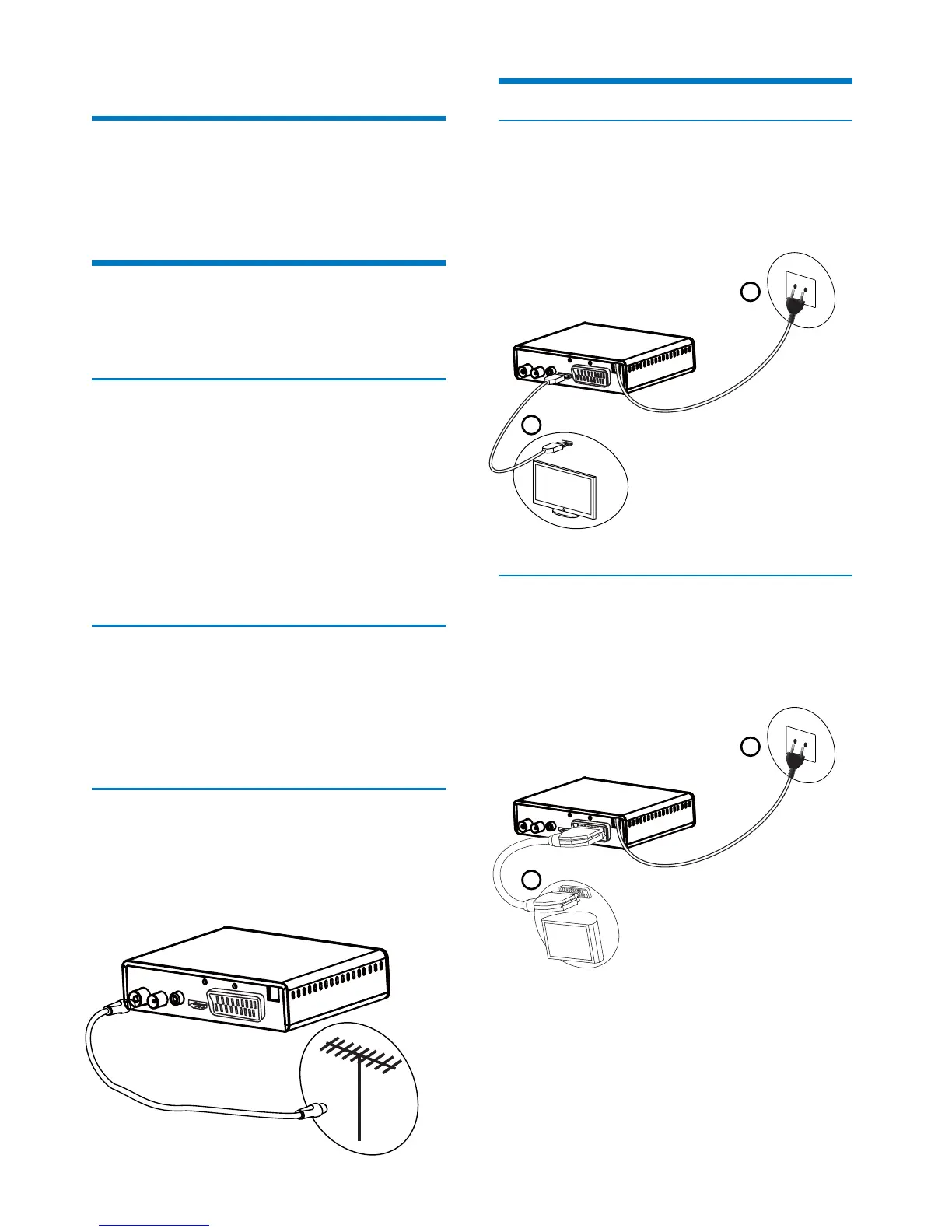
Connection to the terrestrial antenna
Standard outdoor antenna
Indoor antenna
Connection to the antenna
1
2
Connection to the TV set
Connection to a High-Denition television set
using an HDMI lead
Connection to a Standard-Denition television
set
Please check that the delivery is complete (see What‘s in the
box, page 6).
Please ensure that the appliances to be connected together
(recorder, TV set, VCR/DVD…) are unplugged before making
any connections.
Please ensure that Digital Terrestrial Television (DTT) is
available in your area.
if your building is equipped with an old antenna model,
digital channels may be dicult or even impossible to
receive. The problem can only be resolved by changing the
antenna.
if your building is equipped with a common antenna which
contains selective lters devised for analogue channels,
reception will most probably not work correctly. In this case,
you will have to contact the administrator of the building.
some antennas directed towards an analogue TV transmitter
must be re-adjusted towards a digital TV transmitter. If you
encounter reception problems, you can also try placing the
antenna at dierent heights.
use an antenna designed to receive channels 21 to 69.
install the antenna close to the window and direct it towards
the digital TV transmitter.
if possible, use an antenna with an amplier. The Set-top box
can provide remote power supply to your indoor antenna
(see Setting the power parameters, page 29).
Plug the antenna cable (not supplied) into the ANTENNA
IN input connector on your Set-top box.
You can connect the RF output connector of your Set-top
box to the antenna input of the television set or VCR/DVD
recorder (cable not supplied).
1
2
To take advantage of High Denition picture quality, you
must connect the HDMI connector of your Set-top box to the
HDMI connector on your television set (cable not supplied).
Plug the power cord into the wall socket.
1
2
You must connect the television set to your Set-top box
using a SCART connector (not supplied).
Plug the power cord into the wall socket.
Very often to get the best reception, you may simply need to
adjust your antenna. Alternatively, you can connect an indoor
antenna to your system. For more information, please contact
your specialised distributor.
Preferably use an outside roof antenna that is designed to
receive UHF channels (21 to 69). However:
In ideal reception conditions, this type of antenna is sucient.
Here, however, are some useful tips:
•
•
•
•
•
•
•
•
•
1
2
1
2
9


 To Next Page