Batteries
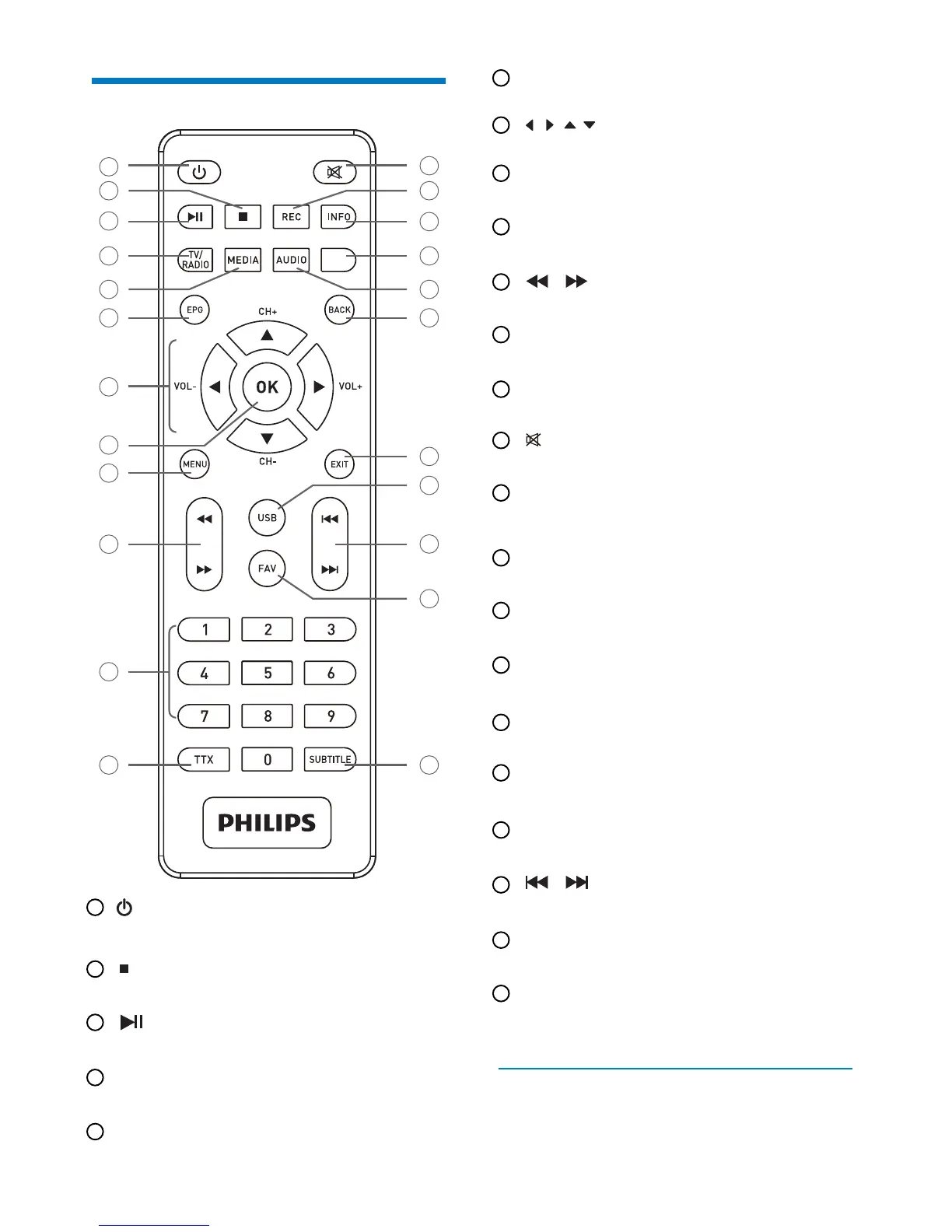
Overview of the remote control
•
•
•
•
•
Put the Set-top box in standby mode/Wakeup the
Set-top box from standby mode
•
•
•
•
•
•
•
•
•
•
•
•
•
•
•
•
•
Stop
2
3
5
8
12
6
7
9
10
11
14
13
1
4
16
15
18
17
20
21
23
19
22
1
2
Play/Pause
3
Switch between TV and Radio/Red button
4
TV/RADIO
Enter PVR menu for U stick/Green button
5
MEDIA
Open up Electronic Program Guide Menu
6
EPG
Display the channel list,conrm a selection
8
OK
Access menus
9
MENU
Access channels and various on-screen options
11
0 to 9
Display Teletext pages when available
12
TTX
Launch immediate recording, Schedule a recording from
the TV Guide
14
REC
Display programme information and options
15
INFO
On-screen options MHEG, Teletext pages and menu
16
Blue button
Select audio mode and audio track/Yellow button
17
AUDIO
Go back to the previous channel, screen or mode
18
BACK
Exit from current screen or setting
19
EXIT
Enter media player from U stick
20
USB
FAV
Rewind/Fastforward
10
Turn the sound o/on
13
(Skip backward/Skip forward
21
Open up Favourite list
22
SUBTITLE
On/O Subtitle
23
Move in a page,a menu... /CH+,-/VOL+,-
7
The remote control needs two batteries (AAA) to operate. The
drawing in the battery compartment indicates how to install
them.The batteries provided are not rechargeable.
8


 To Next Page