10
English
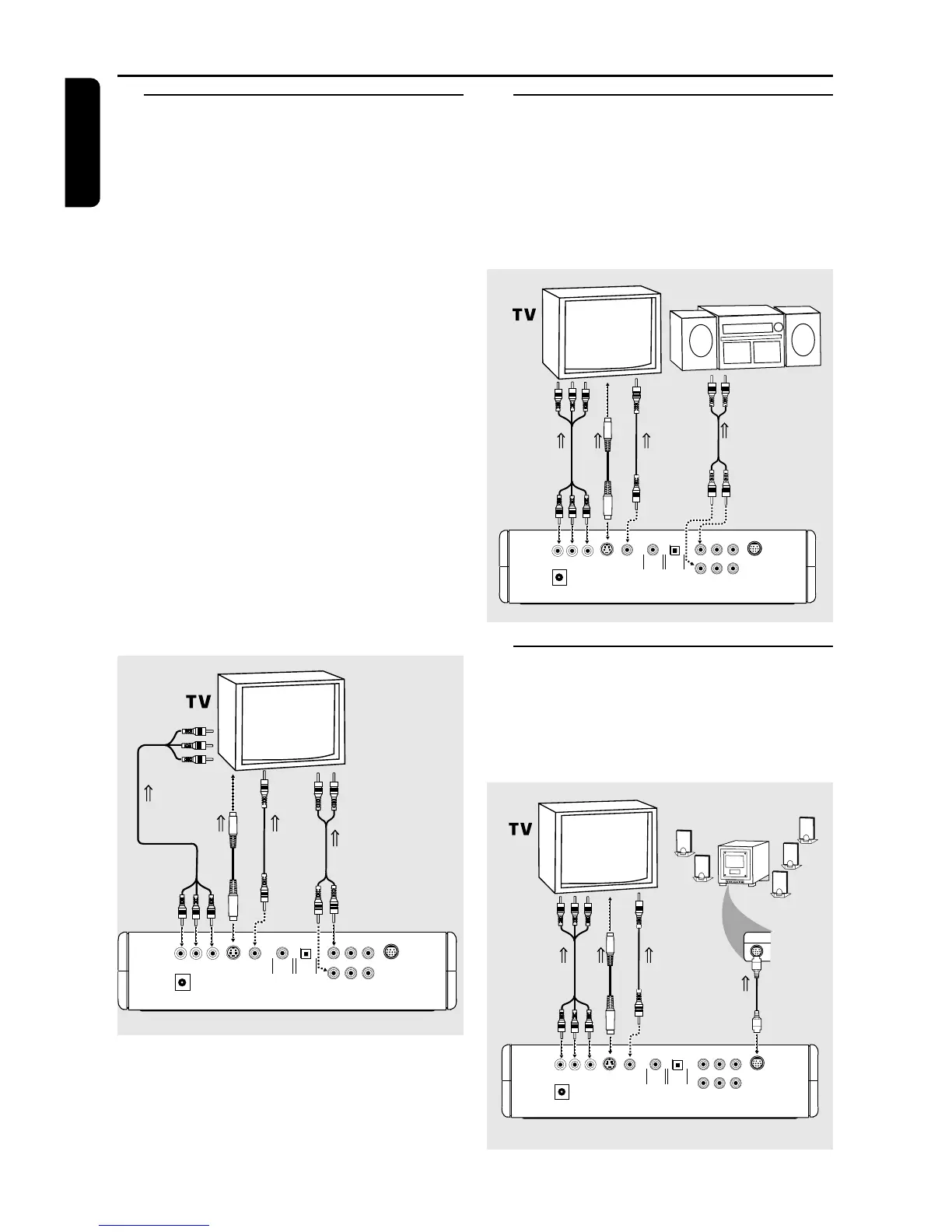
Connecting to a TV
● Make one of the following connections,
depending on the capabilities of your existing
equipment.
If your TV has a Component Video (Y
CbPb CrPr) input connector,
1 Connect the Component VIDEO (Y CbPb CrPr)
OUT on the DVD player to the Component
VIDEO (Y CbPb CrPr) IN on the TV.
2 Connect the Front Left and Front Right AUDIO
OUT on the DVD player to the Left and Right
AUDIO IN on the TV.
If your TV has a Video input connector,
1 Connect the VIDEO OUT on the DVD player to
the VIDEO IN on the TV.
2 Connect the Front Left and Front Right AUDIO
OUT on the DVD player to the Left and Right
AUDIO IN on the TV.
If your TV has a S-Video input connector,
1 Connect the S-VIDEO OUT on the DVD player
to the S-VIDEO IN on the TV.
2 Connect the Front Left and Front Right AUDIO
OUT on the DVD player to the Left and Right
AUDIO IN on the TV.
COAXIAL OPTICAL
VIDEO
S-VIDEO
Y
Pr/Cr
Pb/Cb
12V
FL SL Center
FR SR Sub-W
Multi-5.1
TO AUDIO IN
TO VIDEO IN
OR
TO COMPONENT
VIDEO IN
OR
TO S-VIDEO
IN
Connecting to an Audio System
1 You can also listen to the sound of audio CDs
and DVD video discs by connecting to an
optional stereo system.
2 Connect the Front Left and Front Right on the
DVD player to the Left and Right AUDIO IN on
the stereo system.
COAXIAL OPTICAL
VIDEO
S-VIDEO
12V
FL SL Center
FR SR Sub-W
Multi-5.1
Y
Pr/CrPb/Cb
OR
TO COMPONENT
VIDEO IN
OR
TO VIDEO IN
TO S-VIDEO
IN
AUDIO SYSTEM
TO AUDIO IN
Connecting to Philips Speaker
System
● Connect the MULTI 5.1 channel output on the
DVD player to the dedicated Philips Speaker
system (cable supplied with the speaker system).
COAXIAL OPTICAL
VIDEO
S-VIDEO
Y
Pr/Cr
Pb/Cb
12V
FL SL Center
FR SR Sub-W
Multi-5.1
OR
TO COMPONENT
VIDEO IN
OR
TO VIDEO IN
TO S-VIDEO
IN
TO INPUT 5.1
Input 1
5.1
Input 2
Stereo
Input 3
Stereo
FR.L
FR.R
SR.L
SATELITE
SR.L
REMOTE
IR-EYE
AC MAIN
Input
5.1
SPEAKER SYSTEM
Preparation



 To Next Page