11
English
Connecting to Optional
Equipment
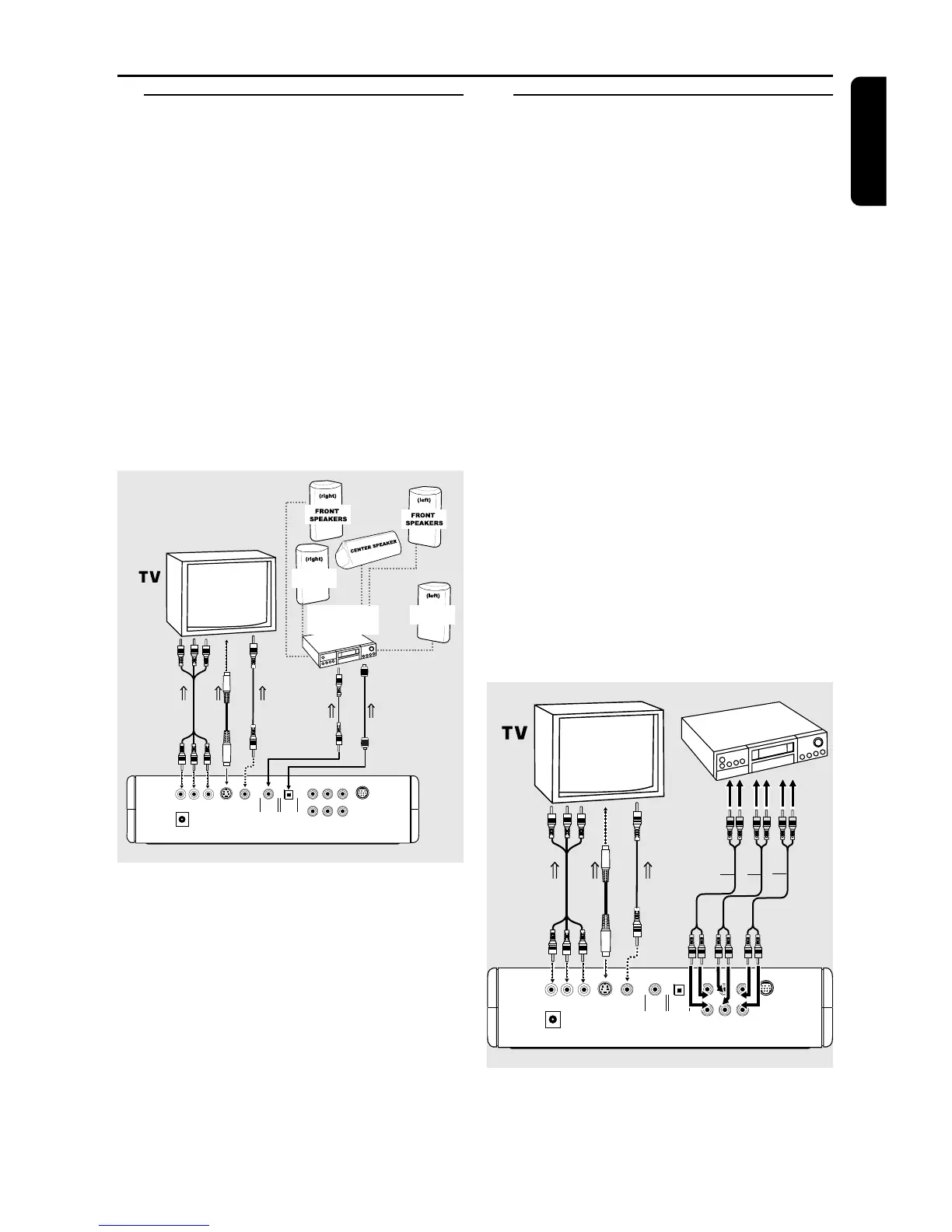
● A digital component with a built-in MPEG 2 or
Dolby Digital™ decoder allows you to enjoy the
surround sound while producing the effect of
being in a movie theater or a concert hall.
● The player outputs the surround sound signals
from the DIGITAL OUT COAXIAL or
OPTICAL connectors.
If your receiver has a MPEG 2 or Dolby
Digital™ decoder,
1 Connect the COAXIAL or OPTICAL DIGITAL
AUDIO OUT of the DVD player to the
COAXIAL or OPTICAL DIGITAL AUDIO IN on
your receiver.
COAXIAL OPTICAL
VIDEO
S-VIDEO
Y
Pr/Cr
Pb/Cb
12V
FL SL Center
FR SR Sub-W
Multi-5.1
OR
TO COMPONENT
VIDEO IN
OR
TO VIDEO IN
TO S-VIDEO
IN
REAR
SPEAKERS
REAR
SPEAKERS
TO COAXIAL
IN
RECEIVER with
MPEG 2 or Dolby
Digital™ decoder
OR
TO OPTICAL
IN
Note:
– If the audio format of the digital output does
not match the capabilities of your receiver, the
receiver will produce a strong, distorted sound or
no sound at all.
Connecting to a Multi-channel
Audio/(Video) receiver with 6
connectors
● This player contains a multi-channel decoder and
it enables playback of DVDs recorded in Multi-
channel.
1 Connect the audio Left and Right outputs for
Front speaker connection (1) to the
corresponding input sockets on your receiver
using the audio cable supplied.
2 Connect the audio Left and Right outputs for
Surround speaker connection (2) to the
corresponding inputs on your receiver using an
optional audio cable.
3 Connect the audio outputs for Center speaker
and Subwoofer connection (3) to the
corresponding inputs on your receiver using an
optional audio cable.
4 In the CHANNEL SETUP menu, select
DOWNMIX to OFF.
5 The 6CH function is now enable (see ‘Setup
Menu’).
Note:
– If the subwoofer is equipped with its own
amplifier, the Subwoofer connection should be
connected directly to the subwoofer.
COAXIAL OPTICAL
VIDEO
S-VIDEO
Y
Pr/Cr
Pb/Cb
12V
FL SL Center
FR SR Sub-W
Multi-5.1
OR
TO COMPONENT
VIDEO IN
OR
TO VIDEO IN
TO S-VIDEO
IN
312
AMPLIFIER
Preparation



 To Next Page