7
English
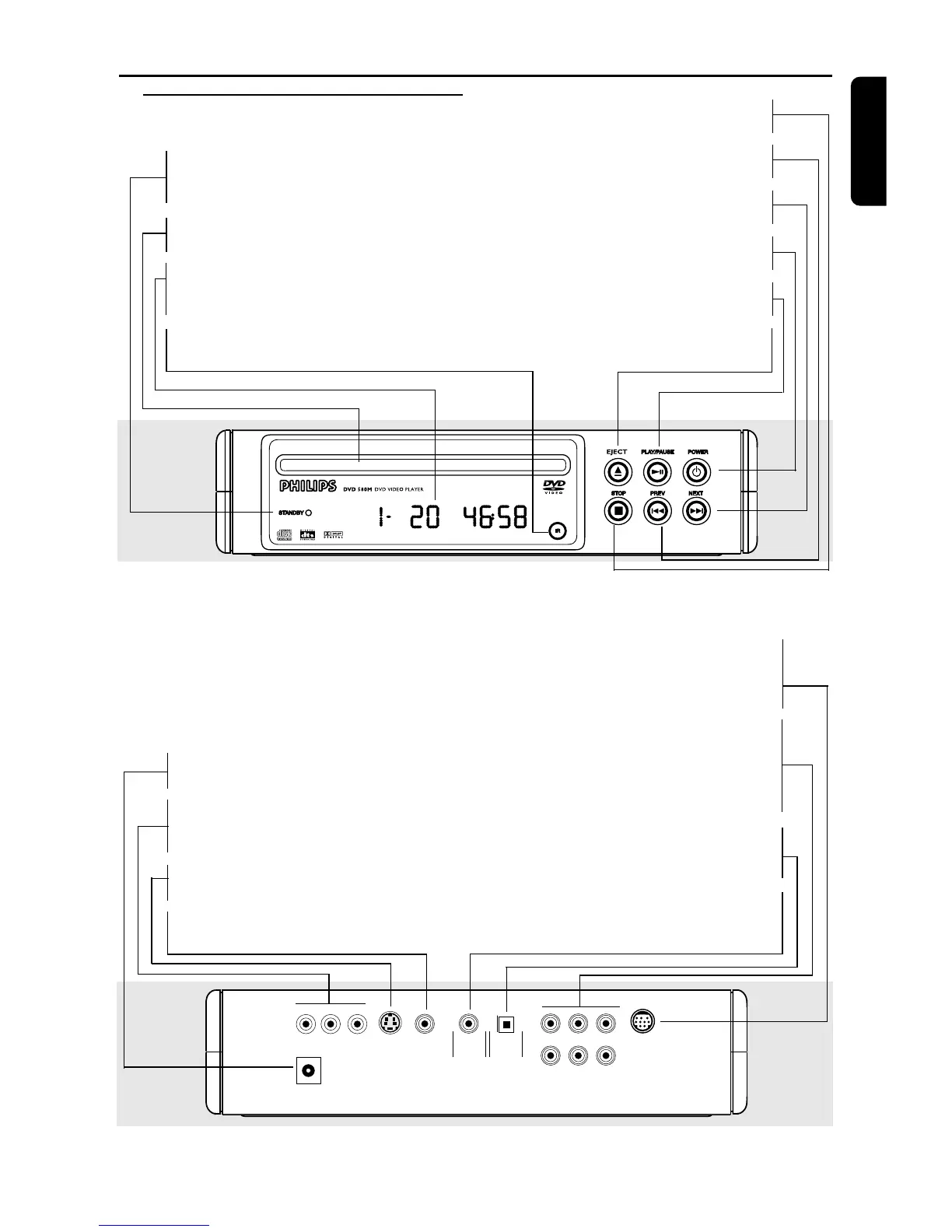
Functional Overview
Front and Rear Panels
COAXIAL OPTICAL
VIDEO
S-VIDEO
Y
Pr/Cr
Pb/Cb
12V
FL SL Center
FR SR Sub-W
Multi-5.1
12Volts DV Input
– connect to an external adaptor
Pr/Cr Pb/Cb Y VIDEO OUT
– connect to a TV with Pr/Cr Pb/Cb Y
inputs
S-VIDEO OUT
– connect to a TV with S-Video inputs
VIDEO
– connect to Video inputs of a TV
MULTICHANNEL 5.1 Analogue
Audio Out
– connect to SPEAKER inputs of a
dedicated speaker system from Philips
MULTICHANNEL AUDIO OUT
(For connection to a multichannel
receiver)
– center speaker, subwoofer, front and
surround speakers connection
OPTICAL (Digital audio out)
– connect to digital (optical) audio
equipment
COAXIAL (Digital audio out)
– connect to AUDIO inputs of a digital
(coaxial) audio equipment
Caution: Do not touch the inner pins of the jacks on the rear panel. Electrostatic
discharge may cause permanent damage to the unit.
STANDBY
– light appears when power is in
Standby mode
Disc Tray
– insert a disc here
Display
– message about current DVD player
operations
IR Sensor
– receive signals from remote control
9 STOP
– to stop playback
S PREV
– goes to previous chapter or track
T NEXT
– goes to next chapter or track
POWER
– press to turn the power on or off
2; PLAY/PAUSE
– to start or interrupt playback
/ EJECT
– to reload or to eject the disc



 To Next Page