English
11
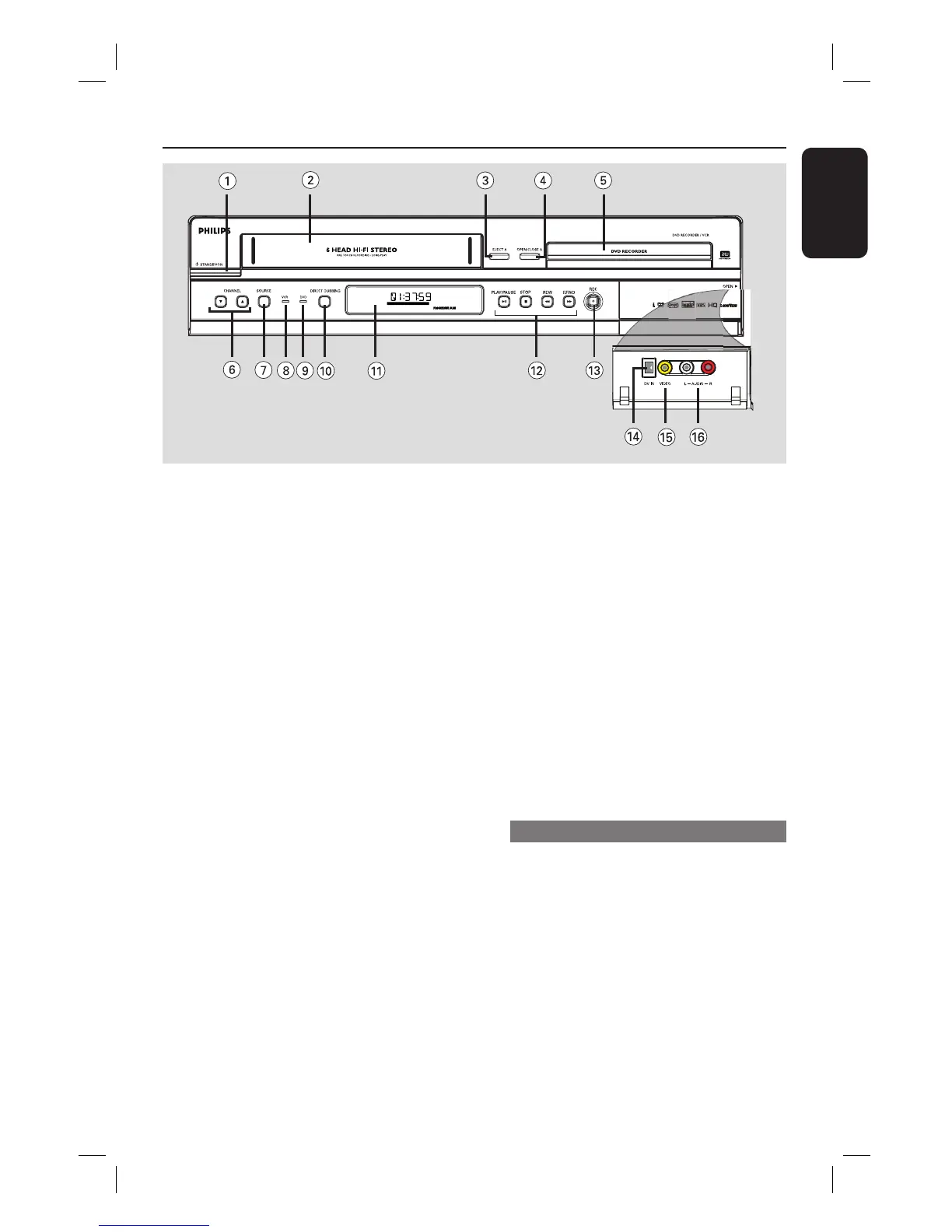
Main Unit
PREV
NEXT
a
STANDBY-ON 1
– Turns on the recorder or to standby
mode.
b
Tape deck
c
EJECT Z
– Ejects the VHS tape.
d
OPEN/CLOSE Z
– Opens/closes the disc tray.
e
Disc tray
f
CHANNEL V v
– While in tuner, selects the next or
previous TV channel.
g
SOURCE
– Selects the recorder’s input source
(EXT1, EXT2, TUNER, CAM1, DV).
h
VCR indicator
– Lights up while in VCR mode.
i
DVD indicator
– Lights up while in DVD mode.
j
DIRECT DUBBING
– Copies from a VHS tape to a recordable
DVD or vice-versa.
k
System display panel
– Shows information about the current
status of the recorder.
l
PLAY/PAUSE u
– Starts playback.
– Pauses the playback/recording/dubbing.
STOP x
– Stops playback/recording.
REW m /
F.FWD M (PREV / NEXT)
– Skips to the previous or next title/
chapter/track.
– Press and hold this button for fast
forward and backward search.
m
REC z
– Start recording the current TV channel
or the current video input source.
– Press repeatedly to set up a One Touch
Recording at 30, 60 or 90 minutes interval.
Sockets behind the ap
Flip down the door as indicated by the
OPEN B label at the right hand corner.
n
DV IN
– Input for digital camcorder or other
suitable devices using this connector.
o
VIDEO
– Video input for camcorder or video
recorder.
p
AUDIO L/R
– Audio input for camcorder or video
recorder.













 To Next Page