English
12
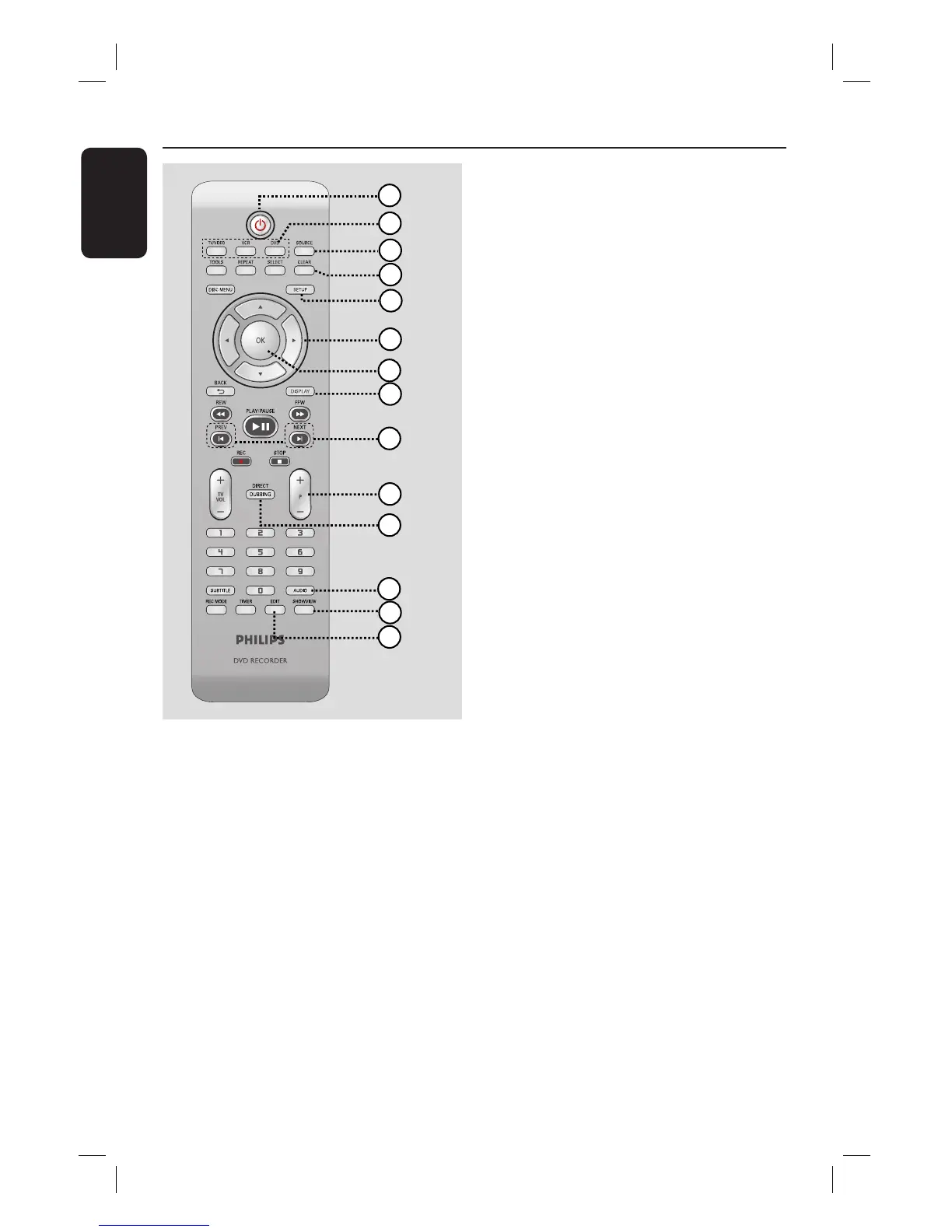
Remote Control
a
2
– Turns on the recorder or to standby
mode.
b
TV/VIDEO
– Switch between playback from additional
devices (connected via EXT2 AUX I/O
socket) and playback from the recorder.
DVD
– Switch to DVD mode.
VCR
– Switch to VCR mode.
c
SOURCE
– Selects the recorder’s input source
(EXT1, EXT2, TUNER, CAM1, DV).
1
2
3
4
5
6
7
8
9
10
11
12
13
14
d
CLEAR
– Clears a track/chapter/ le in the selection
playlist/copylist.
– Clears a timer entry.
– Resets tape counter to zero.
e
SETUP
– Enters/exits the system setup menu.
f
W X : Cursor buttons for moving to the
left or right, do a forward/reverse search.
ST : Cursor buttons for moving
up/down or changing the recorder’s TV
tuner channel.
g
OK
– Stores/con rms an entry.
h
DISPLAY
– Displays/removes the status bar.
i
PREV í/ NEXTë
– Skips to previous or next chapter/track/
index.
j
P +/-
– While in tuner, select the next or
previous TV channel.
– While in VCR mode, adjust the picture
quality (tracking).
k
DIRECT DUBBING
– Copies from a VHS tape to a recordable
DVD or vice-versa.
l
AUDIO
– Selects an audio language (DVD, VCD) or
an audio channel (CD, VHS).
m
SHOWVIEW
– Enters/exits the S
HOWVIEW menu.
VIDEO Plus+ (for UK only)
– Enters/exits the V
IDEO PLUS+ menu.
n
EDIT
– Enters/exits the video editing menu.













 To Next Page