English
13
Remote Control (continued)
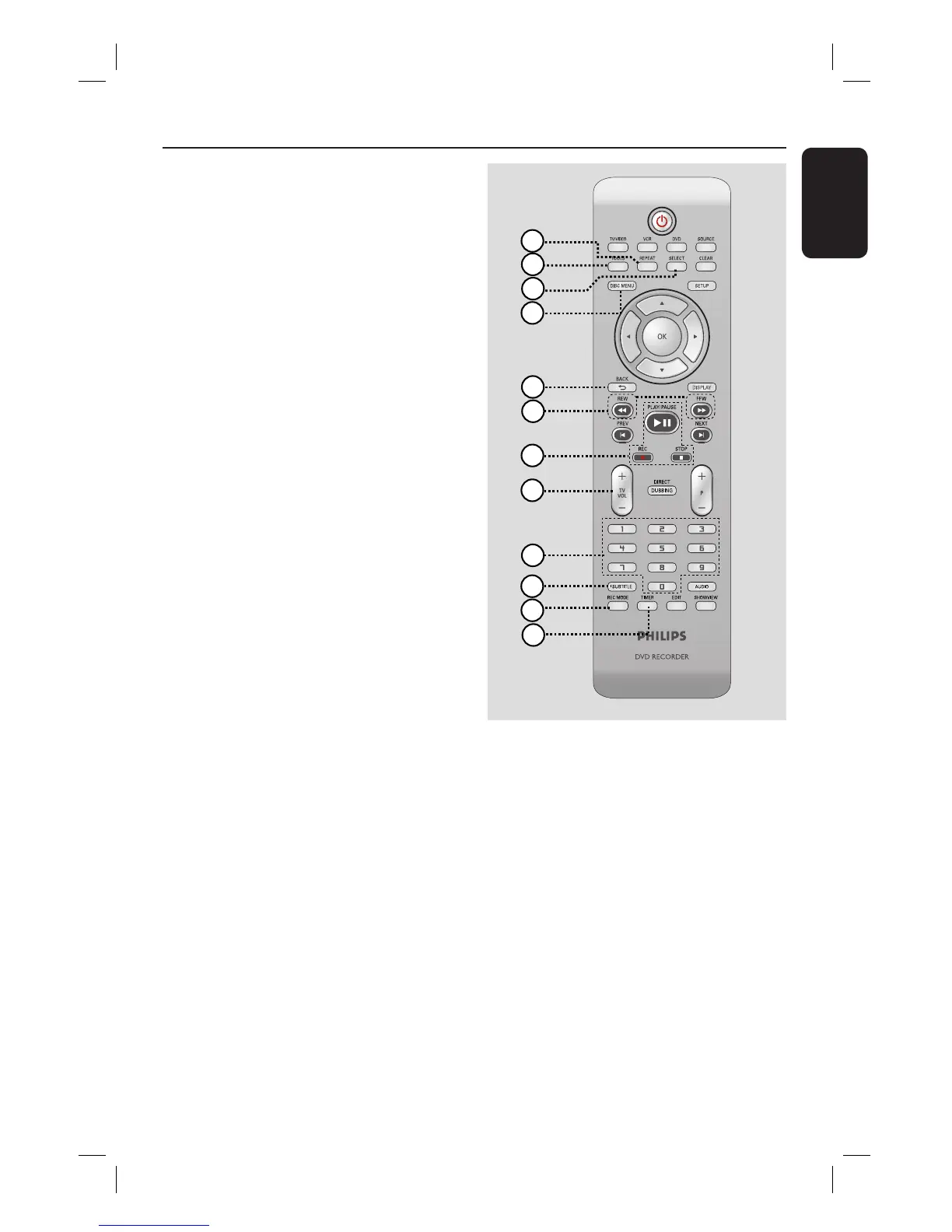
o
REPEAT
– Selects to repeat playback of title,
chapter, track or disc in DVD mode.
p
TOOLS
– Enters/exits the tools or disc/title editing
menu.
q
SELECT
– Selects a track/chapter/ le in the
programme menu.
r
DISC-MENU
– Accesses DVD disc menu or Index
Picture screen of a DVD±R/±RW.
– Accesses VCD disc menu when PBC is
turned on.
s
BACK2
– Returns to the previous menu of a video
CD (VCD).
t
REW m / FFW M
– Fast reverse or fast forward search.
u
PLAY/PAUSE u
– Starts playback.
– Pauses the playback/recording/dubbing.
REC z
– Start recording the current TV channel
or the current video input source.
– Press repeatedly to set up a One Touch
Recording at 30, 60 or 90 minutes
interval.
STOP
– Stops playback/recording/dubbing.
– Press and hold the button to open/ close
the disc tray.
v
TV VOL +/ -
– Adjusts the volume of the TV (Philips TV
only).
w
Numeric keypad
– Selects a chapter/track number to play.
– Selects the recorder’s preset TV tuner
channel.
x
SUBTITLE
– Selects a DVD subtitle language.
y
REC MODE
– Toggles between recording modes:
HQ, SP, SPP, LP, EP or SLP.
VCR: SP & LP
This determines the quality of recording
and the amount/length of time you can
record on a DVD±R/±RW.
z
TIMER
– Enters/exits the timer recording menu.
16
17
18
24
25
26
23
19
20
21
22
15













 To Next Page