Connecting to a Multi
Channel Receiver
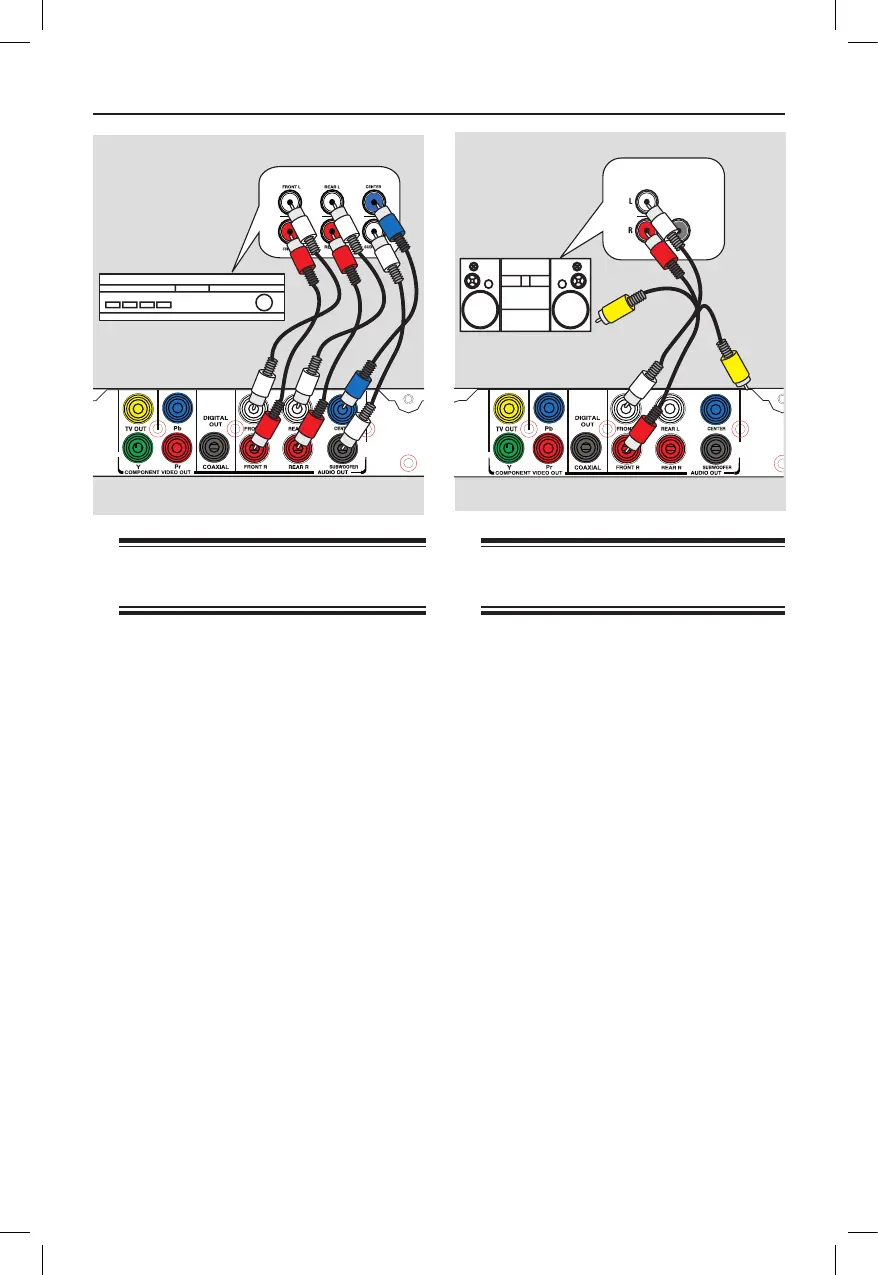
You can connect this unit to a multi
channel audio system in order to enjoy
5.1 channel sound.channel sound.
A Connect the audio cables (not supplied)
from the AUDIO OUT (FRONT L/R,
REAR L/R, CENTER and
SUBWOOFER) jacks on this unit to
the corresponding audio input jacks on
your connecting device.
B
For video connection, see ‘Basic
Connections - Step 1: Connecting to
television’ for details.
Helpful Hint:
– You have to set the appropriate Downmix
Output setting. Otherwise, no sound or
interference may occur. See ‘Setup Menu
Options - Audio Setup Page > Analog
Output’ for details.
Connecting to an Analog
Stereo System
You can connect this unit to a two
channel stereo system (e.g. mini system,
analog receiver) in order to enjoy stereo
sound output.
A Connect the audio/video cables
(supplied) from the AUDIO OUT
FRONT L/R jacks on this unit to the
audio input jacks (red/white) on your
connecting device. Leave the yellow
video cable disconnected.
B
For video connection, see ‘Basic
Connections - Step 1: Connecting to
television’ for details.
Helpful Hint:
– See ‘Setup Menu Options - Audio Setup
Page’ for optimum audio settings.



 To Next Page