14
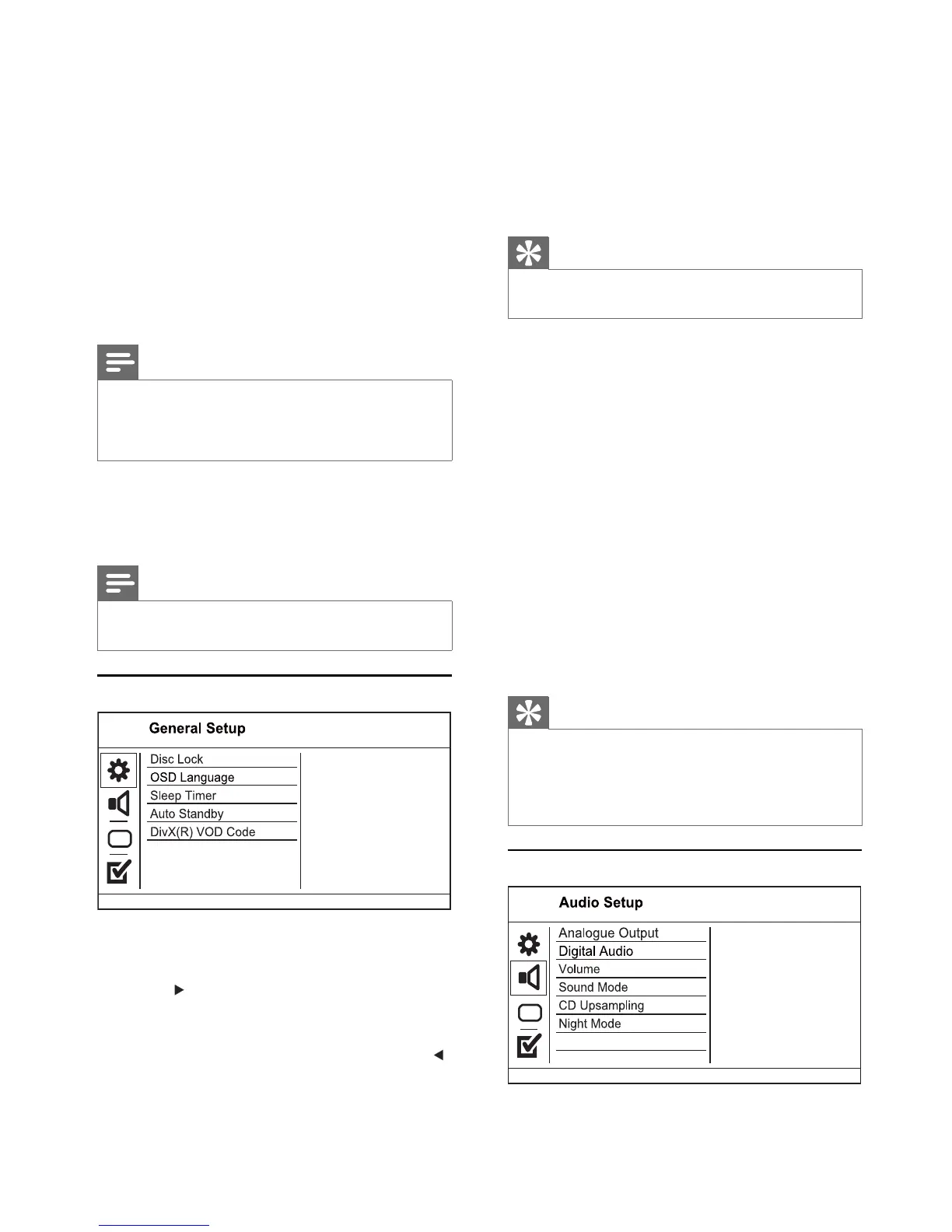
[Disc Lock]
Set play restriction for a disc which is loaded in
the disc compartment (maximum 20 discs can be
locked).
• [Lock] - Restrict access to the current disc.
The next time you want to play this disc or
unlock it, you need to enter the password.
• [Unlock] - Play all discs.
Tip
You can set or change the password, go to • [Preferences]
> [Password].
[OSD language]
Select an on-screen menu language.
[Sleep Timer]
Switch automatically to standby at the preset time.
• [Off] - Disable sleep mode.
• [15 mins], [30 mins], [45 mins], [60 mins] -
Select the count down time for this product to
switch to standby.
[Auto standby]
Turn on or off automatically standby.
• [On] - Switch to standby 15 minutes of
inactivity (for example, in pause or stop
mode).
• [Off] - Disable the auto standby mode.
[DivX(R) VOD Code]
Display the DivX
®
registration code.
Tip
Use this product’s DivX registration code when you rent •
or purchase video from www.divx.com/vod. The DivX
videos rented or purchased through the DivX
®
VOD
(Video On Demand) service can be played only on the
device to which it is registered.
Audio setup
7 Select an audio track, then press OK.
To select another track, repeat step 7.•
To select all tracks, select • [Select All] in
the menu, and press OK.
To deselect all tracks, select [Deselect all] •
in the menu, and press OK.
8 Select [Start] in the menu, then press OK to
start to convert.
Once complete, a new folder is created »
automatically in the USB fl ash drive to store
all the new MP3 fi les.
To exit the menu, select • [Exit], then
press OK.
Note
When you convert, never press any button.•
DTS CDs and copy-protected CDs cannot be converted.•
Writer-protected or password-protected USB fl ash •
drives cannot be used to store MP3 fi les.
7 Adjust settings
Note
If the setup option is grayed out, it means the setting •
cannot be changed at the current state.
General setup
1 Press SETUP.
» [General Setup] menu is displayed.
2 Press .
3 Select an option, then press OK.
4 Select a setting, then press OK.
To return to the previous menu, press •
.
To exit the menu, press • SETUP.
EN


 To Next Page