LL
R
COMPONENT
SCAN MODE
INTERLACE
PROGRESSIVE
VIDEO
VIDEO OUT
PCM / DIGITAL/
DTS / MPEG
COAXIAL OPTICAL
DIGITAL OUT
R
AUDIO OUT
AV
AUDIO
IN
Pr/Cr
Pb/Cb
Y
S-VIDEO
IN
VIDEO IN
COMPONENT
VIDEO IN
AUDIO
IN
Pr/Cr
Pb/Cb
Y
S-VIDEO
IN
VIDEO IN
COMPONENT
VIDEO IN
IN
IN
3
1
2
Back of TV
IMPORTANT!
– S-Video provides better picture
quality. This option must be available
on your TV.
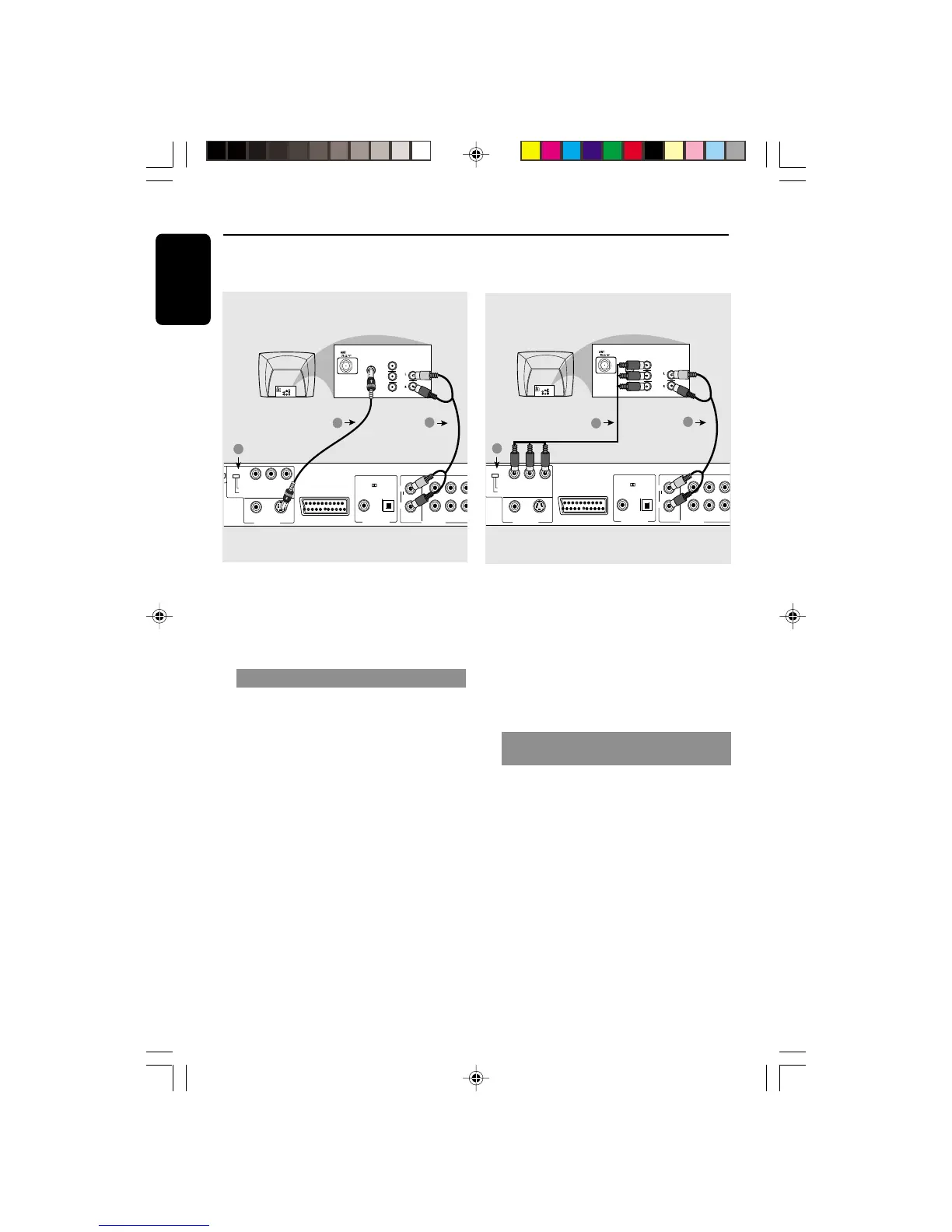
Using S-Video jack
1 Use the S-video cable to connect the
DVD Player’s S-VIDEO OUT jack to the
S-Video in jack (labeled as Y/C or S-VHS)
on the TV (cable not supplied).
2 Set the SCAN MODE switch to
INTERLACE.
3 To hear the sound of this DVD Player
through your TV, use the audio cables
(white/red) to connect AUDIO OUT
(L/R) jacks of the DVD Player to the
corresponding AUDIO IN jacks on the TV
(cable not supplied).
Connections
IMPORTANT!
– The progressive scan video quality
is only possible when using Y Pb Pr
and a progressive scan TV is
required.
– DO NOT connect both video and
Y Pb Pr to a TV, it may affect the
picture quality.
Using Component Video jacks
(Pr Pb Y)
1 Use the component video cables
(yellow, red, white) to connect the DVD
Player’s Pr Pb Y jacks to the
corresponding Component video in jacks
(labeled as Pr/Cr Pb/Cb Y or YUV) on
the TV (cable not supplied).
2 Set the SCAN MODE switch to
PROGRESSIVE.
3 To hear the sound of this DVD Player
through your TV, use the audio cables
(white/red) to connect AUDIO OUT
(L/R) jacks of the DVD Player to the
corresponding AUDIO IN jacks on the TV
(cable not supplied).
01-41 DVP900_00A31 13/01/2005, 09:5710


 To Next Page