/00_3139 246 13873
English
16
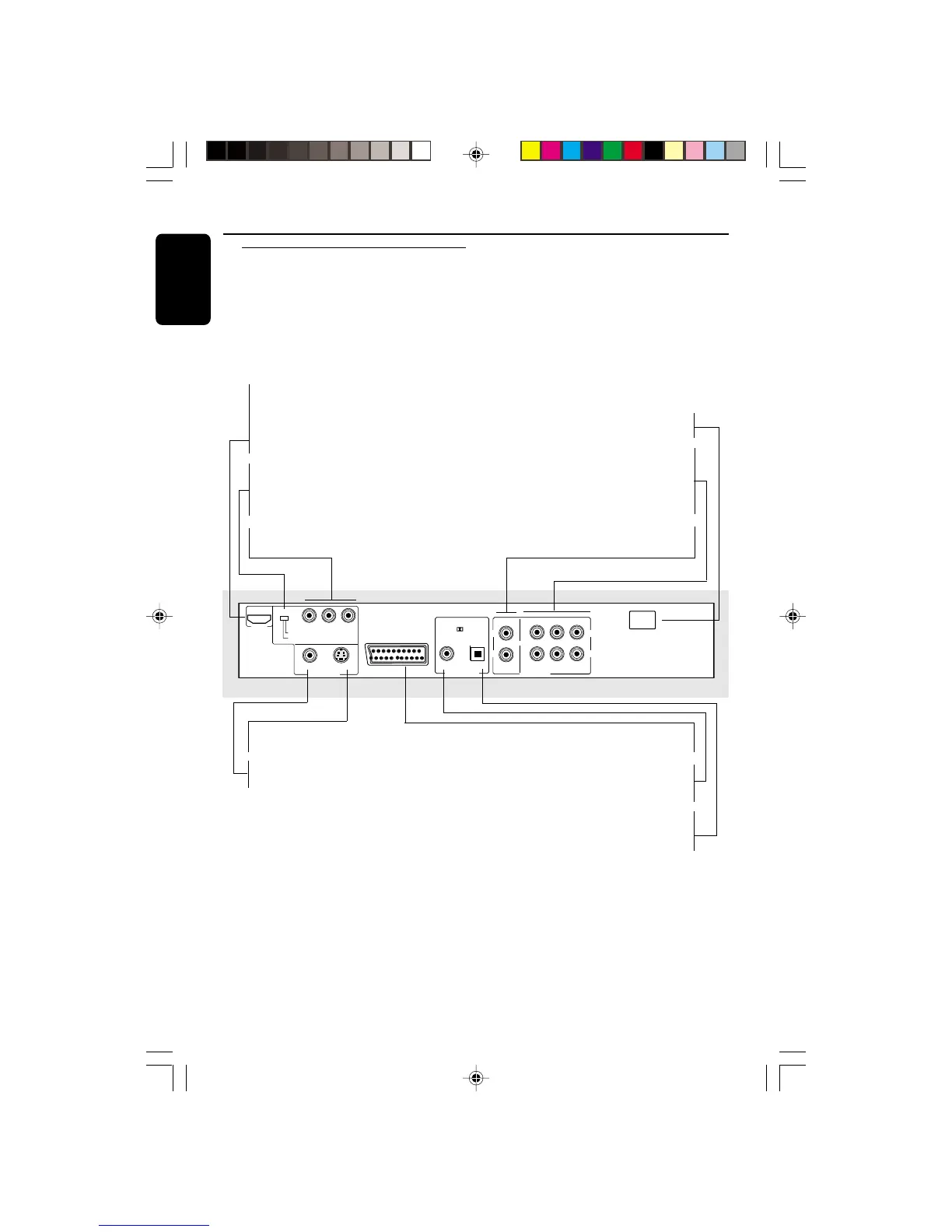
Mains (AC Power Cord)
– Connect to a standard AC outlet
MULTICHANNEL AUDIO OUT
(For connection to a stereo and
multichannel receiver)
– center speaker, subwoofer, front and
surround speakers connection
Audio Out (Left/Right)
– Connect to AUDIO inputs to a stereo TV
S-VIDEO
YPbPr
MIXED 2CH
MAIN
CENTER
SUB WOOFER
6CH DISCRETE
SURROUND
LL
R
L
R
COMPONENT
SCAN MODE
INTERLACE
PROGRESSIVE
VIDEO
VIDEO OUT
HDMI
PCM / DIGITAL/
DTS / MPEG
COAXIAL OPTICAL
DIGITAL OUT
R
AUDIO OUT
~ AC
MAINS
AV
HDMI (High Definition
Multimedia Interface)
– Connect to a valid HDMI device (eg.;
LCD/Projector/Plasma/Projection TV,
HDTV or receiver)
SCAN MODE
(Interlace/Progressive)
– To switch between Progressive or
interlace
Component Y Pb Pr
– Connect to Y Pb Pr input of a TV
Caution: Do not touch the inner pins of the jacks on the rear panel.
Electrostatic discharge may cause permanent damage to the unit.
Functional Overview
Rear Panel
S-Video Out
– Connect to S-Video input of a TV
VIDEO OUT (CVBS)
– Connect to CVBS Video input of a TV
TV OUT (VIDEO OUT)
– Connect to a TV with SCART inputs
COAXIAL (Digital audio out)
– Connect to the coaxial AUDIO input of a
digital audio equipment
OPTICAL (Digital audio out)
– Connect to the optical AUDIO input of a
digital audio equipment
01-41 DVP900_00A31 13/01/2005, 09:5816


 To Next Page