/00_3139 246 13873
English
17
Functional Overview
Remote Control
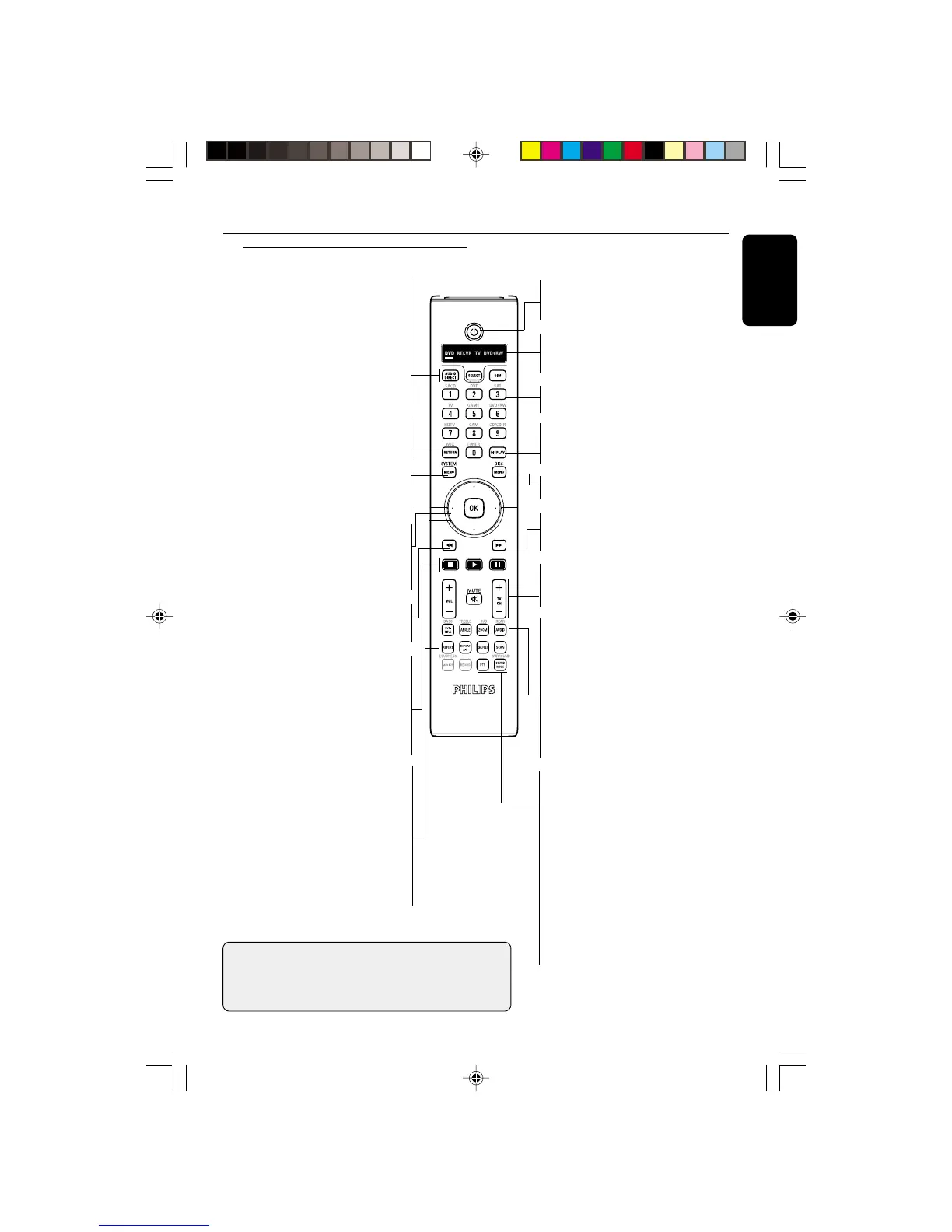
AUDIO DIRECT
– Switches video output on and off
during audio disc playback.
SELECT
– Selects the relevant device to
control: DVD, RECVR, TV, DVD+RW
DIM
– To select 3 different brightnesses
for the display
RETURN
– Return to the previous menu on a
video CD (VCD) or some DVDs
SYSTEM MENU
– Access or exit DVD Player’s system
menu
Cursor
– Selects up (3), down (4), left (1) and
right (2) direction in the menu
OK
– Acknowledge menu selection
S
– To search or select previous chapter
or track
9 (STOP)
– To stop playback
B (PLAY)
– To start playback
; (PAUSE)
– To pause playback temporarily /
frame-by-frame playback
REPEAT
– Selects various repeat modes
REPEAT (A-B)
– Repeats playback a specific section on
a disc
SHUFFLE
– Plays tracks/chapter in random order
SCAN
– Plays the first 10 seconds of each track/
chapter within a disc
POWER B
– To switch the DVD player to
standby mode or ON
LCD Screen
– Indicates active source mode.
(See important note below)
Numerical keypad (0-9)/
– Selects numbered items in a menu
DISPLAY
– Displays information on TV screen
during playback
DISC MENU
– Enters the disc contents menu
T
– To search or select next chapter or
track
VOL (+ / –), MUTE and
TV CH (+/-)
– Not applicable for this model.
SUBTITLE
– To access subtitle language system
menu
ANGLE
– Selects a DVD camera angle
ZOOM
– Enlarge a picture on the TV screen
AUDIO
– To access audio language system
menu
FTS
– Activate/deactivate Favorite Track
Selection
SOUND MODE
– Selects required sound mode
• for SACD: In Stop Mode, selects
either a CD Layer or SACD layer
for hybrid discs.
During playback, allows you to
select CD, Stereo or Multi-channel
(if available).
• for DVDs/VCDs: to select either
Stereo, Dolby Surround-compatible,
3D sound or Multi-channel
Important!
– This RC is a Philips system remote which is capable of
controlling other Philips equipment (eg., Recorder, TV
or DVD-RW player).
– Refer to manuals for other equipment as necessary.
01-41 DVP900_00A31 13/01/2005, 09:5817


 To Next Page