Service Modes, Error Codes and Fault Finding
EN 19FM24 5.
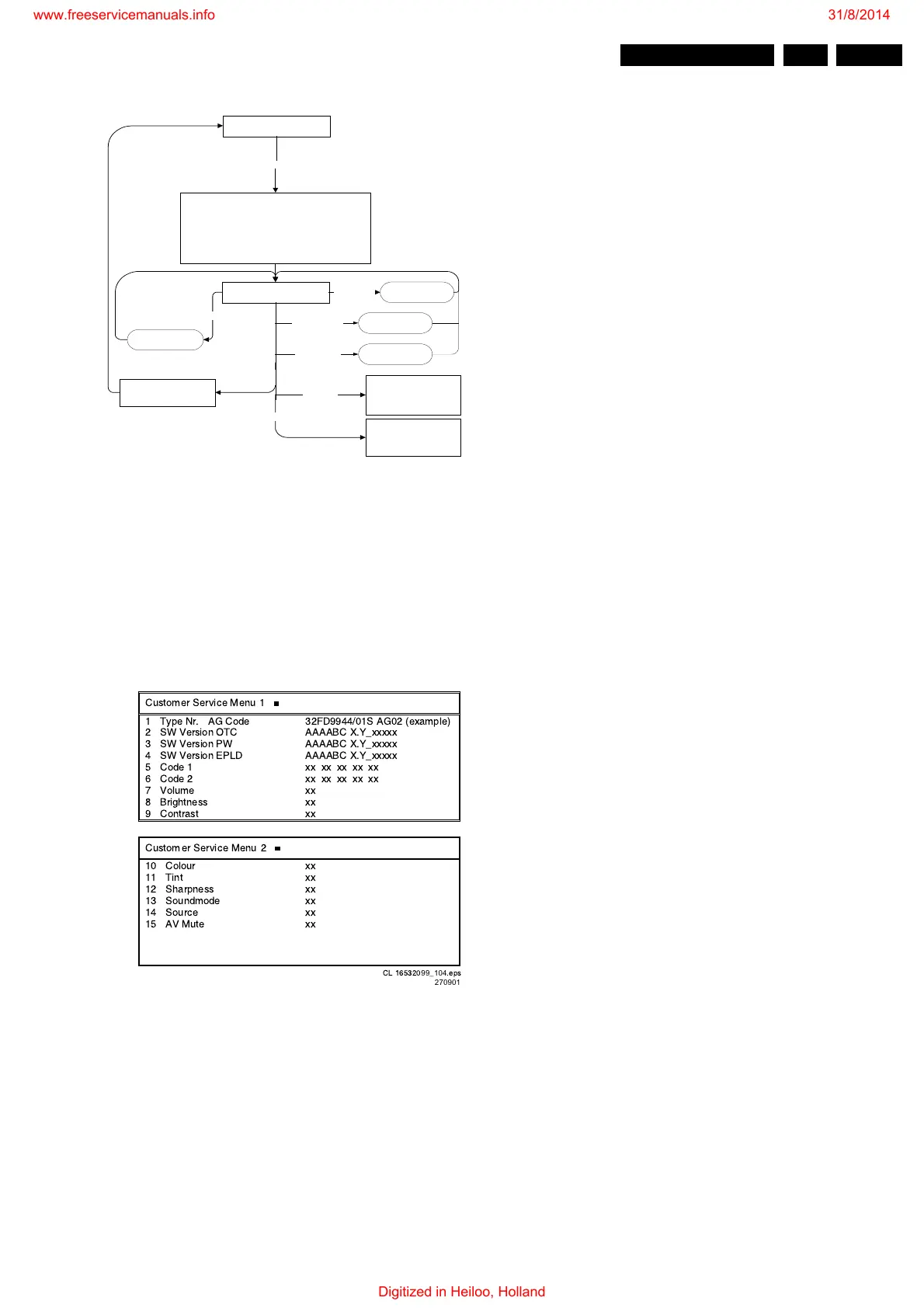
Figure 5-4 CSM Flowchart
How to enter
Use the standard customer RC-transmitter and key in the code
1 2 3 6 5 4.
When CSM is entered, the values of brightness, contrast, etc.
are set to 50% (of max. value), and volume is set to 25%, to
ensure that you always have a picture and sound.
After switching 'on' the Customer Service Mode, the following
screen will appear:
Figure 5-5 CSM Menu
1. Type Nr. - AG Code. Gives the commercial type number
of the monitor, e.g. 42FD9954/01S. AG Code is not
implemented.
2. SW Version OTC (AAAABC-X.Y-xxxxx)
Note: You will find details of the latest software versions in
the chapter 'Software Survey' of the 'Product Survey -
Colour Television' publication, which is published four
times each year.
• A = the chassis name (FM23 for 32" displays or FM24
for 42" displays).
• B = the region (E= Europe, A= Asia Pacific, U= NAFTA,
L= LATAM or G = Global).
• C = the configuration name (B= Basic, E= Enhanced).
• X = the main software version number.
• Y = the sub software version number.
• x = last five digits of 12nc code.
3. SW Version PW (AAAABC-X.Y-xxxxx). See description
above.
4. SW Version EPLD (AAAABC-X.Y-xxxxx). See description
above.
5. Code 1. Gives the last five errors of the error buffer. The
last detected error is displayed at the most left position.
The errors are displayed as 2 digit numbers and separated
by a space. When less than 10 errors occurred, the rest of
the line(s) is empty. In case of no errors, the text ‘No Errors’
is displayed behind menu item ‘Code 1’. See paragraph 5.5
for a description.
6. Code 2. Gives the first five errors of the error buffer. The
last detected error is displayed at the most left position.
7. Volume. Gives the last volume status for the selected
source, as set by the customer.
8. Brightness. Gives the last brightness status for the
selected source, as set by the customer.
9. Contrast. Gives the last contrast status for the selected
source, as set by the customer.
10. Colour (not present in Basic configuration). Gives the last
colour status for the selected source, as set by the
customer.
11. Tint (only for NTSC Enhanced configuration). Gives the
last tint status for the selected source, as set by the
customer.
12. Sharpness. Gives the last sharpness status for the
selected source, as set by the customer.
13. Source. Gives the selected source, as set by the
customer.
14. AV Mute. Indicates if AV Mute is 'on' or 'off'.
How to navigate
Use one of the following methods:
• Switch to the other CSM page with the CURSOR LEFT/
RIGHT keys on the remote control.
• You can increase/decrease volume with the VOLUME UP/
DOWN keys on the remote control.
• You can switch to another source with the NUM/EXT keys
on the remote control.
How to exit
Use one of the following methods:
• Press the MENU key of the remote control transmitter.
• Switch the set to 'standby' with the Power switch on the
remote control.
• Switch the set 'off' with the Mains power switch.
5.3 Problems and Solving Tips (Related to CSM)
5.3.1 Picture Problems
Note: Below described problems are all related to the monitor
settings. The procedures to change the value (or status) of the
different settings are described.
Picture too dark or too bright
Increase/decrease the BRIGHTNESS and/or the CONTRAST
value when the picture improves after you have switched on
the Customer Service Mode. The new value is automatically
stored.
White line around picture elements and text
Decrease the SHARPNESS value when the picture improves
after you have switched on the Customer Service Mode. The
new value is automatically stored.
Snowy picture and/or unstable picture
A scrambled or decoded signal is received.
Normal operation mode
Display CSM information screen
Store current picture, sound and feature settings for later
retrieval (only store if needed to go back to normal
operation).
Set pre-defined picture, sound and feature settings (to be
able to see and hear if the set is working properly and to be
able to read the CSM information).
Ignore service unfriendly options
To next CSM page
To previous CSM page
Key in sequence: 1-2-3-6-5-4 on RC
"Cursor right"
"Cursor left"
Restore picture, sound and
feature settings (that were
stored during entry)
Other key,
e.g. "menu"
Standby
(when the set is switched on,
picture, sound and feature
settings (that were stored
during entry) are restored)
If other key
= standby
Off
(when the set is switched on,
picture, sound and feature
settings (that were stored
during entry) are restored)
mains off
Switch to preset/
channel or external
Numerical key,
external
Increase/decrease
volume
Volume up/down
CL 16532099_103.pdf
260901
Customer Service Menu 1
1 Type Nr. AG Code 32FD9944/01S AG02 (example)
2 SW Version OTC AAAABC X.Y_xxxxx
3 SW Version PW AAAABC X.Y_xxxxx
4 SW Version EPLD AAAABC X.Y_xxxxx
5 Code 1 xx xx xx xx xx
6 Code 2 xx xx xx xx xx
7Volume xx
8 Brightness xx
9 Contrast xx
Customer Service Menu 2
10 Colour xx
11 Tint xx
12 Sharpness xx
13 Soundmode xx
14 Source xx
15 AV Mute xx
CL 165320
99
_
104
.eps
270901
www.freeservicemanuals.info
Digitized in Heiloo, Holland









 To Next Page