19
Preset time for delayed
cooking
Note
•
The preset timer is not available only in Sautè/
Sear, Sauce thickening and Reheat.
1
Follow the steps of pressure cooking
or multi-cooking, choose the cooking
function you need.
2
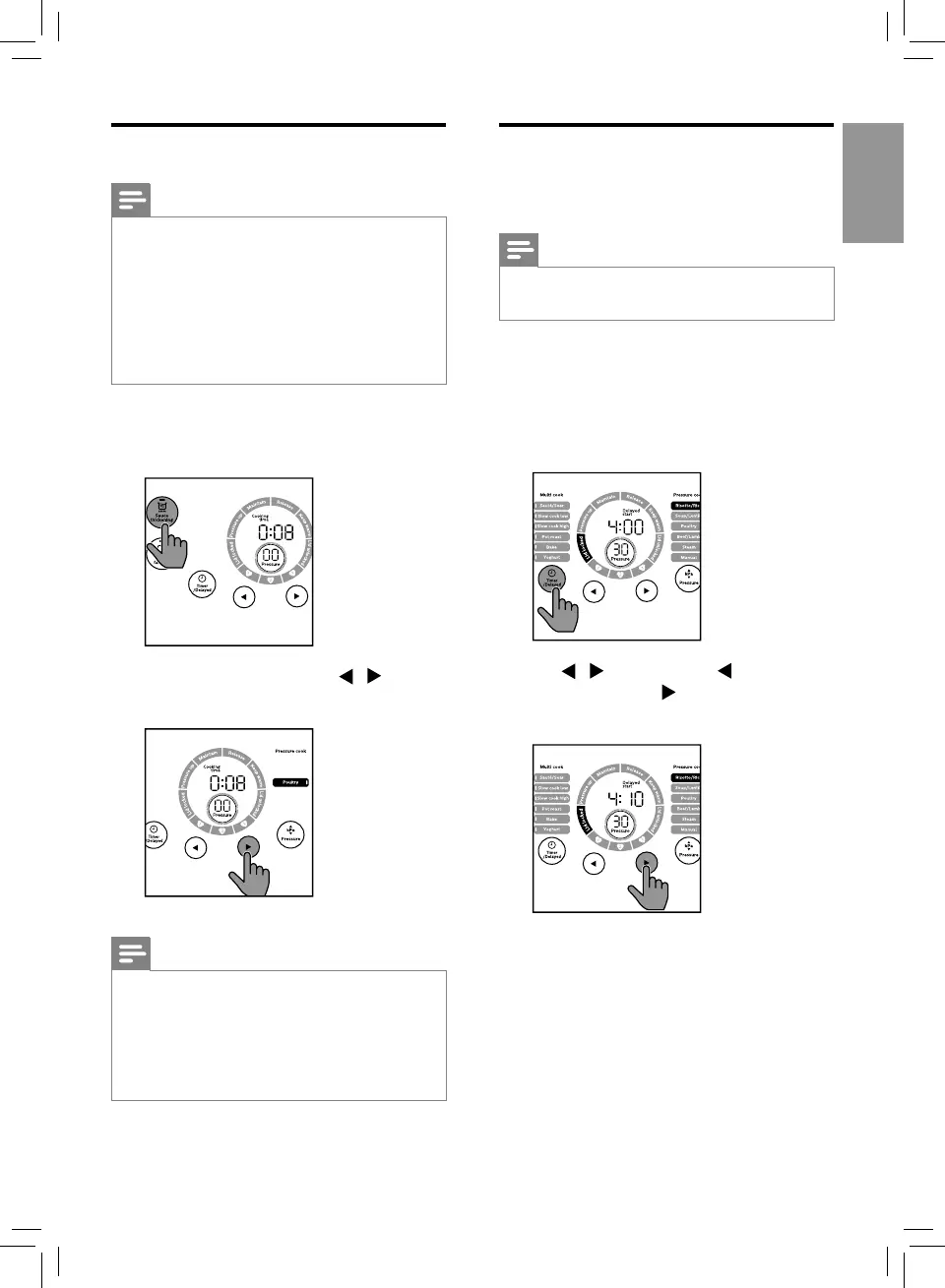
Tap Timer/Delayed twice, the Delay start
indicator lights up.
3
Tap / to set time. Tap to adjust the
time by hours, tap to adjust the time by
minutes.
Sauce thickening
Note
•
The Sauce thickening function applies to all
cooking functions, you can use it in standby
mode or keep warm mode.
•
The default time is 8 minutes, you can set the
time from 5 to 15 minutes.
•
When the Sauce thickening function is working,
tap Keep warm/Cancel to cancel.
•
When using this function, keep the lid open.
1
Tap Sauce thickening button.
» The default cooking time is displayed.
2
Tap Timer/Delayed and tap / to set
the time.
Note
•
When the All-in-One cooker is in warm-keeping
mode, tap Sauce thickening, the function starts
immediately.
•
When the All-in-One cooker is in standby mode,
rstly tap Sauce thickening, and then tap Start
for 3 seconds, the function starts immediately.



 To Next Page