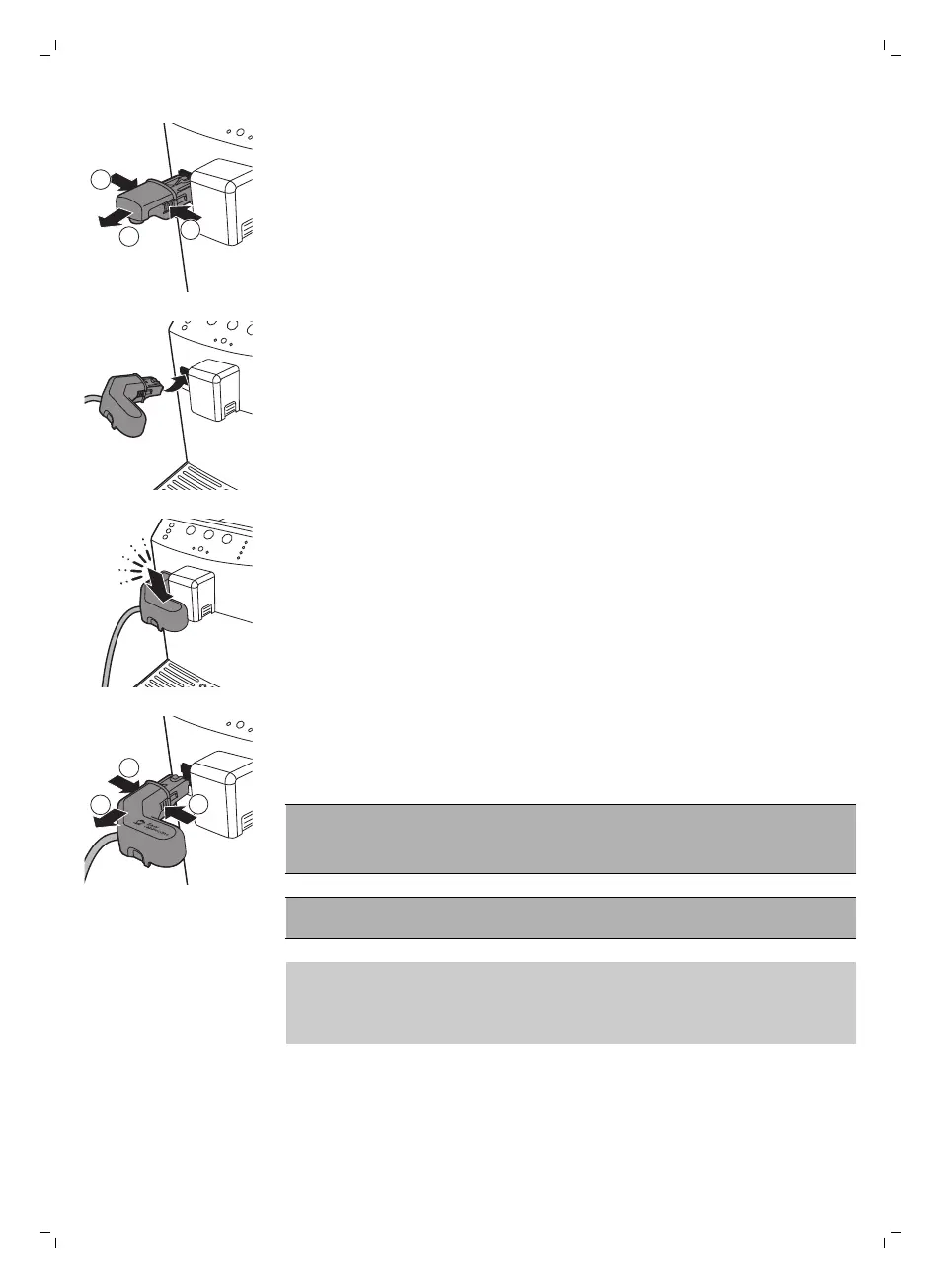
1 If the hot water dispensing spout is installed, press the release buttons on
both sides of the hot water dispensing spout (1) and remove it (2).
2 Slightly tilt the automatic milk frother and insert it all the way into the
guides of the machine.
3 Push the automatic milk frother downwards while turning it until it locks
into the machine.
4 To remove the automatic milk frother, press the release buttons on both
sides of the automatic milk frother, lift it slightly and pull to remove it.
Brewing cappuccino
Warning: Danger of scalding! Dispensing may be preceded by
small jets of hot water. Wait until the end of the brewing cycle
with removing the automatic milk frother.
Caution: Steam and hot milk may spray out of the milk froth dispensing
spout at the start of the brewing cycle.
Note: Use cold milk (at a temperature of approximately 5°C/41°F) with a
protein content of at least 3% to ensure an optimal frothing result. You can
use whole milk or semi-skimmed milk. It is also possible to use skimmed
milk, soy milk and lactose free milk.
17
English



 To Next Page