4
Overview
Overview of the menu functions
Direct Loading
Calling functions directly: You can call a menu func-
tion directly using the function number. Press MENU
and enter the appropriate function number using the nu-
meric keypad. Confirm using o/OK. You will find the
function number in the following list.
1 Installation
Speed dialling
11 Speed dialling ..............................................page 8
Telephone Book
12 Editing the Telephone Book entry...............page 8
Number
13 Your Number ............................................page 11
Name
14 Your name.................................................page 11
Date and time
15 Time/Date.................................................page 11
2 General settings
Key tones
22 Key tones...................................................page 11
Ring tone volume
222 Ring Tones ...........................................page 11
Number of rings for fax switch
223 Number of rings....................................page 12
Auto printout
224 Printing lists automatically....................page 12
Easylink
225 Easylink ................................................page 13
CLIP on off
226 Calling Line Identification ......................page 8
Language
227 Language selection ................................page 11
3 Special settings
Transmission speed
33 Transmission speed....................................page 11
Reception speed
332 Reception speed ....................................page 11
Transmission report
333 Transmission report ..............................page 12
Reception report
334 Reception report ...................................page 12
Dialling mode
335 Dialling process.....................................page 11
4 Printing lists
Fax journal
44 Fax journal ................................................page 12
Speed dialling list
442 Speed dialling list ..................................page 12
Telephone Book
443 Telephone Book....................................page 12
Settings
444 Settings .................................................page 12
Caller List:
445 Caller List: ............................................page 12
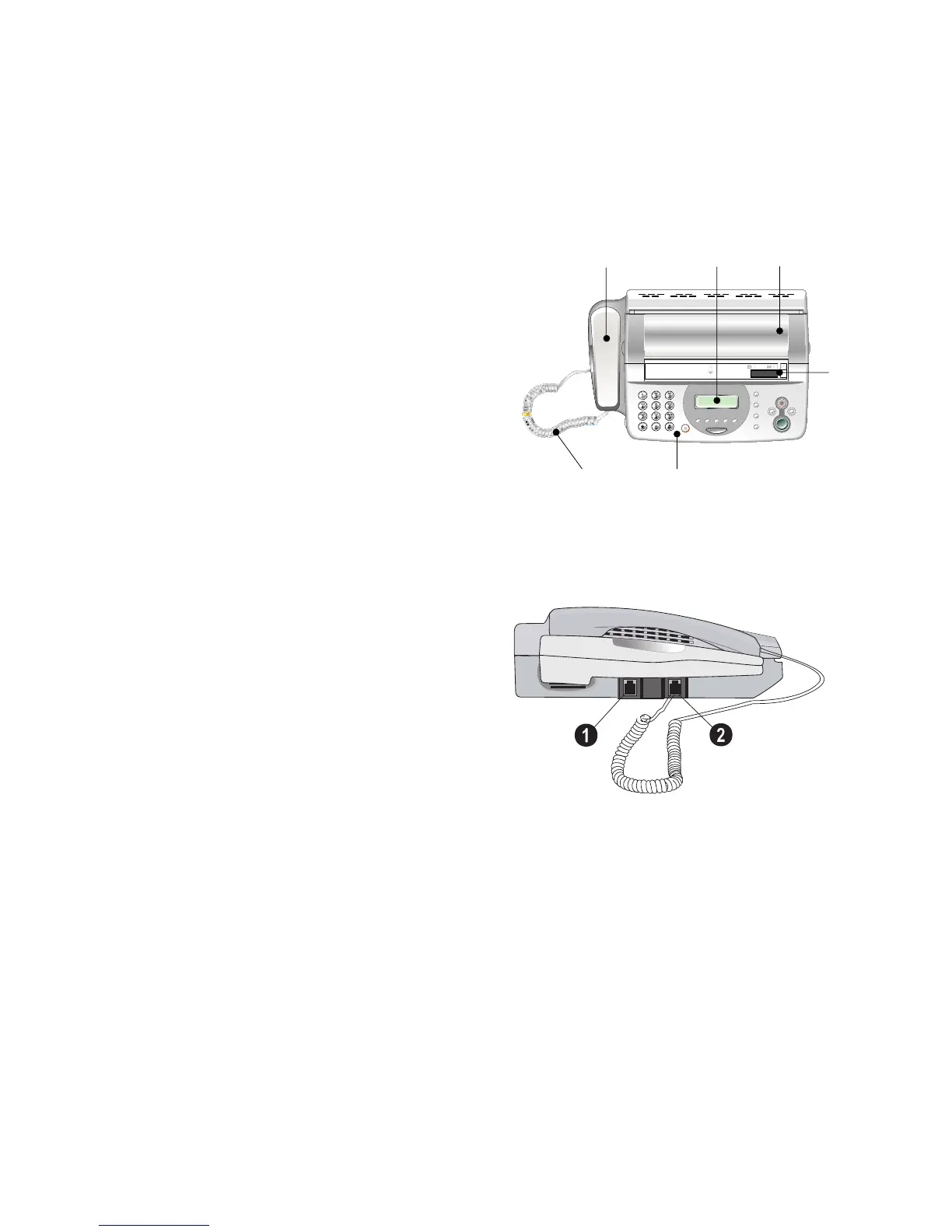
Machine Overview
Overview HFC 242
‚ Handset
ƒ Display
„ Paper tray cover
… Document guide
† Panel
‡ Handset cable
Front view
‚ LINE-Socket – connection socket for telephone cord
ƒ H/S-Socket – connection socket for the telephone
handset
Seitenansicht
‚
ƒ
„
…
‡
†



 To Next Page