8
Precautions Concerning Batteries
• WhentheRemoteControlisnottobe
used for a long time (more than a month),
remove the battery from the Remote
Control to prevent it from leaking.
• Ifthebatteriesleak,wipeawaytheleakage
inside the battery compartment and replace
the batteries with new ones.
• Donotuseanybatteriesotherthanthose
specied.
• Donotheatordisassemblebatteries.
• Neverthrowtheminreorwater
• Donotcarryorstorebatterieswithother
metallic objects. Doing so could cause
batteries to short circuit, leak or explode.
• Neverrechargeabatteryunlessitis
conrmedtobearechargeabletype.
Placement
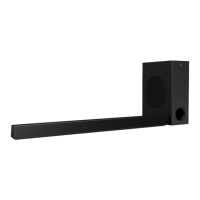
Place the subwoofer at least 1 meter (3 feet)
away from your Soundbar, and ten centimeters
away from the wall.
For best results, place your subwoofer as shown
below.
10cm/4"
1m/3ft
Prepare the Remote Control
• TheprovidedRemoteControlallowsthe
unit to be operated from a distance.
• EveniftheRemoteControlisoperated
within the eective range 19.7 feet (6m),
remote control operation may be impossible
if there are any obstacles between the unit
and the remote control.
• IftheRemoteControlisoperatednear
other products which generate infrared rays,
or if other remote control devices using
infra-red rays are used near the unit, it may
operate incorrectly Conversely the other
products may operate incorrectly
First-time use:
The unit has a
pre-installed lithium
CR2025 battery. Remove
the protective tab to
activate the remote
control battery.
Replace the Remote Control Battery
• TheremotecontrolrequiresaCR2025,3V
Lithium battery
1
Push the tab on the side of the battery tray
towards the tray.
2
Now slide the battery tray out of the
remote control.
3
Remove the old battery Place a new
CR2025 battery into the battery tray with
the correct polarity (+/-) as indicated.
4
Slide the battery tray back into the slot in
the remote control


 To Next Page